Best Ways to Scan and Print Photos From Slides
Preserving memories stored on slides and negatives is easier than ever. This guide highlights top tools that convert film and slides into high-quality digital images you can print. Each option below offers different features, from stand-alone scanners to easy photo printers, helping you choose the best fit for archiving old memories and creating fresh prints.
| Product | Type | Key Benefit | Native Resolution |
|---|---|---|---|
| DIGITNOW 22MP All-in-1 Film & Slide Scanner | Stand-alone Film Scanner | 2-second digital conversion with built-in memory and LCD | Up to 22 MP (interpolated) |
| DIGITNOW! 135 Film Negative Scanner | Standalone Film/Slide Scanner | Easy slide/digital conversion without a computer | 1800 DPI |
| Digital Film & Photo Scanner – 22MP (DigitPro) | Film and Photo Scanner | Wide format support, LCD preview, 22 MP | 22 MP (interpolated) |
| ClearClick Virtuoso 2.0 | Film & Slide Scanner | Extra large 5″ LCD, no computer needed | 22 MP interpolated |
| Printing Solutions for Photos | Photo Printing Service | Quality prints in multiple sizes | Not applicable |
DIGITNOW 22MP All-in-1 Film & Slide Scanner

Convert 35mm/135, 110, 126Kpk and Super 8 films, slides, and negatives into digital JPEGs in seconds. This stand-alone unit requires no computer and stores images on an SD card up to 32GB. It also offers brightness and color adjustments and uses software interpolation to achieve up to 22 megapixel image quality. The built-in 128MB memory supports quick digitization of multiple slides in one session, and the 2.4″ LCD screen lets you preview results in real time.
DIGITNOW! 135 Film Negative Scanner

This standalone film and slide scanner supports adjustable rapid slide feeding and converts 35mm film and slides into JPEGs stored on an SD card (up to 32GB). It provides a high-resolution 1800 DPI scan and can output to a computer via USB 2.0. A convenient feature is the NTSC/PAL TV-out option for viewing scanned images on a screen, which helps verify captures before saving.
Digital Film & Photo Scanner – 22MP (DigitPro)

DigitPro’s scanner converts 35mm/135 slides and negatives, plus 3.5×5″, 4×6″, and 5×7″ photos into crisp JPEG files. It features a 2.4″ LCD preview screen for real-time viewing and easy adjustments before saving. The device is designed for archiving large collections—ideal for turning decades of photos and slides into shareable digital formats with straightforward operation.
ClearClick Virtuoso 2.0
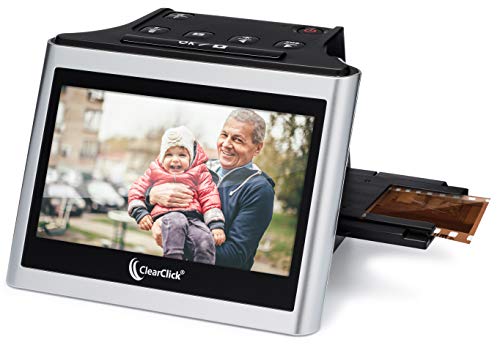
The ClearClick Virtuoso 2.0 scans 35mm, 110, and 126 negatives along with slides up to 50mm in size. It delivers 22 MP interpolated images and requires no computer or drivers, with a large 5″ LCD screen that allows you to preview and adjust scans in real time while you work. This can accelerate the process of digitizing a large photo and slide collection and makes on-the-spot editing feasible.
Petite Progress Photo Printing Service

Printing services provide high-resolution photo prints in multiple sizes, including common formats like 4×6, 5×7, and larger. The service emphasizes premium color accuracy and a choice of glossy or matte finishes, making it a practical option for turning scans of slides into ready-to-display physical photos. Availability of unframed prints allows convenient framing or album inclusion.
Glossy Photo Prints Set of 30 (4×6)

Quality photo prints in a convenient 4×6 size, offered in glossy finishes. These prints are ideal for photo albums, gifts, and wall displays, helping you turn digitized slides into tangible memories. Made in the USA, these prints emphasize color fidelity and durable presentation for everyday use.
Buying Guide: How To Choose The Right Slide-To-Print Solution
Consider the following factors to determine the best option for scanning slides and printing photographs:
- Purpose: If you want quick digital copies for sharing, a standalone scanner with an LCD screen (such as DIGITNOW or ClearClick) reduces setup time and eliminates the computer step. For archiving entire collections, a higher-resolution option may be preferable.
- Format Support: Check which slide formats your collection uses (35mm, 110, 126, etc.) and whether the device can handle negatives as well as slides. Some models also support 3.5×5″, 4×6″, and larger prints.
- Resolution and Quality: Higher megapixel results improve print quality, especially for larger prints like 8×10 or 11×14. Interpolated resolutions are common in stand-alone scanners, so review real-world output expectations.
- Storage and Connectivity: Stand-alone scanners store to SD cards; others connect to computers via USB. Ensure compatibility with your current devices and storage plans (SD card capacity, hard drives, cloud backups).
- Printing Options: If you primarily want prints, a dedicated photo printing service or a compact printer can simplify the workflow, offering finishes (glossy/matte) and convenient size options for albums and frames.
- Ease Of Use: LCD previews and intuitive menus help beginners. Advanced users may prefer devices with broader editing capabilities and more precise color controls.
- Budget And Maintenance: Consider initial costs, replacement consumables (like ink ribbons), and ongoing maintenance when evaluating different models and brands.
- Future Compatibility: Look for devices with ongoing firmware updates or broad file format support to ensure longevity and adaptability to new printing formats.