Best Portable Instant Photo Printer for on-the-Go Memories
Yes—these compact printers let you print photos instantly from your phone anywhere. This guide highlights five top portable instant photo printers, explaining who each is best for and why. Ideal buyers include students, travelers, crafters, scrapbookers, and quick-share enthusiasts who want durable, sticky-backed or standard 4×6 prints without a desktop setup.
| Product | Best For | Key Benefit |
|---|---|---|
| Liene M100 4×6 Organizer | Mobile photographers who want 4×6 prints | Full-color, durable 4×6 prints with Wi‑Fi |
| Nelko PP01 Mini (White) | Pocket-sized, stick-on photos | Sticky-backed 2×3 prints, Bluetooth |
| KODAK Step | Budget-friendly mobile printing | Zero-ink technique, app-based editing |
| KODAK Dock Plus 4×6 | Dock-and-print at home base | Integrated docking, quick 4×6 color prints |
| HP Sprocket (2nd Edition) | Party and group printing | Portability with multi-device sharing |
Liene M100 4×6 Photo Printer

The Liene M100 is a full-color portable printer designed for iPhone, Android, and PC. It ships with 100 sheets and three cartridges, offering a compact, minimalist magnetic design for easy storage. It uses thermal dye-sublimation to produce vibrant prints with a laminated surface that resists water, scratches, fingerprints, and fading. This model fits buyers who want reliable 4×6 photo prints on the go and a straightforward Wi‑Fi printing experience.
Best for: travelers and social sharers who want high-impact 4×6 prints from a dedicated mobile hotspot. It’s a solid choice for家庭 memories and gift printing where quality and durability matter. Caution: cleaning the printhead is advised if smudges appear during operation.
Nelko PP01 Mini Photo Printer (White)

The Nelko PP01 Mini is a 2×3″ portable printer designed for quick, sticky-backed photos. It prints via Bluetooth from iOS and Android using the Nelko app. Each cartridge yields about 80 prints on sticky paper, making it well-suited for scrapbooks and on-the-go crafts. Weighing around 0.6 pounds, it’s highly portable for school, travel, and field trips.
Best for: students and crafters who want ready-to-stick photos for quick albums. Choose this if you prefer adhesive-backed prints and Bluetooth connectivity. Limitation: 2×3″ prints are smaller, which may suit some projects better than others.
KODAK Step Instant Smartphone Printer

The KODAK Step is a compact 2×3” printer that uses ZINK zero-ink technology and connects via Bluetooth or NFC. It includes starter ZINK paper and implements a full editing suite in the KODAK app, allowing filters, borders, and stickers before printing. It prints quickly and is ideal for quick social updates or journaling with durable results.
Best for: casual shooters who want fast, durable prints with simple app-based edits. Better for: those who value a straightforward, no-ink-luggage workflow. Caution: 2×3″ prints are small and may not suit larger photo projects.
KODAK Dock Plus 4×6 Photo Printer

The KODAK Dock Plus integrates a docking station with Bluetooth printing for 4×6” photos. It uses genuine 4PASS dye sublimation with a laminated protective layer, delivering detailed prints finished to resist fingerprints, water, and fading. It is designed for easy setup and day-to-day home use, especially if you want a ready-to-print desktop option that travels well.
Best for: home users who want a simple, fast 4×6 workflow with durable finishes. Better for: those who value an all-in-one docking design and dependable print quality. Caution: it requires a compatible power source and space on a desk or shelf.
HP Sprocket Portable Photo Printer (2nd Edition)
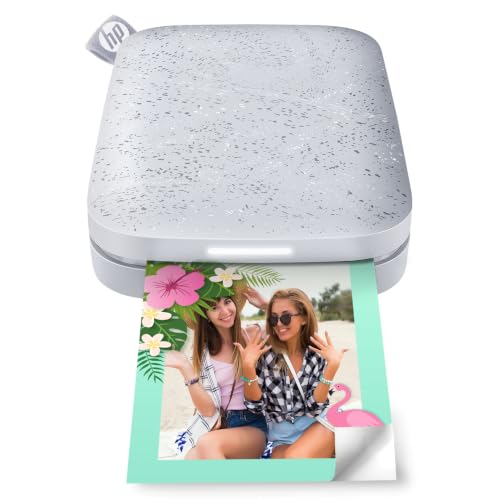
The HP Sprocket 2nd Edition prints 2×3″ sticky-backed photos directly from smartphones. It supports multiple devices and offers LED cues to show print status, which helps coordinate group printing. The Sprocket is designed for social settings and quick, shared prints, making it popular for parties and on-the-go events.
Best for: social users who want quick, shareable photos. Choose this if you prioritize group printing and a playful LED feedback feature. Limitation: prints are small and rely on special sticky-backed paper; long-term durability varies by paper quality.
Buying Guide
What should you consider when choosing a portable instant photo printer?
- Print size: Do you prefer 4×6 for wall displays or 2×3/2×3 sticky photos for scrapbooks?
- Paper type: Dye-sublimation for durable finishes vs. zero-ink systems for simple setups.
- Connectivity: Bluetooth, Wi‑Fi, or direct docking; consider how you print from multiple devices.
- Portability and weight: Will you carry it in a bag or need a pocket-sized option?
- Battery and power: Built-in battery vs. corded; travel-friendly options may require charging considerations.
- Ease of use: App editing features, templates, and print head maintenance impact daily use.
- Print durability: Lamination and water/fade resistance affect long-term preservation.
- Adhesive backs: Sticky-backed prints can be perfect for scrapbooks but may limit framing options.
Which printer type fits your needs?
For minimal setup and mobile printing, devices like the Liene M100 and Nelko PP01 White are strong choices. If you want simple app-based edits with zero-ink printing, the KODAK Step is a good fit. For home-desk convenience with quick 4×6 prints, the KODAK Dock Plus excels. For social events and rapid sharing, the HP Sprocket offers group-friendly features. Consider where you’ll print most and what paper format you prefer.
Practical tips
- Carry a few spare cartridges or paper packs to avoid mid-project shortages.
- Keep printheads clean and follow the manufacturer’s maintenance steps to prevent smudges.
- Test a few photos to check color accuracy before large batches.
Frequently asked questions
- What is a portable instant photo printer? A compact printer that connects to your phone or computer to print photos quickly, often using sticky-backed or standard photo paper.
- Which size is best for albums? 2×3 or 4×6 formats are common; choose 4×6 for wall displays and 2×3 for scrapbooks.
- Do these printers require ink cartridges? Some use dye-sub or zero-ink systems; others use sticky-backed paper with integrated ink.
- Can I print from multiple devices? Many models support Bluetooth, Wi‑Fi, or docking, enabling multi-device printing.
- Are sticky-backed prints durable? Adhesive-backed photos can resist moisture and tearing, but durability varies by paper quality.
- Is color accuracy important? Yes—differences in dye-sub vs. inkjet can affect vibrancy; test prints help ensure satisfaction.