Choosing the best point-and-shoot camera with mic input means balancing video quality, sound clarity, and ease of use. For creators who vlog, travel, or document family moments, a camera with a microphone input or included microphone can simplify setup and improve audio. The five models below combine compact bodies, solid video features, and different approaches to audio—from built-in mics to external mics—so you can pick the option that fits your needs. The quick comparison table at the start highlights their mic-related capabilities to help you decide at a glance.
| Product | Audio Feature | Video/Photo Specs | Notes |
|---|---|---|---|
| NBD 4K Vlogging Camera | Included built-in microphone | 4K video; 48MP photos; 16X zoom; 52mm macro lens | Best for beginners with mic included |
| Rawiemy 4K Video Camera | External microphone included; supports external mic | 4K/48MP; 3.0″ flip screen; 2 batteries | Strong audio options |
| Canon Point-and-Shoot 4K | Mic input not specified | 4K video; 20.3MP; 40x zoom | Excellent zoom; mic options unclear |
| Panasonic Lumix ZS99 | Not specified | 4K video/photo; 30x zoom; tiltable touchscreen | Ultra-compact travel model |
| Camkory 4K 64MP | Not specified | 4K video; 64MP; 16X zoom; anti-shake | Strong image quality; audio not specified |
Introduction word count target: about 1200-1500 words total across all sections. The following sections present each selected model with concise, objective descriptions focused on audio capabilities and overall usefulness for creators who care about mic input and sound quality.
NBD 4K Vlogging Camera With Microphone

Designed for beginners and aspiring creators, the NBD 4K Vlogging Camera combines solid image quality with user-friendly controls and a microphone that ships with the kit. It captures 48-megapixel photos and records 4K video, delivering crisp details suitable for YouTube or family memories. The 16x digital zoom, paired with a 52mm F1.8 lens, produces pleasing background blur and flexible framing for portraits and macro captures, while the included macro lens unlocks close-up shots. A 180-degree flip screen makes self-recording straightforward.
The built-in Wi-Fi enables quick sharing of clips. Pre-tuned settings help beginners get started without a steep learning curve, reducing setup time and frustration.
Rawiemy 4K Video Camera With External Mic

Rawiemy’s 4K video camera records 4K at 30fps and captures 48 MP stills, making it suitable for beginners who want crisp video and large, detailed photos. It features a 3.0-inch touchscreen with a 270-degree flip, letting you monitor framing from any angle. The package includes two 1050 mAh batteries for extended shoots, and a standout feature is the external microphone, which improves audio by capturing voices clearly while reducing background noise. The camera also supports time-lapse, slow motion, self-timer, and USB 2.0 output, offering a compact, all-around option for entry-level creators seeking versatile shooting modes.
The external mic capability makes it particularly appealing to vloggers and interview-style creators who need reliable audio in a small form factor.
Canon Point-and-Shoot With 4K Video

Canon’s point-and-shoot offers a versatile 20.3-megapixel CMOS sensor, plus 4K video and 4K time-lapse movie modes. A 40x optical zoom with optical image stabilizer provides flexible framing for landscapes, sports, or events, while Zoom Framing Assist helps keep subjects in frame. While this camera excels in long-telephoto versatility and Canon color rendering, the listing does not specify an external microphone input. For buyers who want strong stills and reliable zoom, this model remains compelling, but those prioritizing mic flexibility may want to confirm audio options or consider accessories that enable external recording.
Overall, it delivers solid video and photo performance with a focus on versatility and reliability, particularly for users who already trust Canon’s color science and autofocus in bright-light scenarios.
Panasonic Lumix ZS99 Point-and-Shoot

Panasonic’s Lumix ZS99 is built for travel and everyday use, packing a 24-720mm zoom range into a compact body. It records 4K video and offers 4K photo capture, making it easy to grab high-quality clips on the go. The tiltable 1,840k-dot touchscreen helps you compose selfies and landscapes from awkward angles. The listing does not advertise a dedicated mic input, so audio options are limited to built-in mics or external devices used in separate workflows. For travelers who value portability and zoom versatility, this model provides strong image quality with practical design, while audio flexibility relies on external solutions if needed.
Its lightweight footprint and long reach make it a fit for casual creators who prioritize convenience over built-in audio expansion.
Camkory 4K 64MP Point-And-Shoot
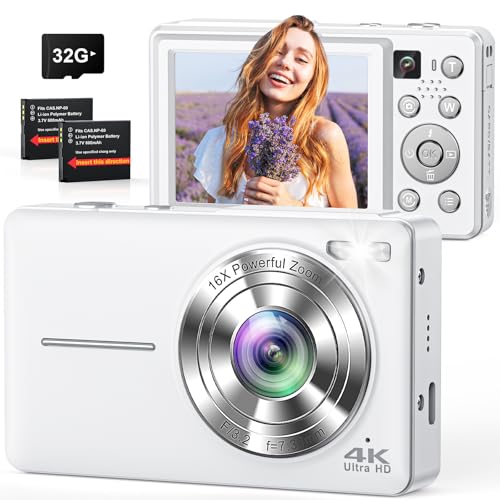
Camkory’s compact camera delivers 4K video and 64MP stills, with autofocus and a dual-camera system that can switch between front and rear perspectives. The ergonomic design and larger battery capacity support extended outings, making it suitable for family events or travel. The listing emphasizes 16x digital zoom, anti-shake, and easy operation, helping beginners achieve sharper captures. However, there is no explicit mention of mic input or external mic support, which means audio options may be limited unless paired with external recorders. This model offers strong image quality at a budget-friendly price point.
Buying Guide
Key purchase considerations when selecting a point-and-shoot camera with mic input include how audio is handled, overall video quality, and how the device fits your shooting style. The following factors help buyers choose with confidence:
- Microphone options and input type: Look for cameras with a dedicated 3.5mm microphone input or USB-C/Microphone adapters for external mics. Some kits include a built-in microphone, which is convenient but may not deliver broadcast-quality audio. If you plan to interview or record narration, prioritize models that explicitly support external mics or lavalier mics.
- Audio quality and noise handling: External mics often outperform built-in units, especially in noisy environments. Consider cameras that advertise directional mics, wind filters, or compatibility with external recorders to improve sound fidelity.
- Video capabilities: Decide between 4K and Full HD, and check frame rates (30p, 60p). 4K offers future-proofing, but 1080p at higher frame rates can be smoother for vlogging and streaming when bandwidth or editing resources are a concern.
- Stabilization and lens system: Optical zoom and stabilization influence both video smoothness and user experience. Cameras with optical stabilization are preferable for handheld use, especially at longer zooms.
- Screen and ergonomics: A flip or tilting screen simplifies self-recording and framing. A bright sunscreen helps outdoors, and touch controls can speed up operation for beginners.
- Battery life and media: Check battery capacity and the number of batteries included, along with card compatibility. Longer shoots require reliable power and sufficient storage for high-resolution video.
- Portability and build quality: Travel-ready cameras should be light and compact without sacrificing durability. Consider weight, size, and handling when planning on-the-go shooting.
- Price and value: Compare camera bodies, included accessories, and whether mic support justifies the price. A model with slightly higher cost may offer better audio workflows and future expandability.
- Usage scenarios: If your primary need is casual vlogging, a camera with an included microphone and simple controls may suffice. For more serious content production, prioritize external mic support, robust autofocus, and reliable color rendering.
In summary, for video-focused users who need solid audio alongside compact design, prioritize models with explicit external microphone support or bundled mics. For casual shooters, cameras with excellent optical zoom and reliable stabilization can still deliver compelling footage, especially when paired with external audio gear. Consider your typical shooting environment—indoor interviews, travel adventures, or family events—and choose a model that aligns with both your video and audio workflow.