Best Ways to Preserve and Digitize 35mm Slides
Growing memories from analog days deserve modern preservation. This article highlights top products that help you store, protect, and digitize 35mm slides, making it easier to enjoy photos on today’s devices. From archival sleeves to DIY digitizers, you’ll find options for any workflow and budget.
| Product | Format | What It Does |
|---|---|---|
| Photomyne Protective Photo Page | Slide pages | Holds up to 200 slides in a compact binder-friendly pack |
| Fuyoooo 50 Pack Protective Photo Slide Pages | Slide sleeves | High capacity storage with waterproof, archival-grade protection |
| KLIM K2 Mobile Photo Digitizer 35mm | Slide/film scanner kit | Digitizes to smartphone with app, includes accessories |
| KODAK Slide N SCAN Film & Slide Scanner | Digital film scanner | 5” LCD for viewing and quick conversion to digital files |
| JJC Photo Slide and Film Digitizing LED Light Kit | LED backlight kit | Improves lighting for digitizing negatives and slides |
Photomyne Protective Photo Page: 200 Slides in 10 Pages

The Photomyne page system provides a simple, binder-compatible solution for organizing 35mm slides. With ten pages per pack and the capacity to hold up to 200 slides, it’s suitable for expanding collections or running a phased digitization workflow. The pages are designed to be waterproof and dustproof, helping to guard slides against everyday wear. Its clear plastic construction ensures easy viewing and quick access when sorting, labeling, or selecting slides for digitization. The compact footprint makes it a practical storage option for hobbyists and families alike.
Fuyoooo 50 Pack Protective Photo Slide Pages
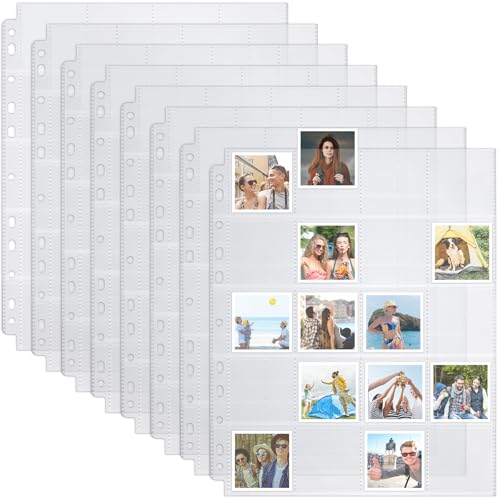
The Fuyoooo set increases capacity for larger archives with 50 pockets per page and up to 1,000 total pockets. Each sleeve holds 2×2 inch photos, aligning with common slide photo dimensions while remaining compatible with 3-ring binders. Built from sturdy polypropylene, these sleeves emphasize longevity and ease of maintenance, including waterproof properties to help protect slides from moisture. The design streamlines organization for frequent access, making it a practical choice for long-term storage and quick retrieval during digitization workflows.
KLIM K2 Mobile Photo Digitizer 35mm

The KLIM K2 is designed for quick digitization of 35mm negatives and slides. It supports viewing, scanning, and converting to digital formats suitable for smartphones, integrating with a free app for ongoing development and sharing. The kit includes batteries, a cleaning cloth, and a magnetic plate compatible with larger phones. It emphasizes portability and low-cost at-home development, offering a straightforward path from physical slides to digital archives without needing a traditional scanner setup. It is best for users prioritizing on-the-go digitization and simple workflow integration.
KODAK Slide N SCAN Film & Slide Scanner

The Kodak Slide N Scan offers a dedicated, built-in 5-inch LCD display to preview and edit when converting 35mm negatives and slides to digital JPEGs. It supports 135, 126, and 110 film formats and stores results on an SD card (not included). Its user-friendly feed system promotes efficient batch processing, making it a practical option for families with mixed-format archives. The included adapters and cleaning tools support a broader range of slides and negatives, enabling a more flexible digitization workflow.
DIGITNOW! 135 Film Negative Scanner

The DIGITNOW 135 Film Negative Scanner offers a standalone option that does not require a computer. It supports 1800 DPI high-resolution scans to SD cards (up to 32GB) or a computer, and includes an adjustable rapid slide feeder to handle multiple frames efficiently. Its simplicity makes it suitable for casual users seeking a straightforward conversion process, while its USB connectivity supports transfer to editing software if desired. The device is positioned as a cost-effective entry point to bring physical negatives into digital formats.
PrintFile Top Load Holds 20 35mm Slides 100 Pack

PrintFile Top Load 100-pack provides a straightforward archival solution for 35mm slides. Each page accommodates twenty mounted transparencies with an I.D. strip to help with labeling and organization. The sleeves use 8-mil polypropylene, balancing durability with flexibility. Dimensions are designed to fit standard 3-ring binder configurations, enabling easy expansion of existing storage systems. The PrintFile option is well-suited for users who want durable, labeled, and binder-friendly storage that supports efficient archiving and later retrieval for digitization.
CODOHI 100 Pack Protective Photo Slide Pages

The CODOHI set provides a large capacity with 100 pages and a total of 1,500 pockets. The side-loading design aids in easy photo insertion while maintaining protection from moisture and dust. The transparent sleeves enable quick viewing, which helps when you’re sorting slides before digitization. This option suits collectors with sizable archives who need durable, long-term protection and straightforward access to individual slides for scanning or sharing.
JJC Photo Slide and Film Digitizing LED Light Kit
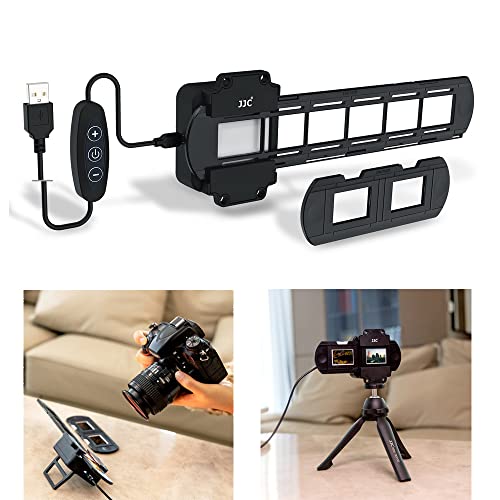
The JJC LED backlight kit delivers a controlled lighting solution for digitizing slides and negatives. With 42 LEDs and a color rendering index of 95+ and a color temperature of 6500K, it provides daylight-like illumination to minimize color bias during photography reproduction. A 10-level brightness control enables precise adjustments, while the included shoe-mount adapter supports flexible placement on tripods or arms. This kit is ideal for users who digitize slides with reflectivity or glare issues and need consistent, professional-like lighting.
Buying Guide: Key Purchase Considerations
- Storage capacity and organization: If you have large archives, choose high-capacity sleeves or pages (e.g., 1,000+ pockets) and consider binder compatibility for easy expansion.
- Protection level: Waterproof and moisture-resistant materials protect slides from humidity, dust, and handling wear. Look for archival-grade polypropylene or similar plastics.
- Compatibility: Ensure sleeves or pages fit your binder system (3-ring or 4-ring) and match slide sizes (common 2×2 inch frames).
- Digitization workflow: Decide between standalone scanners, mobile digitizers, or an LED light kit to complement scanning. Standalone scanners with built-in displays simplify review, while mobile options offer portability for on-the-go digitization.
- Ease of use and setup: Consider whether you prefer plug-and-play devices or equipment that requires more setup (apps, drivers, or manuals). A simple, fast workflow can reduce fatigue during large projects.
- Image quality considerations: For digitization, a high CRI lighting source and stable capture leads to more accurate color and detail. LCD previews help verify results before saving files.
- Future-proofing: Look for products with upgrade paths (additional sleeves, extra binder capacity, or software updates) to accommodate growing collections.
- Cost of ownership: Balance initial purchase price with long-term durability and the number of slides you plan to preserve. Durable sleeves and reliable scanners often lower long-term costs by reducing damage and rework.
- Brand ecosystem: Some brands offer bundled options with sleeves, labels, and guides, which can streamline organization and cataloging as you digitize.
Additional Considerations
When selecting a solution, factor in your primary goal—whether you’re organizing physical storage for quick access, creating a digital archive, or both. If your priority is quick access to many slides, a high-capacity binder system with clear sleeves may be ideal. For full digitization, combine a dedicated scanner or digitizer with a reliable lighting setup to achieve consistent results. Always handle slides with clean hands or gloves to minimize fingerprints and consider labeling slides or boxes to facilitate later searching in your digital library.