Best Photo Book Printing Machines for Clear, Portable, and Charming Keepsakes
The best photo book printing machines help you turn memories into durable, high-quality prints at home or on the go. This guide highlights five reliable options across compact pocket printers to small studio setups, perfect for scrapbooks, travel journals, or DIY photo albums. Each choice suits different buyers: students and travelers for ultra-portable options; hobbyists for feature-rich models; and households seeking reliable weekend-project tools. Below, compare who each product is best for, plus a quick summary table to help you decide fast.
| Product | Best For | Key Benefit |
|---|---|---|
| YOTON Photo Printer | Mobile users and on-the-go crafters | Compact design with Wi‑Fi direct printing |
| HP Sprocket 2×3 | Friends and social printing | Pocket size with AR features and quick connectivity |
| Canon Ivy 2 Mini | Smartphone photographers who want sticky-back prints | No ink required with ZINK technology |
| HP Sprocket Studio Plus | Home craft enthusiasts | 4×6 prints with a library of editing options |
| HPRT CP4100 | Casual crafters and families | 108 sheets included and AR video features |
| Polaroid Hi-Print 3×3 | Creative snap-hands and display-ready photos | Dye-sub prints in a square format |
YOTON Photo Printer Review

Best for travelers and students who need a compact, self-contained printer. The YOTON uses advanced dye-sublimation to deliver vivid colors and durable prints. It includes 54 sheets of 4×6 media and one ink ribbon, with built-in Wi-Fi for direct phone or laptop printing. The device is small enough to fit a backpack and supports iOS, Android, and computer connections. A clear advantage is its stability and ease of use without requiring internet access for printing when connected directly to your device. A potential limitation is that the ink ribbon prints 40–50 photos, so you’ll replace ribbons more often if you print frequently. Choose this if you want a portable, reliable color printer for casual photo projects and quick gift prints.
HP Sprocket Portable 2×3

Best for social moments with friends who want instant, shareable prints. This 2×3-inch printer uses Zink sticky-back paper and slips easily into a pocket or bag. It supports multi-device printing so you and friends can print from several smartphones at once. AR features add a playful element by scanning prints to reveal a virtual queue of photos. It’s ideal for party snaps and quick scrapbooks. A limitation is the small print size, which may not satisfy those who want wall-ready photos or larger keepsakes. Pick this if you value portability, easy sharing, and fun AR interactions on the go.
Canon Ivy 2 Mini Photo Printer

Best for smartphone users who want sticky-back prints without ink maintenance. The Ivy 2 Mini uses ZINK technology, delivering color prints on paper with a peel-and-stick backing. It’s ideal for decorating scrapbooks, walls, or planners. The lack of ink cartridges reduces ongoing costs and maintenance. A consideration is that print sizes are limited to small formats, which may not suit larger albums. Choose this if you prioritize a clean, effortless print experience and peel-and-stick versatility for quick projects.
HP Sprocket Studio Plus 4×6

Best for home projects and small albums. The Studio Plus offers 4×6 prints with dye-sub technology for durable, vibrant pictures. It supports editing within an app and can accommodate stickers, frames, and filters before printing, allowing for personalized layouts. It’s a solid choice for hobbyists who want a desktop printer that supports creative customization. A potential downside is that you may need to stock additional supplies like cartridges and photo papers for frequent use. Choose this if you want a home-focused printer that blends convenience with creative control.
HPRT CP4100 4×6 Printer

Best for families and casual crafters seeking ready-to-print bundles. The CP4100 includes 108 sheets and two ribbons, delivering quick prints with a 300dpi dye-sub process that yields up to 1.7 million colors for detailed, long-lasting photos. The HeyPhoto app enables templates and AR video features for enhanced experiences. A limitation is that ongoing supplies beyond the included sheets may add to the cost. Choose this if you want a ready-to-use system with ample paper and a feature-rich app for fun projects and memories.
Polaroid Hi-Print 3×3
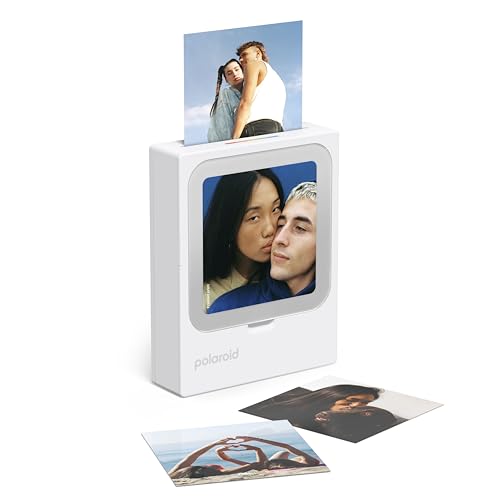
Best for creatives who want square, display-ready prints with quick turnaround. The Polaroid Hi-Print 3×3 uses dye-sub cartridges for vibrant results in under 50 seconds. It pairs with the Polaroid Hi-Print app for templates and stickers, and prints wirelessly via Bluetooth. A note is that the 3×3 format may limit display options for larger albums. Choose this if you want stylish, compact square photos you can display directly from the device.
Buying Guide: Key Purchase Considerations
- Print size and format: Consider whether you want 2×3, 3×3, 4×6, or 4×6 options. Larger formats are better for albums; smaller ones are better for on-the-go sharing.
- Printing technology: Dye-sublimation tends to produce durable, vibrant prints; ZINK requires no ink but may have smaller print formats.
- Connectivity: Direct Wi-Fi or Bluetooth plus app support affects ease of use with smartphones or laptops. Built-in Wi-Fi can be more stable for home setups.
- Media included and replacement costs: Look at sheets per pack and ribbon requirements to estimate ongoing costs for frequent printing.
- Portability vs. feature set: Ultra-compact models excel on the go; larger models often provide more editing features and templates.
- Special features: AR video, sticker-friendly paper, peel-and-stick backs, and party lighting can enhance the printing experience for specific projects.
Frequently Asked Questions
- What is dye-sublimation printing? It’s a heat-transfer process that fuses color dyes into the paper for durable, vivid photos.
- Do these printers require ink cartridges? Some use dye ribbons or ZINK paper with no cartridges; confirm your model’s paper type before purchasing.
- Can I print from iPhone and Android devices with these printers? Yes, most listed models support both platforms via apps.
- Are the prints water-resistant? Many dye-sublimation prints are water-resistant and fade-resistant, but check the specific model’s durability.
- Do these printers work without internet access? Several have direct Wi-Fi or Bluetooth printing, so an internet connection is not always required.
- Is the print size changeable? Print size is typically fixed per model; some offer templates to create layouts but not different print sizes from the same device.