Best Negative Film to Digital Photo Scanners for Preserving Old Memories
Discover reliable options to convert 35mm, 126, 110, and other film formats into high-quality digital photos. The following picks enhance clarity, offer easy loading, and provide built-in displays for quick previews. Each product supports a range of film types and strives to preserve color and detail from your archival negatives and slides.
| Product | Brand | Key Benefit | Format Support |
|---|---|---|---|
| KODAK Slide N SCAN Film & Slide Scanner | KODAK | 5” LCD preview, continuous loading | 135, 126, 110 |
| Magnasonic All-in-One 24MP Film Scanner | Magnasonic | 24MP output with HDMI viewing option | 35mm, 126, 110, Super 8, 135/126/110 slides |
| Kodak Slide N Scan Max Digital Film Slide Scanner | KODAK | Large 7” LCD with gallery mode | 135, 110, 126 |
| DigitPro Film & Slide Scanner | DigitPro | All-in-one, 5” LCD, built-in memory | 35mm, 135/110, 126, slides, photos |
| DigitConvert Digital Film & Slide Scanner | DigitConvert | 22MP output, easy one-click scanning | 135, 110, 126, Super 8 slides |
The following sections highlight each option, focusing on compatibility, display capabilities, loading ease, and overall value for digitizing archived film and slides.
KODAK Slide N SCAN Film & Slide Scanner

The KODAK Slide N SCAN combines 1422MP digital scanning capabilities with a 5” LCD display for instant previewing and editing. It supports 135, 110, and 126 film formats, including slides, and saves directly to an SD card (not included). Its quick-load film inserts and included adapters for multiple film sizes enable fast, continuous scanning. This scanner is designed to serve as an elegant digital picture frame when idle, making it suitable for home or office display as well as archiving.
DigitPro Film & Photo Scanner

DigitPro’s 4-in-1 design handles 35mm slides, 135 & 110 color and B&W negatives, printed photos (3R-5R), and business cards. It features a large 5″ LCD preview screen for on-device review and basic editing without a computer. The scanner operates stand-alone with built-in memory and an 8GB SD card, enabling immediate saving. It emphasizes rapid, straightforward digitization suitable for users who want a single device for multiple media types.
Kodak Slide N Scan Max Digital Film Slide Scanner

The Slide N Scan Max offers a large 7” LCD with gallery mode for easy reviewing and editing. It supports 13/22MP-style output and can convert 135, 110, and 126 negatives and 50mm slides to digital files stored to an SD card (not included). Quick-loading trays and included adapters streamline scanning, while USB cables (and HDMI where applicable) support playback on external displays. It serves as a strong option for families transitioning from older slides to modern digital archives.
Magnasonic All-in-One 24MP Film Scanner

Magnasonic’s FS71 model emphasizes high-resolution 24MP scans and an integrated 5″ display for direct viewing of 35mm/110/126 slides and film negatives, with HDMI output to view on a TV or monitor. It includes built-in memory and an SD card slot for extended storage, enabling a simple workflow from negative to digital image. HDMI connectivity makes it easy to share or present scans in larger formats, increasing versatility for family gatherings or archival projects.
DigitPro 35mm Slide Scanner (2.4-inch LCD)
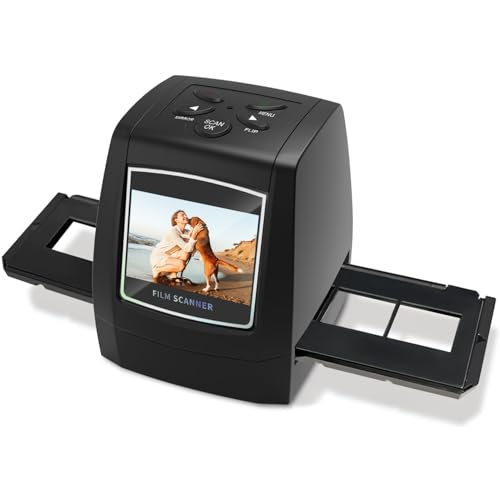
This DigitPro model provides a compact 2.4-inch LCD for on-device previews, focusing on 35mm negatives and slides with a dedicated film adapter for stable positioning. It emphasizes portability and ease of use, making it a practical choice for occasional digitization and quick sharing. While smaller in display, it remains capable of producing high-quality JPEGs from common 35mm media with straightforward operation.
DigitConvert Digital Film & Slide Scanner

DigitConvert combines a 5″ LCD display with 22MP image quality for converting color and B&W 135/110/126 negatives, 50mm slides, and Super 8 to digital JPEGs. It offers built-in memory and SD card support up to 64GB, enabling direct saving. The gallery mode and simple one-click scanning streamline the workflow, presenting a straightforward option for users who want an integrated viewing and editing experience in one device.
Buying Guide: Key Purchase Considerations
- Film format compatibility: Check whether the device supports your specific negatives (135, 110, 126, Super 8) and slides. Some models emphasize broader support, while others focus on a narrower range.
- Display size and quality: A larger LCD (5–7 inches) typically makes on-device preview and editing easier, reducing uncertainty before saving files.
- Storage options: Built-in memory versus SD card expansion affects immediate usability and capacity for larger archives. Look for devices offering at least 8GB built-in or a healthy SD card slot.
- One-touch vs. manual control: Stand-alone scanners with simple one-touch scanning are ideal for quick digitization, while models with manual adjustments may yield finer color and brightness control.
- Connectivity to external displays: HDMI output is valuable for viewing scans on a TV or monitor, particularly for presenting or sharing images with family.
- Loading mechanism: Easy-load trays and adapters reduce the risk of feeding jams and damaged frames during scanning.
- Affordability and maintenance: Consider total cost of ownership, including potential need for adapters, cleaning tools, and future media formats that may require upgrades or replacements.
- Image quality considerations: Resolution (MP), color accuracy, and noise handling influence how faithfully the digital versions preserve original detail and tonal range.
- Software and workflow: Some devices include basic on-device editing; others rely on external software. Evaluate whether you prefer built-in capabilities or desktop editing.
- Future-proofing: If you anticipate adding more film sources later, choose a scanner with versatile media compatibility and reliable support.
When choosing, balance format coverage, ease of use, and display quality with your archival goals. If you need a single solution for varied media, models marketed as all-in-one or “4-in-1” are often the most versatile, though dedicated film-to-digital devices may offer stronger image fidelity for specific formats.