Best Nanny Cams and Hidden Cameras for Home Security
Discover top hidden camera options suitable for nanny monitoring, home security, and remote peace of mind. This guide highlights five reliable choices, explains who each is best for, and notes practical considerations. Perfect for busy families, pet owners, and small offices needing discreet monitoring without compromising privacy.
| Product | Best For | Key Benefit |
|---|---|---|
| Smilephil Hidden Camera | Homeowners needing 1080P, night vision | Compact WiFi camera with motion detection and night vision |
| DAIFAC Hidden WiFi Camera Clock | Parents seeking remote monitoring | Clock form factor with 1080P clarity and multiple cameras support |
| Wxndfr Full HD 1080P | Pet monitoring and nanny needs | Wide-angle, night vision, and motion alerts |
| UIKOP 64GB Mini Camera | No-WiFi setup in trusted spaces | Includes SD card and offline recording |
| HiSpyCam Full HD | Travel-friendly and versatile use | 1080P, indoor/outdoor options, local/cloud storage |
Smilephil Hidden Camera – 1080P WiFi Nanny Cam

Features include an HD 1080P camera designed for home and office security as a baby monitor, motion detection recording, and night vision. It provides remote feedback via a free app for real-time viewing from anywhere. Best for: caregivers and families needing discreet in-home monitoring with quick phone access. Caution: setup relies on a compatible app; ensure your network supports stable WiFi for real-time alerts.
DAIFAC Hidden WiFi Camera Clock HD 1080P

Best for: parents seeking continuous remote monitoring of home activities with a discreet clock-style camera. This model offers 1080P clarity, a free app for real-time viewing, and supports multiple cameras through the app. Limitation: requires 2.4GHz WiFi and may not support 5GHz networks, which can affect high-speed streaming in some homes.
Wxndfr Full HD 1080P WiFi Camera
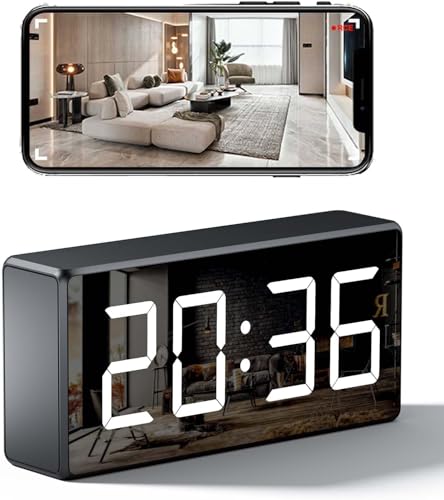
Best for: pet owners and nanny use requiring clear live feeds and motion alerts. This camera streams 1080P video with night vision and supports microSD storage up to 256GB. It provides real-time motion detection with app notifications. Caution: MicroSD card (not included) is required for local storage, and cloud options may vary by region.
UIKOP 64GB Mini Camera

Best for: spaces where WiFi is unavailable or not desired. This mini camera includes a pre-tested 64GB SD card and records in 1080P without needing an app or WiFi. It is ideal for quick setup in trusted rooms. Limitation: no app or remote viewing over the internet; monitoring is local via memory card playback only.
HiSpyCam Full HD 1080p WiFi Security Camera

Best for: travelers or mobile users needing a flexible setup that supports both local and cloud storage. It features 1080P imaging with adaptive low-light performance and built-in motion detection with instant phone alerts. Caution: battery life can vary with use; for prolonged off-grid use, plan for regular charging or a power source.
Buying Guide: Key Considerations For Nanny Cams And Hidden Cameras
- Purpose and placement: Choose a form factor and features that fit your monitoring needs—nanny care, pet supervision, or office security. Discreet designs help reduce intrusiveness in family spaces.
- Video quality and night vision: Prioritize 1080P or higher for clear details. Night vision is essential for after-dark monitoring in bedrooms and nurseries.
- Power and storage: Decide between battery-powered, wired, or solar options. Consider local (SD card) vs. cloud storage based on privacy and accessibility.
- Connectivity: Ensure compatibility with your home WiFi (2.4GHz often required) and check whether remote viewing works on iOS and Android devices.
- Privacy and security: Look for password protection, encryption, and the ability to manage multiple cameras from a single app. Disable features you don’t need to minimize exposure.
- Ease of use vs. features: Some models emphasize plug-and-play with limited app steps; others offer advanced customization like motion zones and alerts. Align with your tech comfort level.
- Budget and expandability: If you plan to monitor multiple rooms, choose a system that supports adding cameras without prohibitive costs or complex setup.
Frequently Asked Questions
- What should I consider when choosing a nanny camera?
– Look for 1080P or higher video, night vision, motion alerts, portable form factors, and whether you need WiFi or offline recording. - Is it better to choose a WiFi or a no-WiFi camera?
– WiFi cameras offer remote viewing and alerts; no-WiFi cameras are simpler, often requiring local storage and are less exposed to online security risks. - Can I monitor multiple cameras from one app?
– Many systems support multiple cameras on a single app; verify compatibility in advance. - What about storage options?
– SD card storage is common for local recording; cloud storage can provide remote access but may involve ongoing fees. - Are hidden cameras legal in my area?
– Laws vary by jurisdiction and location. Confirm local regulations and obtain consent when required, especially in shared spaces. - Do these cameras require special subscriptions?
– Some models include free apps and onboard storage, while cloud storage may require subscription; check the product details for specifics.