Best Mount Smartphone on Tripod for Stable Mobile Shots
Looking for the best way to mount a smartphone on a tripod for steady photos and hands‑free video? This guide highlights five top options for different needs, from portable vlogging mounts to sturdy, multi‑cold‑shoe adapters. Ideal for creators, vloggers, livestreamers, and remote workers who want reliable tripod compatibility and flexible angles.
Quick comparison of selected products
| Product | Best For | Key Benefit | Limitations |
|---|---|---|---|
| SYNCWIRE Tripod Phone Mount | General mobile photography & vlogging | Dual cold shoe mounts for lights/mics; 360° rotation | May require additional accessories for heavy setups |
| SharingMoment Premium Smartphone Holder | Compact, flexible mounting on tripods | Two mounting options with 360° rotation | Clamping range limited to 2.2–4.1 inches |
| PICTRON Metal Phone Tripod Mount | Pro-style rigs with lights/mics | Back cold shoe + two 1/4″ holes; arca bottom | All‑metal build may be heavier |
| SMALLRIG Universal Metal Phone Support | Universal, versatile setups | Free 180° adjustment with two joints | Requires compatible tripod or cold‑shoe setup |
| PHICANT Phone Tripod Mount | Budget-friendly universal mounting | 3× 1/4″ screws for flexible mounting | May lack some premium features |
SYNCWIRE Tripod Phone Mount

Best for: general mobile photography and vlog setups on standard tripods. The mount offers dual cold shoe mounts to attach a microphone and light, expanding lighting and audio options for creators who shoot on the go or in small studios. The design includes a 1/4″ screw hole compatible with tripods and a 360° rotation with 180° tilt for flexible framing.
Caution: While versatile, the attachment load should stay within the mount’s supported range to avoid slippage during tilt or rotation. The product relies on compatible tripod hardware for full functionality.
SharingMoment Premium Smartphone Holder
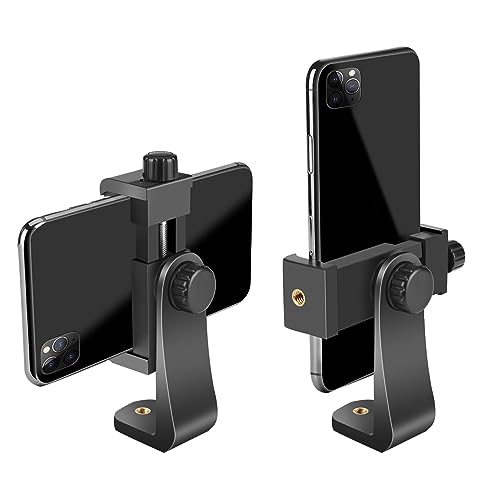
Best for: users who want flexible mounting options without removing the phone from the mount. It supports portrait and landscape modes with a screw‑driven adjustment, offering a 360° rotation and easy switching between tripod mounts and direct attachment to larger setups.
Why chosen: The two 1/4″ interfaces and adjustable width (2.2″–4.1″) cover most standard smartphones, making it a strong all‑rounder for travel kits, interviews, or quick livestreams.
Caution: The clamp range is fixed for standard phones; very large or unusually thick cases might approach the limit of grip without a snug fit, so verify device dimensions before use.
PICTRON Metal Phone Tripod Mount
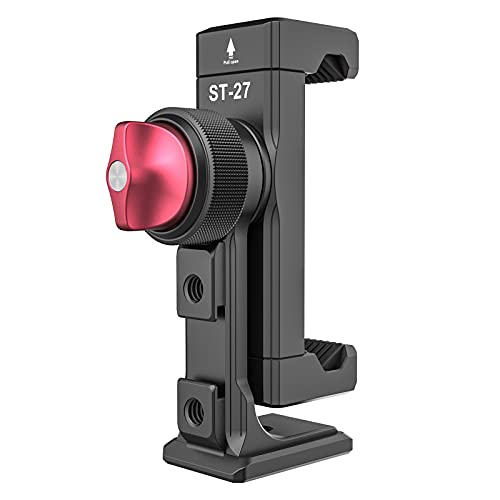
Best for: heavier, professional‑style vlogging rigs. With three cold shoes, two 1/4″ expand holes, and a standard arca bottom, this mount supports a wide range of accessories like lights and microphones for desktop or field setups.
Why chosen: The all‑metal construction promises durability and security for high‑motion shoots, and the back cold shoe helps keep wireless mics in reach during mobile recording.
Caution: The heavier build may add bulk to the rig, which could affect portability for ultra‑light travel kits.
SMALLRIG Universal Metal Phone Support

Best for: users needing mid‑range versatility with solid articulation. The clamp supports both landscape and portrait modes, with two rotary joints providing up to 180° of adjustment for precise angles.
Why chosen: It offers broad device compatibility (57–88mm width) and can attach to tripods or monopods via standard screw holes, making it a flexible option for many setups.
Caution: It relies on compatible tripod mounting hardware; ensure your tripod has the standard 1/4″-20 thread or cold shoe compatibility for best results.
PHICANT Phone Tripod Mount
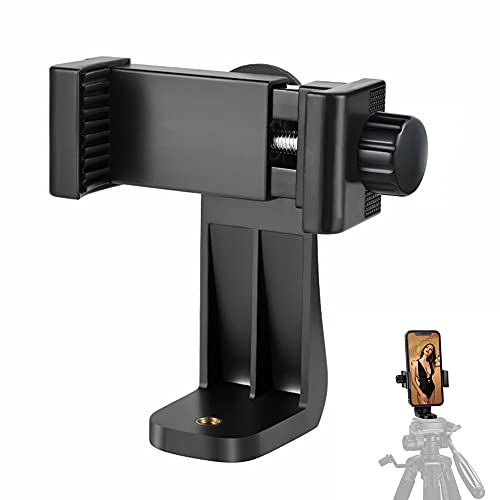
Best for: budget‑conscious buyers who need a universal mounting solution for various smartphones. The mount uses three 1/4″ screws and supports 360° swiveling from portrait to landscape for flexible shooting.
Why chosen: The universal design and rotating capability provide a cost‑effective path to reach widescreen framing for video calls, livestreams, and casual photography.
Caution: Lower price points can coincide with lighter construction; ensure the phone and any attached accessories are not overly heavy for the clamp to maintain stability.
Buying Guide: Key Considerations When Mounting a Phone on a Tripod
- Device compatibility: Check phone width, case thickness, and whether the mount supports 2.2″–4.1″ wide devices or specific tablet sizes if needed.
- Mount stability: Look for solid clamps, silicone padding to protect surfaces, and a locking mechanism to prevent slippage during motion.
- Rotation and tilt flexibility: Decide if you need 360° rotation, portrait/landscape switching, or adjustable tilt without a ball head.
- Accessory integration: Dual or multiple cold shoes are helpful for external mics, lights, or audio accessories; confirm screw thread compatibility (1/4″ standard).
- Mounting option: Determine if you prefer direct tripod mounting, cold shoe attachments, or Arca‑style compatibility for quick release plates.
- Portability vs. durability: Aluminum or metal mounts provide durability but add weight; plastic mounts save weight but may not suit heavy rigs.
- Intended use: For livestreaming, prioritize quick rotation and secure clamps; for photography, ensure stable angle control and easy setup.
FAQ
- What is the standard screw size used for most tripod mounts?
Most mounts use a 1/4″-20 screw thread for tripod compatibility. - Can these mounts hold an iPad or large tablet?
Some mounts are designed for phones only; check product specs for tablet compatibility (width openings from about 5.3″ to 10.6″). - Do all mounts support landscape and portrait mode?
Yes, most listed models support both orientations, with adjustable rotation angles. - Are cold shoe mounts compatible with standard accessories?
Cold shoes are designed for accessories with compatible mounts, such as microphones or LED lights, but verify weight limits. - Is Arca‑Swiss compatibility important?
Arca compatibility is useful for quick‑release systems, but not all models include it; confirm bottom mounting options before purchase.