Best VHS-C and Mini DV Adapters for Preserving Old Tapes in 2026
If you’re looking to play or convert aged VHS-C tapes to standard VHS or digital formats, these motorized adapters are designed to simplify the process. They’re best for anyone who owns classic camcorder tapes and wants an easy, single-device solution for playback or conversion. The top picks below cover nostalgic playback, straightforward one-touch operation, and reliable digitization paths for family memories. The brief table highlights the key features and ideal user profiles for each model.
| Product | Best For | Key Benefit |
|---|---|---|
| HQ VHS-C Video Cassette Adaptor Motorized VHS-C to VHS | Casual users who want simple playback | Motorized loading for easy operation |
| VHS-C Tape Cassette Adapter for Camcorders Motorized VHS VHS-C to VHS | Family memories on regular VHS players | One-touch operation and nostalgia value |
| Portta VHS to Digital Converter | Digital archiving without a PC | 1080P capture, USB/SD storage |
| Oassuose VHS to Digital Converter | Simple USB capture with RCA/AV inputs | 1080P digital conversion via USB |
| VHS-C Cassette Adapter, 12mm | Most 12mm VHS-C tapes and camcorders | One-touch motorized loading |
HQ VHS-C Video Cassette Adaptor Motorized VHS-C to VHS

The HQ VHS-C Adaptor is designed to convert VHS-C tapes for playback on standard VHS machines. It emphasizes nostalgia by making it easy to access old recordings on a familiar interface. This model is best for casual users who want a straightforward way to view family tapes without a complex setup. A noted limitation is that it is not compatible with 8mm, MiniDV, or Hi8 tapes, so only VHS-C formats are supported.
VHS-C Tape Cassette Adapter for Camcorders Motorized VHS VHS-C to VHS

This motorized adapter is aimed at users who want to revive cherished camcorder footage on a standard VHS player. It supports painless playback and recording of VHS-C tapes, turning old recordings into viewable VHS content. Important note: it does not work with MiniDV, Hi8, Digital8, or 8mm tapes. Choose this if your library consists mainly of VHS-C tapes and you want a simple, one-device solution for access and archiving.
Portta VHS to Digital Converter

The Portta device is designed for digital archiving and playback of analog tapes via a PC-free workflow. It supports AV/RCA, S-Video, and AUX inputs, and records up to 1080P at 30Hz. A built-in 3.0″ LCD preview screen helps you review captured footage, and USB/SD storage allows for direct saving. This model is best for users who want an all-in-one capture unit that can store digital files directly to USB drives or SD cards, avoiding separate software tools. It requires external power for high-capacity USB drives.
Oassuose VHS to Digital Converter

The Oassuose capture device emphasizes ease of use and compatibility, converting VHS, VCR, DVD, Hi8, DV tapes and more via RCA or S-Video to USB-C or USB-A outputs. It digitizes content for PCs and Macs with no driver installation required, provided you use compatible capture software. This option is best for users who want a plug-and-play capture card that can handle multiple legacy formats. A caveat is that it relies on compatible acquisition software to complete the digitization workflow.
VHS-C Cassette Adapter, 12mm
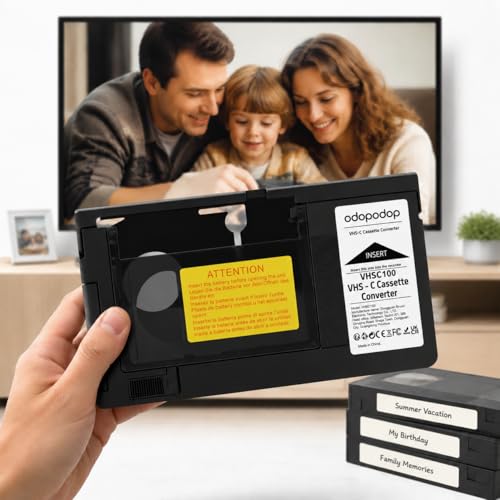
This Generic 12mm VHS-C adapter is tailored for a broad range of 12mm tapes and camcorders. It features a motorized loading mechanism and is positioned as an easy one-touch operation device—useful for family members who may appreciate a simple, assisted workflow. The main limitation is that compatibility is focused on 12mm VHS-C formats, which excludes some camcorder tape variants.
Buying Guide
What should you consider when choosing a VHS-C adapter or converter?
- Tape compatibility: Verify whether your tapes are VHS-C, S-VHS-C, or MiniDV variants, and ensure the device supports those formats.
- Playback vs. digitization: Decide if you want a pure playback adapter, a capture/convert device, or a combined unit with onboard storage.
- Ease of use: Motorized loading and one-touch operation are valuable for non-tech users and older family members.
- Output options: If you plan to digitize, check for 1080P capture capabilities, USB/SD storage, or whether a direct to VHS path is desired.
- Software requirements: Some capture devices require specific software; consider whether you want a driver-free or software-assisted workflow.
- Portability and power: Battery vs. USB-powered devices influence where and how you can use the adapter.
Which adapter is best for your situation?
- Best for nostalgic viewing: HQ VHS-C Adaptor and VHS-C Tape Cassette Adapter (motorized, simple playback).
- Best for archiving without a computer: Portta VHS to Digital Converter (1080P capture with USB/SD storage).
- Best for multi-format digitization: Oassuose VHS to Digital Converter (broad compatibility and USB output).
- Best for broad 12mm VHS-C tapes: VHS-C Cassette Adapter, 12mm (easy one-touch operation).
FAQ
- Can these adapters play back MiniDV or Hi8 tapes?
- No. These adapters focus on VHS-C and similar cassette formats; MiniDV/Hi8 are not supported by the listed devices.
- Do I need a computer to digitize with these devices?
- Some models offer USB/SD storage and direct capture without a PC, while others require software on a computer for digitization.
- Is the loading process manual or motorized?
- Several options include motorized loading for easier use, especially helpful for older users.
- What kind of output formats can I expect?
- Most capture devices output digital formats like MP4 or AVI; check the product specifics for resolution and audio quality.
- Are these devices compatible with all VHS players?
- Compatibility varies by model; ensure the unit supports your specific tape type (VHS-C or S-VHS-C) and your player.