Best Mini DV Camcorder Cable Options for Handycam and Digital Camcorders
Finding the right mini DV camcorder cable starts with matching the connector types your camera uses. This guide highlights five reliable options that connect legacy DV, AV, and USB-enabled devices to modern laptops, TVs, or USB ports. Each pick targets common buyers: photographers upgrading from older models, video hobbyists needing simple AV output, and those seeking easy data transfer to a computer or display. Below, compare connections, best uses, and limitations to help you choose confidently.
| Product | Connector Type | Best For | Key Benefit |
|---|---|---|---|
| LÓVFEIFAN USB 2.0 to IEEE 1394 Mini 4pin | USB 2.0 to Mini FireWire 4-pin | DV cameras needing USB-to-FireWire data transfer | Easy USB connection to cameras with FireWire data compatibility |
| LBSC USB Male to IEEE 1394 4Pin Mini Firewire | USB 2.0 to FireWire 4-pin | Sony DCR-TRV75E users | Compatibility for Sony DCR-TRV75E DV models |
| Eanetf AV Output Cable 3.5mm to RCA | 3.5mm TRRS to 3 RCA | AV output to TVs, TVs and home theater | Broad compatibility for analog AV setups |
| LEAGY AV Cable 5 Feet for Handycam | 10-pin Handycam AV (RCA/S-Video) | Handycam users needing TV or VCR connection | Combined RCA and S-Video for flexible viewing |
| Optimal Shop AV Cable for Sony Handycam | 10-pin AV with RCA and S-Video | Handycam owners linking to TV/VCR | Easy setup with common AV outputs |
LÓVFEIFAN USB 2.0 to IEEE 1394 Mini 4pin FireWire DV Cable

The LÓVFEIFAN cable provides a USB 2.0 to Mini FireWire 4-pin connection, enabling data transfer between compatible cameras and USB hosts. It supports data rates up to 480 Mbps, which suits older DV workflows. Best for: camcorder owners needing a straightforward USB-to-FireWire bridge when direct FireWire ports are unavailable. Limitation: this cable does not guarantee full capture functionality on every system and relies on device compatibility for DV transfer.
LBSC USB Male to IEEE 1394 4Pin Mini Firewire for Sony DCR-TRV75E

This LBSC cable targets a specific Sony model, the DCR-TRV75E, and converts USB 2.0 to a FireWire 4-pin Mini plug. Best for: Sony DV camcorders requiring a FireWire 4-pin connection through USB interfaces. Limitation: compatibility is specifically noted for certain Sony models, so avoid if you own a broader range of devices without confirmed support.
Eanetf 3.5mm to RCA Camcorder AV Cable

The Eanetf AV cable translates an 1/8-inch TRRS audio/video output to standard RCA connectors. Best for: camcorders, TVs, or home theater systems that rely on RCA inputs. Limitation: this is an analog solution and does not support digital data transfer; use when you need live AV playback rather than file transfer.
LEAGY AV Cable for Sony Handycam Mini DV

The LEAGY cable is designed for Handycam devices with a 10-pin output and includes both RCA and S-Video connectors. Best for: users who want flexible playback options on TVs or VCRs with reliable analog connections. Limitation: only compatible with cameras using the 10-pin Handycam interface; not a universal solution for all camcorders.
Optimal Shop 5 Feet/1.5M AV Cable for Sony Handycam
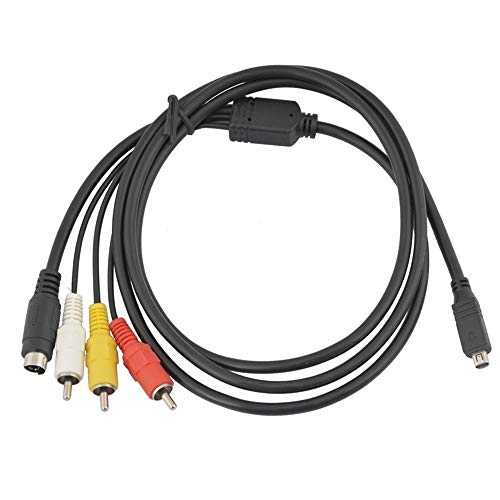
The Optimal Shop AV cable provides 10-pin Handycam AV outputs with RCA and S-Video connectors for clear, standard-definition viewing. Best for: those linking a Handycam to a TV or VHS player for playback without digital transfer. Limitation: analog output may be limited by older display devices or AV equipment compatibility.
PASOW Firewire Cable 4 Pin to 6 Pin iLink DV Cable
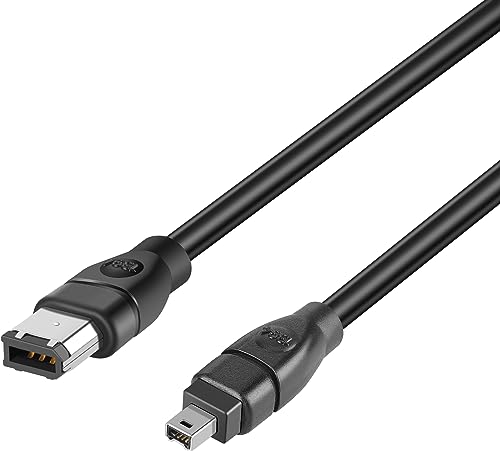
The PASOW cable links Firewire 400 6-pin to 4-pin devices, enabling a DV camera or camcorder to connect to a computer or capture device that has a 6-pin FireWire port. Best for: users with mixed FireWire port types seeking flexible compatibility. Limitation: supports 400 Mbps maximum and requires compatible ports on both ends; verify device support before purchasing.
Buying Guide: Mini DV Camcorder Cable Considerations
- Connector compatibility: Identify your camera’s output and the display or computer input you plan to use. Common options include FireWire 4-pin, FireWire 6-pin, RCA, S-Video, and USB-to-FireWire adapters.
- Digital vs. analog transfer: FireWire cables support DV transfer, while RCA/S-Video cables provide analog AV output for viewing on TVs or VCRs. Choose based on whether you need file transfer or on-screen playback.
- Device-specific compatibility: Some cables are marketed for specific models (for example, Sony DCR-TRV75E) or Handycam interfaces. Confirm model compatibility to avoid nonfunctional purchases.
- Data transfer rate: USB-to-FireWire adapters typically target DV data rates up to 480 Mbps. If you require faster transfers or direct capture, verify device support and driver availability.
- Cable length and durability: Longer cables can introduce signal degradation for analog outputs. Look for a balance between reach and signal integrity, and consider PVC jackets and reinforced connectors for longevity.
- Alternative use cases: Some cables double as general AV connectors to TVs or projectors, while others are strictly for camera-to-computer transfers. Clarify your primary goal before buying.
Frequently Asked Questions
- What is the difference between FireWire and USB in camcorder connections?
FireWire (IEEE 1394) is commonly used for DV data transfer and device control, while USB is often used for power and data up to a limited DV rate. Some cables bridge USB to FireWire to enable connections when a native port is missing. - Can I use any AV cable for my camcorder on a modern TV?
Yes for analog AV cables (RCA/S-Video) to TVs with compatible inputs. For digital playback or file transfer, ensure you have the correct FireWire or USB-to-FireWire adapter and compatible devices. - Will these cables enable video capture on a PC?
Some USB-to-FireWire adapters do not guarantee capture functionality on all systems. Check device compatibility and drivers for your PC or laptop. - Are there model-specific cables I should buy?
Some cables target specific camera models or Handycam interfaces. If you own a Sony DCR-TRV75E or similar, model-specific cables may offer the best fit and reliability. - Do longer cables affect video quality?
Analog AV connections can experience signal loss over very long runs. For DV data transfer, use cables that meet the required data rate and keep within recommended lengths.