Best Memory Cards for Camcorders: Fast, Reliable SDXC Options for 4K
Answering what memory card to choose for camcorders is straightforward: look for high sustained write speeds, reliable 4K support, and broad compatibility. This guide highlights five memory cards that suit different buyer needs—from professional 4K recording to casual Full HD shoots. The top picks focus on speed, durability, and capacity to keep your footage flowing without interruption. Best for professionals needing rapid offload and long recording sessions; best for hobbyists who want solid Full HD to 4K compatibility at a budget; best for versatile cameras and multi-device workflows.
| Product | Brand | Capacity | Best For |
|---|---|---|---|
| SANDISK Extreme PRO SDXC UHS-I 128GB | Sandisk | 128GB | Pro 4K recording, high-speed offload |
| SanDisk Ultra SDXC UHS-I 128GB | Sandisk | 128GB | Everyday Full HD to 4K, budget-friendly |
| Transcend SDXC SDC300S 128GB | Transcend | 128GB | Daily photography and Full HD |
| GIGASTONE 128GB SD Card | Gigastone | 128GB | 4K UHD video, data recovery option |
| SANDISK Ultra 64GB SDXC | Sandisk | 64GB | Compact setups, moderate memory needs |
The table above summarizes a mix of speeds, capacities, and use cases. Use it to compare baseline features at a glance before reading product details below.
SANDISK Extreme PRO 128GB SDXC Card

Best for professionals needing robust 4K recording and rapid offload. This card supports up to 200MB/s read speeds and up to 90MB/s write speeds, enabling smooth 4K UHD capture and quick data transfer when paired with capable readers. SanDisk QuickFlow Technology boosts offload performance on compatible devices, while high-end capacity helps reduce swapping during long shoots. The card is most effective with cameras and readers that can sustain high throughput.
Who it’s best for: videographers and editors who require dependable 4K recording and fast post-shoot transfers. Choose this if you shoot long sessions and move large clips regularly. Caution: actual speeds vary by device, host reader, and conditions; enable QuickFlow where available to realize maximum read speeds.
SanDisk Ultra 128GB SDXC UHS-I Card

Best for everyday photographers and hobbyist videographers who primarily shoot Full HD to light 4K. It offers up to 100MB/s read speeds and is a reliable option for general use with consumer cameras and camcorders. This card provides ample space for many projects, especially when shooting in Full HD or compressed 4K.
Who it’s best for: hobbyists and beginners needing a dependable, budget-friendly option for standard video and photography tasks. Limitation: write speeds are not as high as premium lines, which may affect long 4K bursts or high-frame-rate capture.
Transcend SDC300S 128GB SD Card

This card is designed for everyday use with Full HD and reliable photo capture. With read speeds up to 100MB/s and class ratings for dependable data management, it’s a solid middle-ground choice for many devices, including camcorders, without overpaying for ultra-high-end speeds.
Who it’s best for: those seeking versatile compatibility across cameras, tablets, and other devices, balancing speed and affordability. Limitation: write speeds are significantly lower than top-tier Pro cards, which may affect 4K bursts or high-bit-rate footage.
GIGASTONE 128GB SD Card

Best for 4K camera use with an emphasis on data recovery options. This card advertises up to 100 MB/s transfer speed and is compatible with 4K UHD video. It can serve as a reliable workhorse for camcorders needing steady performance in standard to high-bitrate recording.
Who it’s best for: professionals and enthusiasts who want a data-recovery option when records are critical. Limitation: data recovery claims are not a substitute for proper backups; performance specs depend on device compatibility and workload.
SANDISK Ultra 64GB SDXC
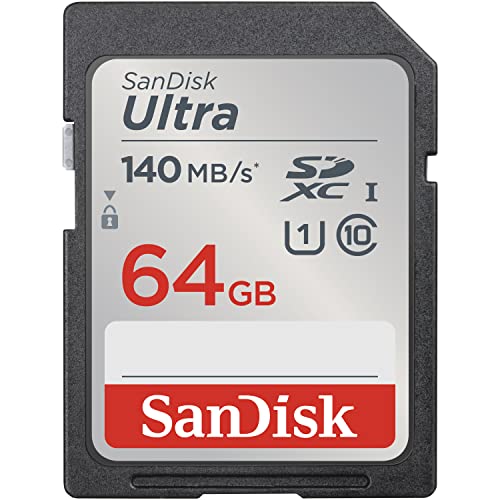
A compact option for lighter camcorder setups or smartphone-adjacent recording workflows. It provides reasonable capacity and efficiency for daily shoots where extreme speed is not required.
Who it’s best for: creators with smaller rigs or those who need a spare card for backup shooting. Limitation: lower capacity may require more frequent swaps on longer sessions.
Buying Guide: Key Purchase Considerations
- Speed Class and UHS Rating: For 4K recording, prefer UHS-I or faster with Class 10 and Video Speed Class (V30) or higher. Higher write speeds reduce dropped frames and ensure smoother footage.
- Capacity Needs: Camcorders with long shoots benefit from 128GB or 256GB cards. For travel and event filming, multiple cards may be prudent.
- Device Compatibility: Check your camcorder’s reader compatibility. Some devices deliver peak performance only with specific speeds and formats.
- Durability and Reliability: Look for cards with robust construction and tested endurance for varied temperatures and carry conditions.
- Data Management Features: Some brands offer QuickFlow or other offload accelerators—these can cut post-production time when paired with compatible readers.
Frequently Asked Questions
- What speed class should I look for in camcorder memory cards?
- Is capacity more important than speed?
- Can I use standard photo cards for video?
- Do faster cards always deliver better performance?
- Should I choose multiple smaller cards or one large card?
For 4K recording, seek UHS-I or faster with a minimum C10 and a V30 rating to ensure stable video capture.
Depends on use case. If you shoot long sessions in 4K, capacity matters to avoid frequent card swaps. Speed matters for reliable recording and quick offloads.
While some can handle video, dedicated memory cards with higher sustained write speeds are preferable for consistent 4K video.
Not always. Device compatibility and reader performance influence real-world speeds. Use the card that matches your camera’s maximum throughput.
Multiple cards reduce risk of data loss from card failure and make organization easier, especially on long shoots.