Memory card readers that work with cameras and mobile devices simplify the workflow from field to post-production. The right reader supports SD and microSD formats, works plug-and-play, and transfers data quickly without requiring apps. This guide highlights five reliable options that combine portability, compatibility, and speed, helping you choose the best memory card reader for your camera and iPhone or iPad setup. The selections emphasize ease of use, multi-format support, and durable, compact designs suitable for travel and studio work.
| Product | Brand | Key Strength | Slots / Interfaces |
|---|---|---|---|
| Anker 2-In-1 USB-C Card Reader | Anker | Dual-slot, fast USB-C transfer | SD + microSD; USB-C |
| BENFEI 4-In-1 USB Card Reader | BENFEI | Reads 4 card formats simultaneously | SD, microSD, MS, CF; USB-C/USB 3.0 |
| xdgeLoad USB-C SD Card Reader | xdgeLoad | 2 slots; bi-directional transfer | SD, microSD; USB-C |
| uni USB-C Dual Slot Card Reader | uni | High-speed dual-slot with broad compatibility | SD/XC/HC/SD/MMC and microSD |
| CULGC USB-C + Lightning Card Reader | CULGC | Lightning and USB-C compatibility | SD/TF; USB (flash drives) via USB-C/Lightning |
Anker 2-In-1 USB-C Card Reader
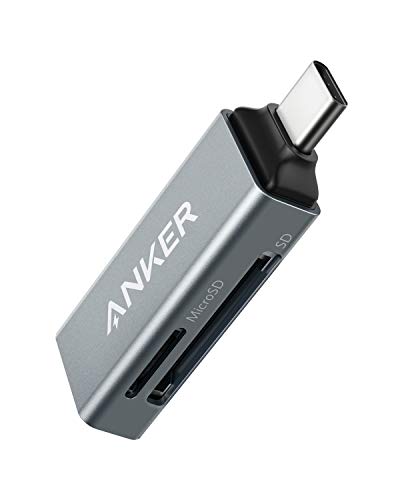
Anker’s 2-In-1 USB-C Card Reader provides a compact, plug-and-play solution for transferring photos and videos from SD and Micro SD cards to USB-C devices. Its dual-slot design accommodates SD/SDHC/SDXC and Micro SD formats, enabling quick offloads from cameras, drones, or trail cameras. A single USB-C connection keeps your workflow tidy, and the device can stay connected while your phone remains in its case. With USB 3.0-level performance and UHS-I compatibility, you can browse or edit files on laptops, tablets, or smartphones without installing apps.
- Dual card slots: SD/SDHC/SDXC and Micro SD (TF) support.
- Plug-and-play with USB-C devices; no app or driver required.
- Compact, portable design that works next to devices in cases.
- Maximum peripheral current: up to 500 mA listed in product notes.
BENFEI 4-In-1 USB Card Reader

The BENFEI 4-in-1 reader combines USB-C and USB 3.0 interfaces to handle four card formats at once—SD, Micro SD, MS (Memory Stick), and CF (Compact Flash). The integrated design provides fast access to media with read/write speeds suitable for transferring large photo and video files. It supports a wide range of host devices, including modern laptops and smartphones, enabling seamless workflow for photographers who use multiple formats across cameras and assistants. The reader is positioned as a universal solution for diverse media needs.
- Reads SD, Micro SD, Memory Stick, and CF cards simultaneously.
- USB-C and USB 3.0 compatibility; plug-and-play.
- Supports high-speed transfers; works with laptops and smartphones.
- Universal card reader solution for multi-format workflows.
xdgeLoad USB-C SD Card Reader

The xdgeLoad reader provides a 2-slot, bi-directional design that supports SD and Micro SD cards with a USB-C interface. It’s described as a plug-and-play option suitable for travelers and creators who need to save photos or videos directly to iPhone, iPad, Mac, or camera. The device emphasizes portability and a stable data transfer experience, with a USB-C port designed not to obstruct nearby ports on your computer. It’s a practical choice for quick backups on the go.
- 2-in-1 SD and Micro SD card support.
- Bi-directional transfer with USB-C interface.
- Plug-and-play, no driver installation required.
- Compact design ideal for travel and on-site edits.
uni USB-C Dual Slot Card Reader

The uni reader focuses on speed and versatility with USB 3.0 and USB-C interfaces and dual card slots that support SDXC, SDHC, SD, MMC, RS-MMC, Micro SDXC, Micro SD, and Micro SDHC cards from cameras, GoPro, dash cams, and surveillance devices. It delivers up to USB 3.0 transfer rates and is backward compatible with USB 2.0. This makes it a solid option for editors who juggle multiple devices and need simultaneous access to two cards without swapping readers.
- USB 3.0 and USB-C dual interfaces.
- Dual card slots for simultaneous read/write.
- Broad compatibility with USB hosts and card formats.
- No driver required on modern Windows and Mac systems.
CULGC USB-C + Lightning Card Reader

The CULGC reader blends USB-C and Lightning compatibility to accommodate iPhone, iPad, and Mac workflows. It supports SD and Micro SD (TF) cards and can read USB flash drives and other USB peripherals, depending on the host. Transfer speeds reach up to 5 Gbps in ideal conditions, and the unit supports simultaneous reading of two cards plus USB drives. This makes it convenient for iPhone-centric creators who want a single, versatile adapter for multiple devices.
- USB-C and Lightning two-way compatibility.
- Supports SD and Micro SD cards; USB drives as needed.
- High-speed transfers; no separate power required in typical setups.
- Plug-and-play with iPhone, iPad, and Mac.
Buying Guide
When selecting a memory card reader for cameras and Apple devices, consider format support, device compatibility, and practical usage scenarios. The following factors help differentiate models and guide a purchase that fits your workflow, whether you shoot RAW on a mirrorless camera, vlog on an iPhone, or travel with limited gear.
Key purchase considerations
Format support matters most. Look for readers that handle SD, microSD, SDHC/SDXC, CF, and MS formats if you work with multiple cameras or legacy gear. USB-C compatibility is essential for modern laptops, tablets, and many Android phones, while Lightning support benefits iPhone users who want to stay in the Apple ecosystem without adapters.
Slot count and arrangement influence workflow. Two-slot readers enable simultaneous transfers, while four-slot readers let you offload multiple cards at once. If you frequently backup on location, a two-slot model with fast speeds may be enough; for studio setups dealing with many cards, a four-slot option can save time.
Speed and real-world performance
Transfer speeds depend on host capabilities and the card type. USB 3.0/3.1 interfaces typically deliver higher throughput than USB 2.0, with practical speeds often governed by the SD card’s own read/write performance. In many cases, the claimed speeds are theoretical; expect real-world speeds to be lower but still significantly faster than older readers.
Power, compatibility, and plug-and-play
Many readers are bus-powered and designed to require no separate power supply. Some lists specify maximum current to peripherals (for example, up to 500 mA). Check that your device can provide adequate power for reliable transfers, especially when working with USB-C hubs or laptops with limited ports. Plug-and-play capability ensures you can use the reader with minimal setup on Windows, macOS, iOS, and Android devices.
Durability and portability
Travel-friendly readers emphasize compact form factors and robust connectors. A lightweight, slim design reduces the risk of damage in backpacks or camera bags, while reinforced cables or protective covers help withstand field use and weather exposure. If you frequently shoot outdoors, consider models with dust resistance or molded cases for added protection.
Compatibility with ecosystems
iPhone and iPad users benefit from Lightning-to-USB-C hybrids or dedicated Lightning interfaces. MacBook and Windows users may prioritize USB-C or USB-A compatibility. If you work across mobile and desktop platforms, a dual-interface reader (USB-C and Lightning or USB-C and USB-A) can streamline your workflow without swapping devices.
Price and warranty
Prices vary depending on slot count, formats supported, and build quality. Look for products with a reasonable warranty and responsive customer support, especially if you rely on field gear for professional projects. A modest premium for a more durable, multi-format reader can be worthwhile if it minimizes downtime and data loss risks.
Quick comparison snapshot
| Model | Best For | Slots | Interfaces | Notes |
|---|---|---|---|---|
| Anker 2-In-1 USB-C Card Reader | Travel, casual to semi-pro | SD, microSD | USB-C | Plug-and-play; compact; good for USB-C devices |
| BENFEI 4-In-1 USB Card Reader | Multi-format studios | SD, Micro SD, MS, CF | USB-C/USB 3.0 | Simultaneous four-card support |
| xdgeLoad USB-C SD Card Reader | On-the-go creators | SD, Micro SD | USB-C | Bi-directional transfer; slim profile |
| uni USB-C Dual Slot Card Reader | Pro workflows | SD, Micro SD | USB-C | High-speed; broad compatibility |
| CULGC USB-C + Lightning Card Reader | Apple-centric setups | SD, Micro SD | USB-C + Lightning | Dual-interface for Apple and non-Apple devices |