Best Large Screen Slide and Negative Converters for Quick Digital Archiving
Looking for a reliable large-screen slide and negative converter to digitize old photos? This guide spotlights five top options with big displays, simple loading, and direct-to-storage capabilities. These scanners are best for memory keepers who want a user-friendly, stand-alone device without a computer. Each pick suits different needs—from casual family archives to small home studios. The table below highlights the five models and their standout strengths to help you compare at a glance.
| Product | Best For | Key Benefit | Notes |
|---|---|---|---|
| KODAK Slide N SCAN Film & Slide Scanner | Families digitizing mixed film formats | 5” LCD screen for instant preview | Supports 135, 126, 110 films; SD card storage |
| DigitPro 35mm Film & Slide Scanner (2.4″ LCD) | Compact, budget-friendly archiving | Built-in 2.4” LCD with TV-out | Standalone; no PC required |
| DigitPro Film And Slide Scanner (35mm, 126, 110) | Classic 35mm and slide collections | 5” LCD display; one-step scanning | Direct-to-SD, simple color/brightness controls |
| PORTTA Film Scanner with 5″ LCD | Higher resolution scans | 22MP option; large preview screen | HDMI output; no PC required |
| Wolverine Titan 8-in-1 | All-in-one versatility | 4.3″ color screen; HDMI output | Handles multiple formats quickly |
KODAK Slide N SCAN Film & Slide Scanner

The Kodak model provides a robust 5” LCD for direct viewing and editing of scanned images. It can convert 135, 126, and 110 film formats as well as slides, storing results to an SD card (not included). Best for households with a mixed-format legacy collection and a desire for an elegant, in-frame display when not actively editing. A potential limitation is SD card compatibility and the need to source storage separately.
- 5” LCD display for immediate review
- Quick-feed loading with included slide adapters
- Supports 135, 110, 126 formats
- Requires SD card for storage
DigitPro 35mm Film & Slide Scanner (2.4″ LCD)

This standalone scanner offers a compact solution with a built-in 2.4” LCD and TV-out, enabling larger viewing on a television. It supports 135 negatives and slides, color and B&W modes, and requires no computer. It’s best for users who want a simple, TV-friendly workflow and occasional scanning of vintage 35mm collections. It may be less ideal for very large archives due to its smaller screen and limited internal storage.
- All-in-one device; no PC needed
- 2.4” LCD display with TV-out
- Supports 135 negatives and slides; color/B&W modes
DigitPro Film And Slide Scanner (65) 35mm, 126, 110

DigitPro’s all-in-one solution emphasizes easy, on-device scanning with a 5” LCD and 128MB memory plus SD card support up to 64GB. It handles a broad range of formats—color and black-and-white 35mm, 126, 110 negatives and 50mm slides. This model is best for households building a digital library with minimal setup and straightforward, one-touch scanning. A limitation is the internal memory size, which may require frequent SD card swaps for large archives.
- 5” large LCD for preview and editing
- Supports 35mm, 126, 110 negatives and slides
- SD card expandable storage
PORTTA Film Scanner with 5″ LCD Screen

Portta’s scanner offers 16MP or an enhanced 22MP output option, a 5″ LCD for precise previews, and HDMI output for viewing scans on a bigger screen. It is best for users who want higher detail in their scans and the flexibility to display results on a TV or monitor. It remains a standalone device, avoiding computer requirements. A potential hindrance is the need to manage HDMI connections for the best viewing experience.
- Options for 16MP or 22MP scans
- 5″ LCD for real-time preview
- HDMI output for external display
Wolverine Titan 8-in-1
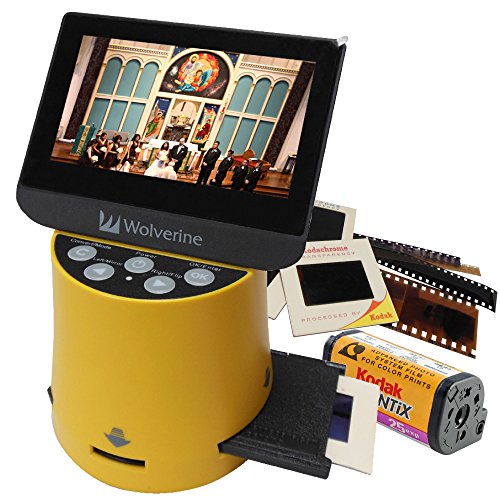
The Wolverine Titan combines support for a wide range of formats—including 35mm, 127, 126, 110, and APS—with a 4.3″ screen and HDMI output for high-definition viewing. This makes it a strong choice for multi-format collectors who want a single device to handle many types of film and slides. The larger size and versatility come with a learning curve and potentially slower workflows for very large collections. It’s best for enthusiasts who prize flexibility over compactness.
- 8-in-1 compatibility across common film formats
- 4.3″ color screen; HDMI output
- Fast conversion for quick previews
Buying Guide: Large Screen Slide And Negative Converters
What should I look for in a large-screen film scanner?
Key considerations include display size, format compatibility, standalone operation, storage options, and output quality. A larger LCD helps with color correction and alignment, while support for 135, 110, 126, and slide mounts affects how many of your photos can be digitized without extra adapters. Standalone devices without a PC are convenient for casual users; those with HDMI output can share scanned images on TVs or monitors.
How important is the output resolution?
Resolution impacts detail and cropping flexibility. Look for models offering at least 16MP to 22MP scans to preserve fine lines and textures in old negatives. Higher resolution is beneficial for archiving and printing but may increase scan times. If you only want quick previews, a device with a 5” LCD may be sufficient.
What about storage and transfer?
Most scanners save locally to built-in memory or SD cards. Ensure your chosen model supports SD cards of adequate capacity (often up to 32–64GB). If you plan to export to a computer later, check for USB or HDMI connectivity options. Standalone units with SD card support are best for simple, no-setup workflows.
Which model suits a multi-format archive?
For mixed collections, consider devices that handle 35mm, 126, 110 negatives, and slides in one go. The Wolverine Titan and PORTTA models stand out for format versatility and HDMI viewing. If you primarily digitize 35mm slides and negatives, a compact option like the DigitPro or DigitConvert line may offer a quicker workflow with a smaller footprint.
Are there any caveats I should be aware of?
Many scanners rely on SD cards for storage; always verify card compatibility and available space before starting a project. Standalone devices may have limited internal memory, requiring frequent card swaps for large archives. Some models require adapters for specific film formats, so confirm included accessories before purchase.
How should I approach a purchase decision?
Assess your archive size, preferred workflow, and display needs. If you value a large viewing screen for editing and sharing, prioritize 5” or larger LCDs, HDMI output, and SD card support. If you want the simplest setup with quick transfers, lean toward all-in-one devices with built-in memory and straightforward one-touch scanning.
FAQ
- Do these devices require a computer? Answer: Most models offer standalone operation, but some also provide USB or HDMI outputs for connection to TVs or PCs.
- What formats can be scanned? Answer: Common formats include 35mm, 126, 110 negatives, and slides; some models also support Super 8 and APS.
- What is the typical max resolution? Answer: Many scanners offer 16MP to 22MP scans, balancing detail with speed.
- Is a large screen necessary? Answer: A larger screen helps with color correction and previewing scans, especially for older or faded media.
- Should I buy a model with TV-out or HDMI? Answer: TV-out is convenient for viewing on a larger screen without a computer, while HDMI offers higher fidelity to a monitor or TV.
- What storage should I expect? Answer: Look for SD card support (often up to 32–64GB) and, if needed, internal memory or USB transfer options.