Best iPhone Case Tripod Mounts for Stable Shots and Easy Mobile Filming
Yes, these iPhone case tripod mounts deliver secure smartphone attachment while enabling 360° rotation and quick orientation changes. They’re ideal for creators who need hands-free filming, live streaming, or steady photography with a standard tripod. The top picks below cater to different setups: compact desk use, on-the-go vlogging, and professional-style rigs. Each entry explains who benefits most and why it stands out.
Summary table of selected products
| Product | Best For | Key Benefit | Notable Consideration |
|---|---|---|---|
| SharingMoment Premium Smartphone Holder | Travelers and casual creators | Versatile 2-in-1 attachment with pivoting arm | Requires extra familiarity with tripod threads |
| SYNCWIRE Tripod Phone Mount | Vloggers and livestreamers | Dual cold shoe mounts for mics/lights | Heavier setup may require sturdy tripod |
| ULANZI ST-06S Phone Mount | On-camera monitors and gimbal users | 2 cold shoes; strong build | Bulkier than ultra-compact options |
| Lamicall Magsafe Tripod Stand | MagSafe-first users | Ultra-fast magnetic attachment with wide mounting options | Requires MagSafe compatibility |
| KobraTech UniMount 360 | All-around flexibility | 2x 1/4″ threads and cold shoe | Includes cold shoe; no built-in light/mic |
SharingMoment Premium Smartphone Holder
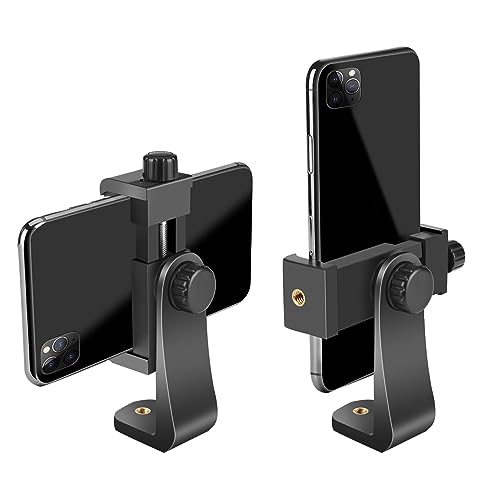
The SharingMoment mount uses a screw-adjustable mechanism with 360-degree rotation, supporting vertical and horizontal modes. It can be attached directly to a tripod or used as a pivoting arm with the phone clamp removable for universal tripod or monopod mounting. Best for casual photographers and travelers who need a simple, flexible clip that fits most regular-size smartphones.
Who it’s best for: People who want a compact, multi-use mounting solution that can convert between handheld and tripod use without buying a separate clamp. It helps photographers who frequently switch between portrait and landscape modes during social posts or event shoots.
Why selected: It’s functional and compact, offering two standard 1/4 x 20 thread interfaces. The wide clamp range (2.2″–4.1″) accommodates most smartphones with cases, making it a versatile pick for everyday mobile filmmaking.
Limitation: The two mounting options may require a moment to switch from direct tripod attachment to a clamp-on approach, which can slow rapid setup in fast-paced environments.
SYNCWIRE Tripod Phone Mount

The SYNCWIRE mount features dual cold shoe mounts for accessories and a 1/4″ screw to fit tripods, selfie sticks, or gimbals. With 360° rotation and 180° tilt, it supports easy transitioning between landscape and portrait modes. It’s designed for creators who want a ready-to-use setup for audio, lighting, and camera coupling in one place.
Who it’s best for: Vloggers, interview-style shooters, and mobile filmmakers who rely on additional audio or lighting gear in the same rig. It’s ideal for on-the-go setups where a single clamp must support multiple accessories.
Why selected: The dual cold shoe design adds practical expansion, letting users quickly mount a mic or light in addition to the phone.
Caution: The added accessories can increase weight, so ensure your tripod or stand can support the total load without compromising stability.
ULANZI ST-06S Camera Hot 2 Cold Shoe Mount
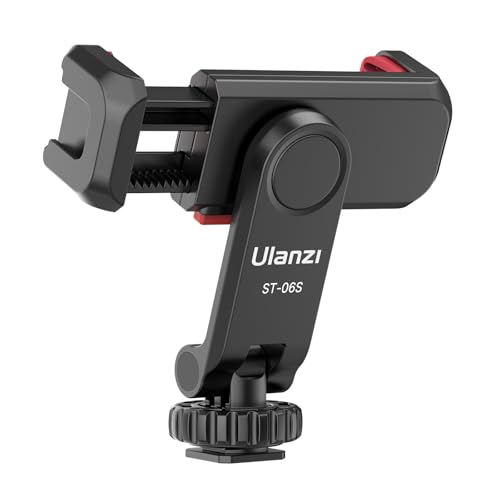
The ST-06S adds an extra cold shoe and strengthens the build for broader accessory support. Its 360° rotation supports both horizontal and vertical angles, and it’s compatible with select gimbals and cameras, expanding use beyond typical phones. This mount is well-suited for creators who use microphones or lighting in tandem with their phone for high-production mobile video.
Who it’s best for: Content creators who need to run multiple accessories at once and want reliable, robust mounting, such as on-the-go vloggers using an external mic or LED light in the shot.
Why selected: The dual cold shoes and sturdy construction enable more professional-looking setups without swapping mounts or adapters.
Caution: The added weight of microphones and lights may require a sturdier support than compact tripods provide, especially in windy outdoor environments.
Lamicall Magsafe Tripod Stand
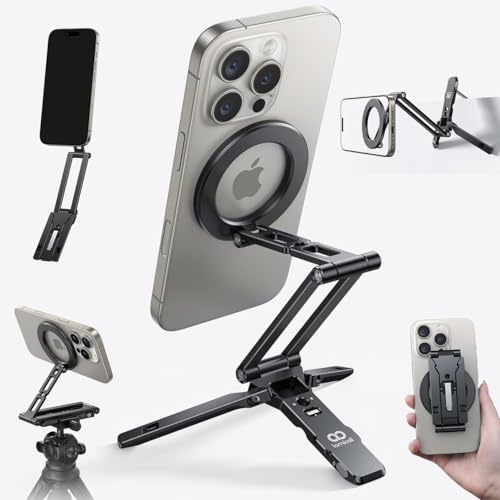
This ultra-compact MagSafe tripod stand uses a strong magnet for quick attachment and includes a 1/4″ screw thread plus a hook accessory support. It’s designed for iPhone users with MagSafe compatibility, offering a fast setup and simple rotation for both portrait and landscape captures. The mantis hook adds versatility for mounting on rails, tables, or other surfaces.
Who it’s best for: Users who prioritize speed and simplicity, especially those who want a clean, magnetic mount for quick one-handed mounting and easy dismounting on the go.
Why selected: The magnetic hold reduces the chance of slipping, aiding stable framing during movement or casual filming.
Caution: Magnetic attachments may not be ideal if you use non-MagSafe cases or if strong magnets interfere with nearby electronic devices.
KobraTech UniMount 360

The UniMount 360 uses two standard 1/4″ threaded holes and a cold shoe mount, providing flexible mounting on most tripods and supports. It emphasizes 360° rotation for convenient switching between portrait and landscape modes and is compatible with a wide array of devices and accessories, including cases. The design is straightforward for a broad range of shooting scenarios.
Who it’s best for: Builders and creators who want a universal adapter with multiple mounting options and straightforward operation, suitable for many tripod configurations.
Why selected: The dual 1/4″ threads plus a cold shoe allow adding mics, lights, or monitors without buying extra adapters, improving setup efficiency.
Caution: The absence of a fixed locking system beyond the standard screw may require tighter adjustments in some setups to prevent drift during movement.
Buying Guide: How To Choose The Right iPhone Case Tripod Mount
What mounting scenario best fits your needs?
- Desk or tabletop use: Look for compact, magnetic or low-profile clamps with quick-release features and stable, shallow bases.
- On-the-go vlogging: Prioritize mounts withExternal shoe options for mics or lights, and robust rotation for easy framing.
- Professional rigs: Choose mounts with Arca-compatible bases or dual 1/4″ threads for flexible tripod and monopod setups.
What level of accessory support do you require?
- Dual cold shoes: Ideal for light and mic integration in a single rig.
- Arca or quick-release compatibility: Helps with fast transitions between different tripods and supports.
- Magnetic vs clamp: Magnetic holds are fast but may limit non-MagSafe cases; clamps offer universal compatibility but may take longer to secure.
How important is orientation control?
- 360° rotation and 180° tilt: Beneficial for dynamic shots, interviews, or social videos where framing needs to adapt quickly.
- Locking mechanisms: Ensure the mount won’t slip during movement, especially with heavier accessories or extended rigs.
What is your device compatibility?
- Case compatibility: Some mounts specify grip range (e.g., 2.2″–4.1″); ensure your phone and case fit.
- MagSafe compatibility: If using MagSafe products, magnetic mounts offer rapid attachment and detachment.
Quick comparison by scenario
- Best for beginners and travel: SharingMoment or Lamicall MagSafe, due to simplicity and compact form factor.
- Best for lighting/mic integration: SYNCWIRE or ULANZI ST-06S for dual shoe support.
- Best universal flexibility: KobraTech UniMount 360 for broad compatibility and multiple mounting options.
FAQ
- Do these mounts work with any iPhone? Yes, most support standard 1/4″ tripod screws and fit a wide range of devices, including iPhone models with or without certain cases.
- Can I use these mounts on a gimbal? Some mounts are compatible or adaptable with gimbals; check the product details for compatibility notes.
- Is a cold shoe mount necessary for my setup? If you plan to attach external mics or lights, a cold shoe provides convenient accessory attachment.
- Are magnetic mounts safe for every phone? Magnetic mounts are typically safe with MagSafe-enabled devices; use non-MagSafe devices with caution or with included adapters.
- What should I consider for outdoor use? Stability matters; choose mounts with robust materials and a secure locking mechanism to counter wind and vibrations.