Best iPhone and Android Film Scanners for Digitizing 35mm Memories
If you want to convert old film into shareable digital photos using your smartphone, these film scanners are a smart, simple choice. They’re best for different buyers: casual collectors who want one-click digitization, families preserving generations of slides, and hobbyists who prefer standalone devices over computer software. The following picks emphasize ease of use, portability, and compatibility with iPhone and Android phones. A quick summary table helps compare key points at a glance.
| Product | Best For | |
|---|---|---|
| DGODRT Mobile Film Scanner | All-in-one 35mm negative and slide digitization | One-click preservation; works with 35mm formats; easy phone alignment |
| KODAK Slide N SCAN | High-quality previews with a built-in screen | 5” LCD; direct SD storage; quick-feed tray |
| DigitPro Photo Scanner | Standalone, easy-to-use with large display | 5″ LCD; no computer required; simple one-touch |
| COMOAEW Portable Scanner | Budget-friendly entry for 35mm and 135 film | High-resolution scans; user-friendly interface |
| DigitConvert Mobile Film Scanner | Smartphone-based scanning with LED backlight | Standalone app workflow; quick 35mm to JPEG |
DGODRT Mobile Film Scanner for 35mm Slides & Negatives
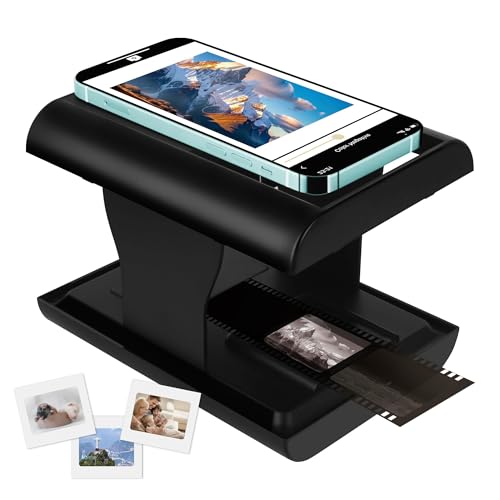
Best for beginners who want a compact, one-device solution that handles multiple 35mm formats. This scanner digitizes dusty negatives and slides into JPEGs stored on your phone, enabling easy viewing and sharing. It supports color and black-and-white 35mm formats and provides a straightforward four-step setup: backlight on, film in the tray, phone aligned on the stand, and a single tap to capture. Best for households looking to preserve a broad range of film types without separate tools. Caution: performance relies on the phone’s camera quality and the provided app’s stability.
Eyoyo Upgraded QR Code Scanner Bluetooth

Best for users seeking a compact, phone-attached scanner for barcode tasks rather than photos. Eyoyo focuses on 1D and 2D codes with Bluetooth connection to a smartphone, making it ideal for inventory, retail, or event check-ins. This is a good supplement to film scanning when combined with other devices, but not a direct replacement for digitalizing film. Caution: does not replace dedicated film scanning for photo archives.
KODAK Slide N SCAN Film & Slide Scanner

Best for: users who want a built-in display and direct viewing before saving to a card. The 5” LCD screen provides a d.Feature-rich experience with a gallery mode and continuous loading. It supports 135, 126, and 110 film formats and includes slide holders and adapters. This makes it a strong choice for those who digitize many slides and want to preview immediately. Limitation: requires SD card (not included) and may be bulkier than pocket scanners.
COMOAEW Portable 35mm Film Scanner

Best for budget-conscious buyers seeking a straightforward 35mm and 135mm film conversion device. This scanner emphasizes high-resolution digitization with a simple, user-friendly interface, making it suitable for parents and grandparents digitizing old collections. Caution: quality is tied to phone camera resolution; the device itself is a basic scanner without built-in storage or advanced editing tools.
DigitPro Photo Scanner With 5” Screen

Best for those who want an all-in-one solution that does not require a computer. The DigitPro scanner supports 35mm slides, 135 and 110 negatives, printed photos, and even business cards. The built-in 5″ display makes it easy to preview and edit on the device. It’s ideal for families digitizing a wide variety of physical media. Limitation: some users may prefer higher-res outputs or more extensive editing options available on computer software.
Buying Guide
What should I look for in a film scanner for iPhone or Android?
Consider compatibility with your phone’s operating system, the presence of a built-in display or app-based workflow, and whether you want a standalone device or a smartphone-attached scanner. A larger display helps preview quality, while a simple one-touch workflow reduces setup time.
Which formats and media are supported?
Look for scanners that handle 35mm color and black-and-white negatives, slides, and 110/135 formats. Some models also support printing photos or saving to SD cards. If you have diverse media, a versatile scanner with multiple adapters is advantageous.
Storage, power, and portability considerations
Portable devices powered by internal batteries are convenient for on-the-go digitization. If you plan to store many files, choose a scanner with SD card support or seamless phone storage transfer. Consider whether you prefer a standalone device with its own screen or a phone-based app workflow.
Image quality and output format
Most scanners produce JPEG outputs. If you need higher quality or RAW options, check for resolution specs and whether the device saves at higher megapixels. A larger viewing screen helps ensure you capture the best frame.
Ease of use and setup
Devices with quick-start guides and intuitive, one-touch operations reduce the learning curve. Avoid devices with ambiguous controls or requiring extensive software installation.
FAQ
- Can I use these scanners with any smartphone? Most listed devices connect via Bluetooth or use a dedicated stand; they are designed to work with iPhone and Android phones, but ensure your device is compatible with the scanner’s app or connection method.
- Do these scanners require a computer? Several options are standalone with built-in displays, while others rely on a smartphone app. Choose based on whether you want on-device previews or computer-free operation.
- What formats do they save images in? JPEG is common; some models support direct SD card saving or connection to a phone for instant transfer.
- Is 5-inch LCD sufficient for detailed edits? A 5” display provides good previews for quick checks, but advanced editing is better done on a computer or a mobile app with editing features.
- Are they suitable for archival projects? Yes, for digitizing large collections, especially if you need a straightforward workflow and broad format support; for professional archives, consider higher-end options with RAW outputs or higher resolution.