Best IEEE 1394 Video Camera Cables and Adapters for Classic DV
Answering the search for reliable IEEE 1394 cables and adapters, this guide highlights five options that balance compatibility, performance, and practical use for classic DV workflows. Ideal buyers include video editors retracing older workflows, hobbyists preserving camcorder footage, and professionals maintaining legacy equipment. The chosen products cover 4-pin and 6-pin FireWire connections, USB adapters, and PCIe capture solutions to fit desktops and laptops.
| Product | Connector Type | Best For | Note |
|---|---|---|---|
| LBSC 4 Pin to 4 Pin Firewire Cable | 4P to 4P | Camera-to-PC on legacy systems | Versatile, reliable 1394a |
| PASOW Firewire 4 Pin to 6 Pin Cable | 4P to 6P | Connecting camcorders to newer PCs | Works across device pin configurations |
| Cuxnoo FireWire 6 Pin to 6 Pin Cable | 6P to 6P | High compatibility with DV devices | Strong fit for multiple devices |
| Cuxnoo FireWire 6 Pin to 4 Pin Cable | 6P to 4P | Old DV cams to 1394a ports | Bridges 6P and 4P ports |
| LUKFOCAB FireWire 4 Pin to 4 Pin Cable | 4P to 4P | Compact setups and laptops | Solid 400 Mbps data rate |
LBSC 4 Pin to 4 Pin Firewire Cable

The LBSC 4 Pin to 4 Pin Firewire Cable uses standard FireWire 1394a connections, making it suitable for consumer and professional cameras with 4-pin ports and computers with 4-pin interfaces. It is best for users who need a straightforward, device-to-device link without adapters. It supports common 1394a transfer rates up to 400 Mbps. The cable is best for: filmmakers and editors working with older digital camcorders on older laptops or desktops. Limitation: does not convert formats or provide capture capabilities—data transfer requires compatible software and hardware.
PASOW Firewire 4 Pin to 6 Pin Cable
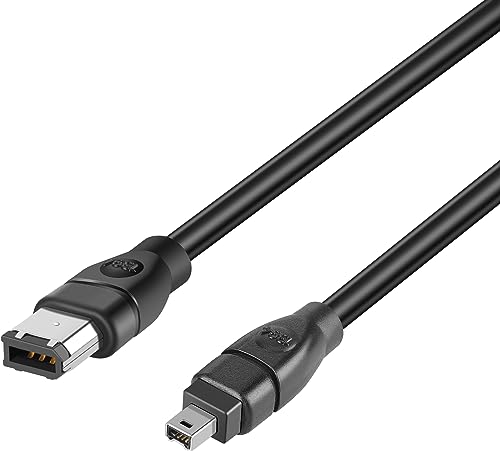
The PASOW 4P to 6P FireWire cable accommodates devices with both 4-pin and 6-pin interfaces, ideal for connecting camcorders with different port configurations to computers or capture cards. It supports data transfer speeds up to 400 Mbps and is suitable for those who work with a mix of devices. Choose this if your workflow includes both 4-pin and 6-pin devices. Caution: ensure your computer’s port supports FireWire 400 on the receiving end, as some USB adapters may not offer full capture capability.
Cuxnoo FireWire Cable 6 Pin to 4 Pin
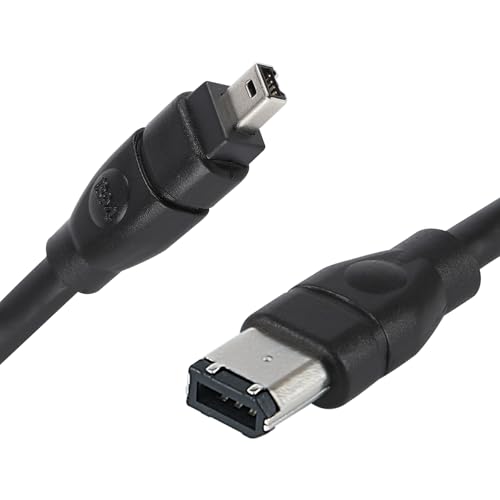
This 6P-to-4P Cuxnoo cable bridges devices with a 6-pin port to a 4-pin FireWire interface. It is a practical choice when you have newer camcorders or devices with 6-pin outputs needing to connect to older 4-pin ports on laptops or capture cards. Best for editors who alternate between newer and older devices. Limitation: the 6P-to-4P cable does not convert power; ensure compatible power delivery if required by the device.
Cuxnoo FireWire Cable 6 Pin to 6 Pin
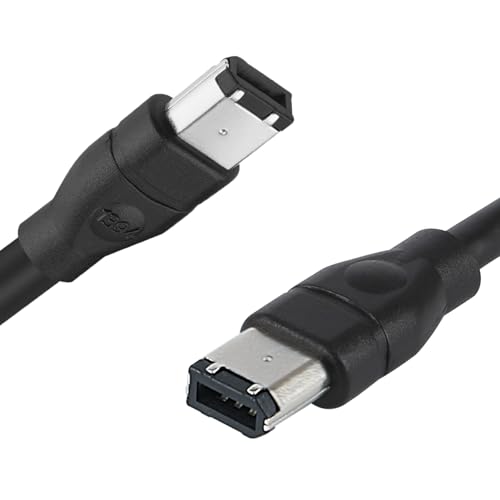
The Cuxnoo 6P-to-6P FireWire cable provides a direct 6-pin connection between devices, suitable for camcorders, hard drives, printers, and computers with FireWire ports. This option is best for users who consistently work with devices that utilize 6-pin interfaces. Benefit: reliable high-speed data transfer up to 400 Mbps. Caution: ensure your capture hardware supports FireWire 1394b or 1394a as needed for best results.
LUKFOCAB FireWire 4 Pin to 4 Pin Cable

The LUKFOCAB 4P-to-4P FireWire cable is compact and well-suited for laptop-to-camera connections in space-constrained setups. It delivers up to 400 Mbps data transfer and supports standard IEEE 1394a devices. Best for travelers or field editors who need a durable, shorter cable with dependable performance. Limitation: length may restrict the distance between devices in some setups.
Buying Guide
What to consider when choosing an IEEE 1394 cable or adapter:
- Connector compatibility: Decide between 4-pin and 6-pin ports. Some devices require adapters to bridge 6P to 4P or vice versa.
- Signal standard: Ensure the product supports IEEE 1394a (FireWire 400) for the widest compatibility with older DV gear.
- Data transfer needs: For HD video, aim for cables rated at up to 400 Mbps. Cables that advertise higher speeds may imply PCIe or bridge hardware rather than pure FireWire speed.
- Device type: Camcorders, DV cameras, hard drives, and capture cards may have different port configurations. Match the connector count to your devices.
- Capture workflow: Some cables offer only viewing capability, not data capture. Confirm whether you need true data capture or simple file transfer/viewing.
- System compatibility: Desktop PCIe capture cards differ from laptop-ready USB adapters. Choose based on your computer’s available interfaces and requirements.
- Cable length: Longer cables may introduce more signal loss. For critical captures, opt for shorter, well-shielded cables.
FAQs
What is IEEE 1394a and what devices use it?
IEEE 1394a, also known as FireWire 400, is a high-speed interface used by many camcorders, DV cameras, and some storage devices. It is common in older devices and legacy workflows.
Can these cables transfer video to a PC for editing?
Some cables enable viewing only, while others support data transfer. Verify the product’s stated capabilities and your capture hardware/software requirements.
Do I need a 4-pin or 6-pin cable for my camera?
It depends on the camera’s port. If your camera has a 4-pin port, use a 4P cable. If it has a 6-pin port, use a 6P cable or a 6P-to-4P adapter as needed.
Will FireWire cables work with Windows or Mac systems?
FireWire is supported on both platforms, but some modern machines may require legacy or add-on PCIe cards or adapters to provide FireWire ports.
Is USB-to-FireWire a good replacement for FireWire capture?
USB-to-FireWire adapters exist, but they may not provide reliable capture in all workflows. For professional capture, use a dedicated FireWire interface or PCIe card when possible.