Best Hot Shoe to PC Sync Adapters for Off-Camera Lighting
The best hot shoe to PC sync adapters connect your camera’s hot shoe to external strobes or studio lights using a PC Sync cord. This guide targets photographers who want reliable trigger options for off-camera flash, including beginners building a simple setup and more experienced shooters expanding their lighting. Each top pick is best for a specific need—compatibility, ease of use, or additional ports for more accessories. Use the quick reference table below to compare key points at a glance.
| Product | Best For | Key Benefit |
|---|---|---|
| JJC Standard Hot Shoe Adapter | Standard ISO hot shoe users | Extra PC sync port and 3.5mm socket |
| Nikon AS-15 Sync Terminal Adapter | Nikon camera users | Simple Nikon hot shoe to PC sync |
| ProMaster Standard Hot Shoe to PC Sync | Budget-friendly setups | Reliable basic adapter |
| Pixel TF-322 | Nikon shooters with Nikon flash | Dedicated for Nikon auto/manual modes |
| PIXEL Standard Hot Shoe Adapter | Adapters with extra ports | Extra PC sync and 3.5mm port |
JJC Standard Hot Shoe Adapter With PC Sync and 3.5mm Port

This adapter fits cameras with a standard ISO hot shoe and provides a PC sync connection plus a 3.5mm mini phone socket. It is best for photographers using a standard ISO hot shoe and needing a single external flash or studio light trigger. Choose this if your camera lacks additional advanced hot shoe features and you want straightforward PC sync compatibility. A limitation: it does not fit cameras with multi-function, mini advanced, or MI hot shoes. Best for simple off-camera lighting setups.
Nikon AS-15 Sync Terminal Adapter

The Nikon AS-15 is designed for Nikon cameras with a standard ISO-type accessory shoe that does not include a built-in sync terminal. It converts the shoe to a PC sync connection, enabling external flash triggering. It does not offer high-voltage sync protection and may not be suitable for flashes exceeding 6V. Best for Nikon shooters who need a straightforward, no-frills adapter. A caveat: compatibility is limited to Nikon-standard shoes without a sync terminal.
ProMaster Standard Hot Shoe To PC Sync (Model 7676)

The ProMaster 7676 offers a standard hot shoe to PC sync connection for reliable triggering of external strobes and studio lights. This budget-friendly option is suitable for photographers building a basic off-camera lighting setup without advanced features. Best for those who want a simple, dependable adapter. Limitation: it provides core functionality without extra ports or protection features.
Pixel TF-322 Flash Hot Shoe Sync Adapter

The Pixel TF-322 is a dedicated hot shoe converter for Nikon DSLR and flashguns. It slides into the camera’s hot shoe and supports connection to third-party flashes via standard hot shoe or PC sync cord sockets. It works with many flash guns in auto or manual mode, though it only supports i-TTL mode from Nikon’s original flash. Best for Nikon users seeking easy compatibility with third-party flashes. Caution: performance can vary with non-Nikon flashes and Nikon’s i-TTL limitations.
PIXEL Standard Hot Shoe Adapter With Extra PC Sync Port
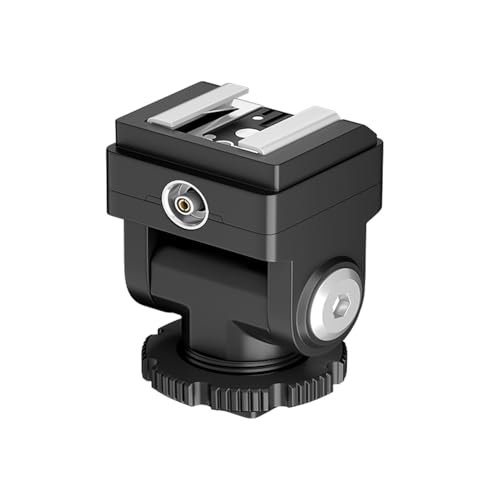
This PIXEL adapter mirrors the JJC design with an extra PC sync connection and a 3.5mm mini phone port. It is ideal for mounting a flash that lacks a sync connector and triggering external strobes via PC sync cord. Best for shooters who use off-camera lighting plus third-party flashes. Limitation: some cameras may require careful alignment to ensure reliable triggering due to shoe fit.
Buying Guide
What should I consider before buying a hot shoe to PC sync adapter?
Compatibility with your camera’s hot shoe type is essential. Look for standard ISO compatibility if you use most consumer cameras. If your camera has a multi-function or specialized shoe, verify fit before purchasing. Consider whether you need extra ports (like a 3.5mm jack) to connect additional accessories or a second flash.
Do I need high-voltage protection?
Some units mention high-voltage protection. If you plan to trigger high-powered or older studio strobes, this feature can increase safety and reliability. If your flashes are standard consumer models, high-voltage protection may be less critical.
What is the best option for Nikon users?
Nikon-specific adapters (like the AS-15 or certain Pixel adapters) optimize compatibility with Nikon’s hot shoe behavior and flash modes. If you use Nikon flashes and want straightforward PC sync, choose Nikon-branded or Nikon-compatible options.
Which adapter is best for budget setups?
ProMaster and some Pixel options offer straightforward performance at a lower price point. These are suitable for basic off-camera lighting workflows that don’t require advanced features or protective circuits.
How important is ease of installation?
All listed adapters screw directly into the camera’s hot shoe with minimal assembly. Models that advertise “easy to install” or “slide into hot shoe” are typically the fastest to set up for quick shoots or on-location work.
What about future-proofing my gear?
If you anticipate expanding to more complex lighting setups, choose adapters with extra ports (PC sync and 3.5mm) to accommodate additional strobes or controllers. This helps scale your studio without buying new connectors each time.
FAQ
- What is a PC sync adapter used for? It enables triggering an external flash or strobe via a PC sync port from a camera hot shoe.
- Can I use these with any camera? Most are designed for standard ISO hot shoes; verify compatibility if your camera uses a non-standard or multi-function shoe.
- Do these adapters protect my flash from voltage? Some offer high-voltage protection; check product details if you use high-voltage studio strobes.
- Will a 3.5mm port affect my flash timing? The 3.5mm jack is typically for additional accessories and does not influence core PC sync timing.
- Are these wired or wireless solutions? These are wired PC sync adapters; they require a PC Sync cord to connect to the flash.
- Which one should I buy for Nikon? For Nikon, consider Pixel TF-322 or Nikon AS-15 depending on your camera’s hot shoe type and flash compatibility.