Best High Speed Web Cams for Fast-Paced Recording
For users who need ultra-smooth video of fast-moving objects, high frame-rate webcams are essential. This guide highlights five top high-speed USB cameras that deliver crisp 1080p or higher footage, rapid frame rates, and versatile zoom and lens options. Each option is suitable for streaming, conferencing, sports analysis, or macro-style close-ups. Below is a quick summary of the highlighted products to help you compare at a glance.
| Product | Resolution & Frame Rate | Key Feature | Lens Type |
|---|---|---|---|
| IFWATER 1080P High Speed 260fps 5-50mm | 1080p @ 60fps; 720p @ 120fps; 260fps at 640×360 | 10x optical zoom with manual varifocal lens | CS Mount 5-50mm |
| SVPRO High Speed USB Camera 1080P/60fps | 1080p @ 60fps; 720p @ 120fps; 360p @ 260fps | Wide 120° angle; versatile for machine vision | M12 120° wide-angle lens |
| SVPRO 1080P 120fps with 3X Optical Zoom | 1080p @ up to 120fps | 3x optical zoom; sharp detail | CS mount 3.6-10mm |
| IFWATER 1080P 260fps 2.8-12mm | 1080p @ 60fps; 720p @ 120fps; 260fps at 640×360 | Compact 2.8-12mm manual zoom | CS Mount 2.8-12mm |
| IFWATER 120fps Golf Swing 4K 12MP | 1080p @ 120fps; 4K output at various modes | 4K high-res with 3X optical zoom | 3.6-10mm manual zoom |
The selections emphasize high-speed capture, robust color reproduction, and practical lens options for studios, classrooms, or sports setups. Each product below is linked to its Amazon listing for quick access to specifications and compatibility notes. The focus remains on objective performance characteristics to help comparisons across scenarios such as live streaming, video conferencing, or motion analysis.
IFWATER 1080P High Speed 260fps 5-50mm
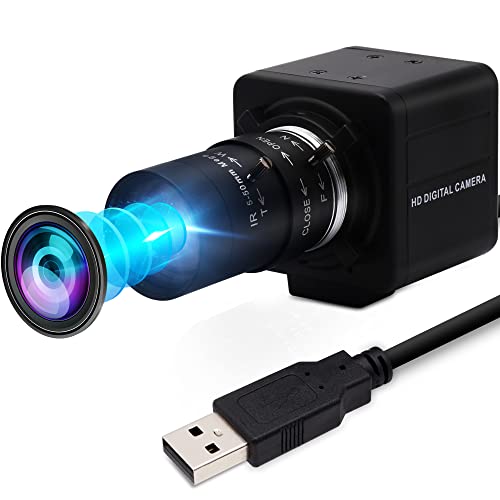
The IFWATER model combines a 2MP sensor with a 5-50mm manual varifocal CS mount lens, enabling a wide to telephoto range for diverse scenes. It supports high-speed USB 2.0 and outputs MJPEG or YUY2 formats. Frame rates include 60fps at 1080p and up to 260fps at lower resolutions, which helps capture fast movements without motion blur. Manual focus and a durable aluminum case make it suitable for surveillance, sports capture, and Raspberry Pi projects. Bright lighting is recommended for best results.
SVPRO High Speed USB Camera 1080P/60fps

SVPRO’s high-speed camera delivers 1080p at 60fps, with supporting modes up to 260fps at lower resolutions. It features a 120-degree wide-angle view and uses a 1/3″ OV4689 sensor for clear color reproduction. The camera is suitable for studio filming, sports analysis, and DIY projects. It’s compatible with Windows, Linux, Android, and MacOS, and supports UVC plug-and-play use. The wide angle helps cover larger scenes, though users may adjust settings to manage distortion in tight spaces.
SVPRO 1080P 120fps With 3X Optical Zoom

This SVPRO model uses a 1/2.3″ 12MP sensor to achieve high still resolutions, with support for up to 120fps at 1080p. The lens offers 3X optical zoom via a 3.6-10mm CS mount, enabling tight close-ups without losing image quality. It’s well-suited for golf swing analysis, live streaming, or industrial inspections. Users should verify software compatibility when aiming to push the maximum frame rate, as some video editors or players may have frame-rate constraints.
IFWATER 1080P 260fps 2.8-12mm

The 2MP IFWATER camera with a 2.8-12mm manual varifocal lens provides a compact option with strong zoom versatility. It supports MJPEG/YUY2, with high-speed output at 260fps in lower resolutions, and 60fps at 1080p. The aluminum construction, manual focus, and a dimmable zoom dial set this model apart for close-up work or dynamic scenes in sports, conferencing, or studio setups. USB 2.0 compatibility makes it easy to connect to most computers and SBCs.
IFWATER 120fps Golf Swing 4K 12MP

This IFWATER model targets high-speed golf analysis, delivering 120fps at 1080p and 4K output at select modes. The camera features a 12MP sensor for detailed stills and a 3X optical zoom with a 3.6-10mm lens, enabling close-up analysis of swings without sacrificing detail. It supports plug-and-play use across major operating systems and is suitable for live streaming, online classes, and professional coaching scenarios. As with other high-speed cams, ensure appropriate lighting and software compatibility for maximum performance.
Buying Guide
Key purchase considerations when selecting a high-speed webcam:
- Frame rate versus resolution: Higher frame rates (120–260fps) often come at lower resolutions. Determine whether smooth motion capture or maximum detail is your priority.
- Lens and zoom options: Manual varifocal lenses (CS mount) offer flexible framing, while fixed lenses deliver simplicity and reliability. Optical zoom preserves image clarity at different distances.
- Sensor size and sensitivity: Larger or more advanced sensors improve dynamic range and low-light performance, aiding color accuracy and detail in challenging environments.
- Interface and compatibility: USB 2.0 is common, but USB-C or UVC plug-and-play support can simplify setup across Windows, macOS, Linux, and Raspberry Pi.
- Mounting and form factor: Compact, durable housings are preferable for portable setups, while fixed mounts work well for desks, tripods, or cameras near action.
- Software and workflow: Consider whether your preferred video software, streaming platform, or machine-vision tool supports the camera’s frame rates and resolutions without bottlenecks.
- Lighting and environment: High-speed capture benefits from bright, even lighting to maintain resolution and reduce noise. Avoid extreme backlighting that can wash out detail.
- Maintenance and warranty: Given the technical nature of high-speed cameras, check vendor support, firmware updates, and warranty coverage for long-term reliability.
Across the selected models, differences center on lens flexibility, maximum frame rate, and sensor quality. For fast-action sports or motion analysis, prioritize models with 120fps or higher at 1080p plus a solid zoom option. For macro or close-up work, varifocal CS-mount lenses provide versatility in framing subjects at different distances. Finally, ensure your computer or streaming setup can handle the selected resolution and frame rate to avoid dropped frames or stuttering.