Best High-Resolution Slide Scanning Options for Digital Archives
Answering the need for high-quality slide and film digitization, this guide highlights five top high-resolution slide scanning products. Each choice is suited to different kinds of collectors, hobbyists, and archivists seeking reliable, desk-friendly scanning without complex setups.
The following summary table compares key attributes to help you pick quickly:
| Product | Resolution | Best For | Key Advantage |
|---|---|---|---|
| DIGITNOW 135 Film Negative Scanner | Up to 1800 DPI | Casual users with SD card workflow | Standalone operation, no computer needed |
| BEONEGLOBAL ClearScan S5 | Up to 24 MP | Serious hobbyists with a built-in display | 5″ LCD preview and high color accuracy |
| Eyesen Slide Viewer Light Box | Approx. 10000–12000K color temp | Manual viewing and quick digital capture | Ultra-thin light pad with adjustable brightness |
| BEONEGLOBAL ClearScan P5 | Up to 24 MP | Users needing quick JPEG conversion | Ergonomic controls and large LCD |
| Suceem 22MP Film & Slide Scanner | 22 MP | Built-in storage lovers and quick scanning | Integrated storage and quick-load technology |
DIGITNOW 135 Film Negative Scanner

This standalone scanner converts 35mm film and slides to JPEG digital files, saving directly to an SD card (up to 32 GB) without needing a computer. It supports 1800 DPI high-resolution scans and includes a rapid slide feeder for efficient batch processing. This makes it best for casual users who want simple, cable-free digitization and easy file transfer.
Best for: light archivists or hobbyists who favor a simple, plug-and-play workflow and often scan into SD cards. Choose this if you want a budget-friendly, stand-alone device with straightforward operation.
Caution: While convenient, the 1800 DPI resolution may be modest for very large prints or professional-grade restoration work. Transfer and editing speed depend on your SD card and computer when importing JPEGs.
BEONEGLOBAL ClearScan S5 Film Scanner

The ClearScan S5 emphasizes high-resolution scanning up to 24 MP via a 1/2.3” CMOS sensor, with a large 5-inch LCD for immediate review. Its ergonomic front-panel controls are designed for easy operation, making it suitable for serious hobbyists who want accurate color and detail without a computer. The built-in display helps verify scans before saving, reducing repeat passes.
Best for: photographers and collectors who want precise previews and strong color fidelity within a dedicated film scanner. This is a good pick if you value real-time review on a bright display and tactile controls.
Limitation: While the LCD aids workflow, it still relies on post-processing for best color accuracy, and larger formats beyond 24 MP may not benefit from the sensor’s limits.
BEONEGLOBAL ClearScan P5 Film Scanner

This upgraded model offers a 24 MP high-resolution scan and a 5-inch LCD for instant image previews. Its ergonomic interface mirrors professional-grade features, making it easy to digitize 35mm, 135, 126, 110, and Super 8 formats. It’s well-suited for users who need fast JPEG conversion and a comfortable control layout.
Best for: users who want a reliable, compact all-in-one device with a bright screen to review scans on the fly. Choose this if you value a clean interface and built-in preview before saving.
Caution: Like similar units, post-processing may still be necessary to achieve optimal color accuracy on every image, especially with color-rich originals.
Suceem 22MP Film & Slide Scanner
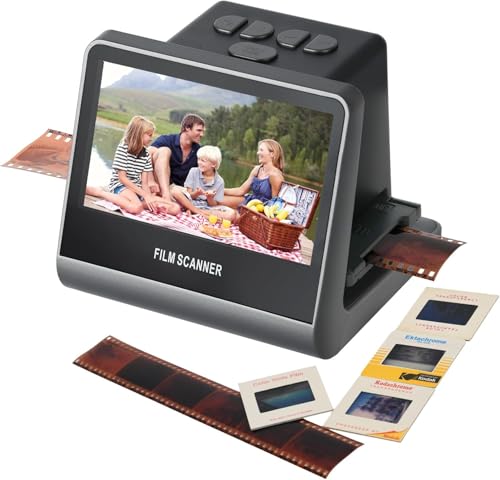
This unit features a built-in 22 MP sensor and a 5-inch LCD screen for immediate viewing, editing, and saving JPEG files. Its quick-load technology is intended to streamline scanning of multiple slides and negatives, including various film types. It is particularly useful for users who want a compact, all-in-one device with local memory options.
Best for: memory-keepers who value rapid scanning and a self-contained device with straightforward editing. It is a solid choice for those who prefer a small footprint and built-in storage options when available.
Limitation: The device relies on its own processing to deliver quality results, so expect to perform some color and brightness adjustments for archival-grade outputs.
Buying Guide
What to consider when choosing a high-resolution slide scanner
- Resolution and detail: Look for devices offering 20 MP or higher for sharp archival images. If you plan large prints, prioritize better MP and sensor quality.
- Display and workflow: An integrated LCD/LED preview helps verify scans without a computer. A larger screen generally improves accuracy in color and framing.
- Storage options: Decide between SD card saving, internal memory, or built-in storage. SD card support up to 32 GB (or more) affords greater flexibility for batches.
- Ease of use: Ergonomic controls, straightforward interfaces, and quick-load feeders reduce handling time and fatigue during batch scanning.
- Connectivity: USB-powered models and those with optional computer transfer offer flexible setups for different workspaces.
- Compatibility: Ensure the scanner supports your film formats (35mm, 126/110, Super 8, etc.).
What about a combined solution?
For collectors who want both quick archival scans and high-fidelity reproductions, a model with a high MP sensor plus an LCD preview provides a balanced workflow. If you prefer minimal setup, a standalone device with SD card output can accelerate batch digitization without a computer.
Maintenance tips
- Clean the light source and scanning glass regularly to avoid dust spots on scans.
- Store slides and negatives in archival sleeves to preserve image quality over time.
- Back up digital files to multiple locations to prevent data loss.
FAQ
- Q: Do these scanners require a computer to save images?
A: Some models operate standalone and save to SD cards, while others transfer directly to a computer. - Q: What film types can be scanned?
A: Most models support 35mm/135, 126, 110, and Super 8 formats, among others. - Q: Is 24 MP always better than 22 MP?
A: Yes, higher megapixels generally yield more detail, but sensor quality and processing also matter. - Q: Can I edit scans within the device?
A: Some devices offer basic on-device editing and color adjustments; others require external software. - Q: Do scanners come with storage or memory?
A: Several include built-in storage or SD card compatibility; verify card size limits before purchasing. - Q: Are color results accurate for archival use?
A: Color accuracy depends on the sensor, optics, and post-processing; professional restoration may still be needed.