Best High Quality Web Cameras for Clear Video and Flexible Work
Discover top-tier web cameras that deliver sharp detail, accurate color, and features designed for classrooms, meetings, and streaming. This guide highlights five high-quality options with differing strengths—from ultra-high-definition sensors and fast autofocus to wide angles and built-in mics—so you can choose the best fit for your needs.
Summary of chosen products:
- IPEVO V4K Ultra High Definition 8MP USB Document Camera
- j5create 360 Degree All Around Meeting Webcam
- OKIOLABS OKIOCAM S2 Pro 13-MP USB Document Camera
- Nolansend 4K Webcam
- j5create USB Streaming Webcam JVCU100
IPEVO V4K Ultra High Definition 8MP USB Camera

The IPEVO V4K uses an 8-megapixel camera to capture ultra-high-definition live images up to 3264 x 2448 pixels. It supports high frame rates for lag-free streaming—up to 30 fps at full HD and about 15 fps at the 3264 x 2448 resolution. Fast focusing helps minimize interruptions when switching between materials, and the Sony CMOS sensor enhances noise reduction and color reproduction in dim lighting, making it suitable for live demos, distance learning, and web conferences.
Key advantages include crisp document and object capture, effective color fidelity, and reliable performance across Mac, Windows, and Chrome OS. The design emphasizes classroom and meeting use, with a focus on rapid focusing and stable streaming. For educators and presenters who need clear visuals without manual adjustments, this camera offers a balanced mix of resolution, speed, and ease of use.
j5create 360 Degree All Around Meeting Webcam

This webcam delivers a full 360-degree field of view for collaborative setups and larger spaces. It includes a built-in omnidirectional microphone and offers six display modes to tailor viewing angles for different meeting or class scenarios. The camera streams at 1080p Full HD at 30 Hz, balancing image clarity with smooth motion for video conferences, online classes, and group projects. USB-C connectivity supports modern devices, and the design is optimized for flexible placement and wide-angle coverage.
With a wide viewing range and versatile display modes, the JVCU360 is well-suited for classrooms, boardrooms, and home offices that require inclusive visibility. It is a practical option when you need to capture multiple participants or large objects in a single frame, without sacrificing voice pickup or setup simplicity.
OKIOLABS OKIOCAM S2 Pro 13-MP USB Document Camera

The OKIOCAM S2 Pro features a 13-megapixel 4K UHD CMOS image sensor, producing true 4K resolutions up to 3840×2160 (16:9). It also supports 4K at 30 fps for detailed, professional-looking presentations and demonstrations. The camera includes OKIOPoint smart pointer for interactive documents and live software, enabling smooth tracking and zooming to the point of interest. A built-in light and microphone support live demos in varied lighting, and compatibility covers PC, Mac, and Chromebook environments.
Fast autofocus and accurate color reproduction help reduce distractions during live teaching or demonstrations. The combination of high resolution, smart pointing technology, and interactive features makes this model a strong choice for teachers and presenters who rely on dynamic, multimedia materials.
THUSTAR 8MP Document Camera With Lighting

The THUSTAR camera offers 8MP resolution with 2448p output and 30 fps for clear live transmission. It includes three levels of LED ring lighting to improve image clarity in variable lighting conditions, plus an image inversion option to adjust orientation during live demonstrations. The device supports USB connectivity across Windows, macOS, and Chrome OS. It can be folded for compact transport, making it suitable for on-the-go teaching, distance learning, and professional demonstrations where lighting is variable.
Notable features include adjustable brightness, a macro-friendly close-up capability, and a straightforward control layout. For instructors who need reliable document capture and the ability to toggle the view quickly, this model provides practical performance with portable form factor.
Nolansend 4K Webcam With Remote Control

This Nolansend model provides 4K Ultra HD video at 3840×2160 and offers digital zoom controlled via a remote. It supports AI-assisted auto-zoom to optimize framing and focus, and features built-in microphones for audio capture. A privacy cover is included for privacy and security, aligning with remote work and classroom privacy considerations. The camera is designed for plug-and-play use on PCs and laptops with compatibility for Zoom, Teams, and other conferencing tools.
The combination of 4K resolution, remote zoom control, and a privacy cover makes this webcam a viable option for educators and professionals who need flexible framing and reliable performance in varied environments. The advanced features help maintain a polished appearance during presentations and meetings.
j5create USB Streaming Webcam JVCU100
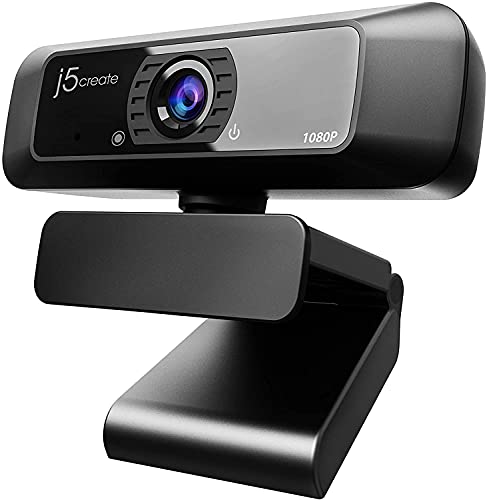
The JVCU100 is a streaming-ready webcam that delivers 1080p video with a wide-angle lens and USB plug-and-play setup. It features a built-in low-light enhancement with an F/2.4 aperture, helping to improve image quality in dim environments. The included high-fidelity microphone supports clear voice capture, though some notes indicate microphone performance differs on Chrome OS-based setups. This model is well-suited for home offices, streaming, and conferencing where simple, reliable full-HD video is needed.
Overall, the JVCU100 offers a balanced combination of ease of use, image clarity, and microphone quality. It suits users who want a straightforward camera for video calls, live streams, and casual teaching with minimal setup.
Buying Guide
Key considerations when selecting a high-quality web camera:
- Resolution and image quality: Choose cameras with at least 1080p for clear video, with 4K options if you frequently display detailed documents or need future-proofing for higher resolution streams.
- Sensor and color accuracy: Look for CMOS sensors (preferably from reputable brands) and features like noise reduction to perform well in variable lighting.
- Autofocus and zoom: Fast autofocus reduces interruptions during live demos. Some cameras offer digital or optical zoom and remote control for precise framing.
- Field of view: Wide-angle lenses (360-degree or broad fields) are valuable for classrooms or group meetings but may require position planning to avoid distortion.
- Microphone quality: Built-in mics are convenient, but consider external mics for larger rooms or when audio clarity is critical.
- Lighting support: Integrated LEDs or brightness controls can improve image quality in dim environments. Adjustable lighting helps reduce shadows on documents or objects.
- Connectivity and compatibility: Ensure USB-C or USB-A compatibility and confirm support for Windows, macOS, and Chrome OS if you use multiple devices.
- Privacy features: Privacy covers or physical shutters help maintain security when cameras are not in use.
- Portability and form factor: Foldable or compact designs are beneficial for educators who travel or switch classrooms.
- Software features: AI auto-framing, smart pointers, or live software integration can enhance engagement in presentations and interactive lessons.
Use cases vary by environment: classrooms benefit from document capture and clear annotations; corporate meetings favor stable streams and accurate color; streaming setups require consistent autofocus, framing tools, and high resolution. Balancing price, performance, and feature set will help you pick a camera that meets your priorities for quality, workflow efficiency, and future-proofing.