Best High Quality Photo Scan Solutions for Home and Office
Discover top photo scanning devices that deliver crisp image quality, fast results, and easy workflows. This guide highlights five dependable options for preserving memories, digitizing old photo albums, and integrating scanning into a small office or home setup. Each pick balances target photo sizes, software features, and user-friendly design so you can choose the right tool for your needs.
Summary of Selected Products
| Product | Brand | Key Use | Notes |
|---|---|---|---|
| Plustek Photo Scanner ePhoto Z300 | Plustek | Photo and document scanning | Fast 4×6 in 2 sec; 600 dpi; CCD sensor |
| Canon imageFORMULA RS40 | Canon | Photos with auto feeder | Dual-side scan; up to 40 ipm; bundles software |
| ClearClick QuickConvert 2.0 | ClearClick | Photo, slide, negative scanning | No computer required; 22 MP interpolated |
| VIISAN 3120 Flatbed Scanner | VIISAN | Artwork, photos, large documents | A3 size; 1200 dpi; auto-scan |
| VIISAN VF3240 Large Format | VIISAN | Large format photos and documents | A3 size; 2400 dpi; fast 4 sec at 200dpi |
Plustek Photo Scanner ePhoto Z300

The Plustek ePhoto Z300 is designed to simplify digitizing photo collections and documents. It supports common photo sizes including 3×5, 4×6, 5×7, and 8×10, as well as letter and A4 paper. An optical resolution of up to 600 dpi (with selectable 300 dpi and 600 dpi settings) balances detail with file size. The scanner is positioned as faster and more efficient than flatbed devices: a 4×6 photo can be scanned in about 2 seconds, with 8×10 at 300 dpi taking around 5 seconds. The ePhoto Z300 emphasizes ease of use—just insert photos one by one and scan, saving time when digitizing large batches. It’s compatible with both Mac and PC platforms and uses a CCD sensor for reliable color reproduction.
Key features include:
– Supports multiple photo sizes plus document paper sizes
– Quick scanning with efficient batch workflow
– CCD sensor and 600 dpi optical resolution
– Cross-platform compatibility (Mac and PC)
Canon imageFORMULA RS40

The Canon RS40 is a compact, user-friendly option with an automatic document feeder designed to handle both photos and documents. It scans in batches, enabling double-sided capture at up to 40 pages per minute through the feeder, which is ideal for mixing photo archiving with older document digitization. Software bundles include tools for photo enhancement, red-eye correction, digital face smoothing, and editing capabilities. This model emphasizes efficiency and editing support, making it suitable for preserving family photo albums alongside essential paperwork. The RS40 works with Windows and Mac and provides a seamless workflow for mixed media scanning.
- Automatic feeder for fast batch scanning
- Dual-side capture for photos and documents
- Bundled software for enhancement and editing
HP Envy Photo 7975 Wireless Color Printer
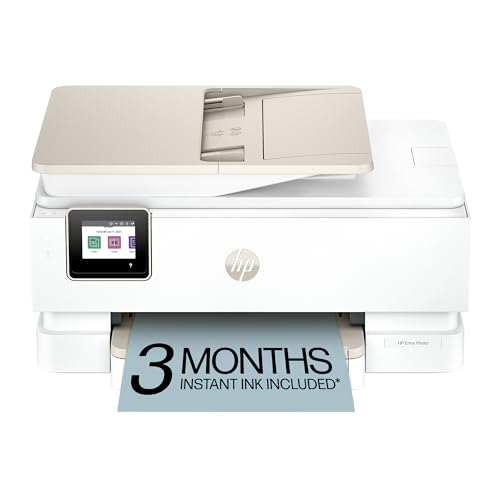
The HP Envy Photo 7975 is a multifunction printer designed for home use, combining high-quality photo printing with scanning and copying. It supports wireless printing, mobile printing, and AI-enabled features to streamline workflows and improve output quality. While primarily a printer, its scanning capabilities are positioned to complement photo digitization tasks from a home setup. The AI-driven adjustments aim to reduce wasted space and enhance true-to-screen color reproduction, suitable for creating true-to-life photo projects and documents. Ideal for households that need all-in-one capabilities with strong photo print performance.
Key points:
– All-in-one home device with print, scan, and copy
– AI-enabled adjustments for optimized image quality
– Wireless and mobile printing support
ClearClick QuickConvert 2.0

The ClearClick QuickConvert 2.0 is a compact, no-computer photo, slide, and negative scanner that prioritizes portability and ease of use. It scans 4×6 photos and smaller in 2–3 seconds, improving turnaround when digitizing older media. The device saves images directly to an SD card at approximately 3824 x 2512 pixels (22 MP interpolated), and it includes a built-in rechargeable battery for cord-free operation. A small LCD screen provides instant previews, and no driver installation is required. This makes it ideal for quick field digitization or quick archival projects without a computer.
- No computer needed for operation
- 2–3 second scan times for 4×6 photos
- Built-in battery and SD card storage
VIISAN 3120 A3 Flatbed Scanner

The VIISAN 3120 is an A3 flatbed scanner aimed at high-quality scanning of large items such as artworks, photos, books, CAD drawings, and magazines. It supports up to A3 dimensions (11.98″ x 16.8″) with a maximum optical resolution of 1200 x 1200 dpi, delivering rich color depth for detailed digitization. The scanner includes an auto-scan feature for efficiency and a frameless design to maximize usable bed space. It’s suitable for schools, design studios, and libraries seeking a dependable large-format option. It operates with Windows and Mac compatible power and software workflows.
Highlights:
– Large-format A3 scanning capability
– 1200 dpi optical resolution for detailed images
– Auto-scan function and frameless bed design
VIISAN VF3240 Large Format Flatbed

The VIISAN VF3240 is a high-capacity, A3 large-format flatbed scanner designed for professional scanning tasks. It features a maximum optical resolution of 2400 x 2400 dpi, enabling detailed scans of photos, books, and large documents. The device promises fast performance with a claimed 4-second scan speed at 200 dpi for A3 size, making it practical for time-sensitive archival work. The frameless design and dedicated scan controls target users who regularly digitize large-format materials, including art and design portfolios. It supports both Windows and Mac platforms and uses a universal power adapter for global compatibility.
- High-resolution large-format scanning
- Fast A3 scan speed with frameless design
- Supports Windows and Mac with universal power
Buying Guide: Key Purchase Considerations
When choosing a high-quality photo scanning solution, consider how you will use the device, the sizes you typically scan, and the level of editing or organizing you need after scanning. Here are several factors to guide your decision:
- Scan size and format: If you primarily digitize photos and larger prints, flatbed scanners with A3 support (like VIISAN models) or multi-format cassettes (like Canon RS40) provide flexibility. For quick batches, a feeder-based model may save time (Canon RS40).
- Resolution and color accuracy: For archival-quality results, look for at least 1200 dpi optical resolution on flatbeds or 600 dpi on consumer models, plus color depth features. Higher dpi is beneficial for large prints or restoration work.
- Speed versus batch workflow: If you have hundreds or thousands of photos, a fast feeder or a photo-specific unit (4×6 in 2–3 seconds) will reduce time. For delicate or oversized items, a high-quality flatbed is preferred.
- Software ecosystem: Bundled software for photo enhancement, red-eye correction, and easy organization can add value. Consider whether you need OCR for documents in addition to photo scanning.
- Portability and power: Battery-powered or compact scanners are convenient for on-the-go digitization, while larger units offer steadier scanning for detailed work. Check compatibility with your operating system (Windows or Mac).
- Future-proofing: If you anticipate growing needs, a model with robust software updates and support across platforms helps maintain compatibility with newer file formats and cloud workflows.
In sum, choose a device that aligns with your typical media, desired speed, and your preferred post-scan workflow—whether that’s quick family albums, school projects, or professional art digitization. The five options highlighted here cover a wide range of use cases from compact, no-fuss scanning to large-format archival projects.