Best High Definition Cameras for Video Conferencing
Modern video conferences demand crisp visuals, reliable autofocus, and clear audio pairing. The following five high-definition cameras are among the best options for professional and home setups, offering a mix of 1080p and 4K quality, flexible mounting, and easy plug-and-play connections. Each entry includes key features to help you compare performance, compatibility, and value for video meetings, virtual classes, and remote collaboration.
| Product | Resolution | Connector | Special Feature |
|---|---|---|---|
| IPEVO V4K Ultra High Definition 8MP | Up to 3264 x 2448 | USB | Sony CMOS sensor, fast focus, strong low-light performance |
| NexiGo N60 1080P Webcam | 1080p | USB | Built-in microphone, privacy cover, software control |
| j5create 360 Degree Meeting Webcam | 1080p | USB-C | 360° view, multiple display modes |
| IPEVO VZ-R Dual Mode 8MP | 3264 x 2448 USB; 1920 x 1080 HDMI | USB / HDMI | Dual mode; works without a computer |
| ActionRing 4K 15MP Webcam | 3820 x 2160 | USB | 4K capture; foldable design |
IPEVO V4K Ultra High Definition 8MP USB Document Camera

The V4K model delivers Ultra High Definition imagery with an 8-megapixel sensor that supports up to 3264 x 2448 pixels. It offers a high frame rate for smooth live streaming, with up to 30 fps at full HD and 15 fps at full 4K-like resolution. The device benefits from a Sony CMOS image sensor for reduced noise and accurate color reproduction, even in dim rooms. Fast focusing helps keep demonstrations and documents in sharp relief during multi-material presentations, making it well-suited for remote teaching and live product demos.
Designed for versatility, the V4K can capture documents, objects, and text with clarity, supporting live demonstrations and distance learning. Its compatibility spans Mac, Windows, and Chromebooks. While primarily a document camera, it can function as a high-quality webcam in many conferencing setups, especially when you need to share live desk materials with credible detail. The combination of high resolution, decent frame rate, and color accuracy makes it a strong all-around option for educators and professionals.
NexiGo N60 1080P Webcam

The NexiGo N60 provides full HD 1080p video with 30 frames per second, delivering sharp, steady images for everyday conferencing. A 3.6mm glass lens supports reliable focus at typical indoor distances, making it suitable for Zoom, Teams, Meet, and other meeting platforms. The built-in noise-canceling microphone reduces ambient chatter, helping your voice come through clearly in rooms with background noise. This webcam emphasizes compatibility, working with USB 2.0/3.0 systems and offering broad OS support including Mac, Windows, Android, Chrome OS, and Linux.
Setup is straightforward, often requiring no additional drivers. It’s a practical choice for users who want a simple plug-and-play solution with decent video quality and an integrated mic. The privacy cover adds a layer of privacy, which is increasingly important for home offices and shared workspaces. Overall, the N60 balances performance and convenience for typical home office workflows and light-duty remote teaching.
j5create 360 Degree All Around Meeting Webcam

The JVCU360 from j5create is built for meetings with a 360-degree field of view, enabling flexible layouts and broader perspectives in video conferences. It delivers Full HD 1080p video at 30 Hz and includes a built-in omnidirectional microphone to capture voices from multiple directions. The camera’s design supports multiple display modes, making it easy to adapt to different room setups, whether sharing a whiteboard, a document, or a central presenter.
With USB-C connectivity, the JVCU360 aligns with newer devices while maintaining broad compatibility. Its emphasis on wide angles and versatile display options makes it a suitable choice for collaborative sessions, online classes, and corporate training where capturing more of the room is beneficial. For rooms that require flexible camera angles without moving the device, the 360-degree capability provides a practical edge.
IPEVO VZ-R Dual Mode 8MP Visual Communication Tool
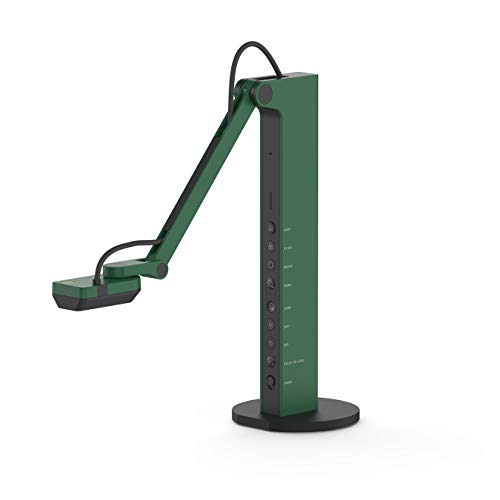
The VZ-R combines HDMI and USB in a single, flexible tool designed for real-time projection, distance learning, and web conferencing. It can connect directly to TVs, monitors, or projectors via HDMI, while USB shares the image with a computer for web calls. The 8-megapixel sensor captures up to 3264 x 2448 in USB mode and 1920 x 1080 when using HDMI, offering a wide maximum capture area of up to 10.6 inches by 18.9 inches in 16:9. The device benefits from fast autofocus, noise reduction, and strong color reproduction thanks to Sony’s CMOS sensor and an Ambarella SoC, plus a built-in LED to illuminate dim scenes.
As a dual-mode tool, it’s well suited for classrooms and small offices that require both a high-quality webcam and a document camera. Note that HDMI cables and power adapters are not included, so plan for those extras if you intend to use HDMI output in a presentation setup. This flexibility makes the VZ-R a robust option for educators and professionals who value plug-and-play adaptability with multiple display paths.
ActionRing 4K 15MP Webcam

ActionRing’s 4K webcam targets higher-end video quality with a 15-megapixel sensor that can capture at 3820×2160 resolution at 15 Hz or 1080p at 30 Hz. The device emphasizes eye-level interaction and clarity with a retractable arm for adjustable positioning and a compact footprint suitable for desks with limited space. It is designed for online classes, webinars, and professional conferencing, pairing solid image quality with practical projection capabilities via USB connectivity.
The camera supports high-detail sharing for demonstrations, lectures, and collaborative work, helping viewers perceive fine print, diagrams, and text. While it may require higher bandwidth and a capable PC or laptop, the 4K capability can yield sharper overall video when bandwidth permits. This makes it a compelling option for users seeking a premium, document-friendly solution for teaching and meetings.
Buying Guide: Key Purchase Considerations
- Resolution and frame rate: For professional meetings, consider 1080p at 30 fps as a baseline; 4K options provide crisper details on large displays but demand more bandwidth and processing power.
- Sensor technology and color accuracy: Cameras with high-quality sensors (such as Sony CMOS) tend to deliver better low-light performance and more faithful color reproduction, which matters in dim home offices.
- Autofocus speed and versatility: Fast autofocus minimizes interruptions when switching between materials or presenters. Dual-mode or HDMI options can be useful for classroom-style demonstrations.
- Microphone quality and privacy features: Built-in mics help reduce clutter, but consider external mics for environments with ambient noise. Privacy covers add peace of mind for home use.
- Compatibility and setup: Look for USB compatibility across Windows, macOS, and Chrome OS, plus easy plug-and-play with minimal driver requirements.
- Room setup and field of view: Wide-angle or 360-degree cameras cover more of the space, reducing needed adjustments. Document cameras excel for showing papers and objects.
- Accessories and bundling: HDMI cables, power adapters, mounts, and privacy accessories can influence total cost and ease of use. Check what’s included in the box.
In summary, the best choice depends on your conferencing style: classroom-style demos and document sharing benefit from high-resolution document cameras like the V4K or VZ-R, while general video calls can be well-served by 1080p options such as the NexiGo N60 or j5create JVCU360. The ActionRing model suits users prioritizing 4K detail and a foldable form factor for portable setups. Consider your platform, lighting, room size, and whether you need HDMI output or a built-in microphone when selecting a camera for video conferencing needs.