Best HDMI Cameras for TV: Clear TV-Ready USB/HDMI Cameras for Live Streaming and Displays
Choosing an HDMI-enabled camera that outputs directly to a TV or monitor can simplify live streaming, public displays, or classroom setups. The following five cameras are selected for their direct HDMI output, compatibility with TVs or monitors, and versatile zoom and lens options. Each product is evaluated on image quality, ease of use, and flexible connections to suit various viewing environments.
| Brand | Product | HDMI Output | Notable Feature |
|---|---|---|---|
| ENS | 5MP HDMI Security IP Camera | HDMI | 2.8mm wide lens with NDAA/NDAA compliance |
| IFWATER | HDMI 4K USB Camera | HDMI + USB | 10X zoom, simultaneous output |
| ELP | 4K HDMI USB Camera | HDMI + USB | 4K, concurrent outputs |
| SVPRO | HDMI Camera 4K USB | HDMI + USB | 10x zoom, professional imaging |
| LuckDog | Wireless HDMI Transmitter/Receiver | HDMI | Long range wireless 4K streaming |
ENS 5MP HDMI Security Camera With TV Output

The ENS 5MP HDMI Security IP Camera provides direct HDMI output for real-time display on televisions or monitors. It captures high-resolution 5MP imagery and downscales to 2MP for smooth HDMI video, making it suitable for live monitoring in public areas. A 2.8mm fixed lens offers a wide viewing angle, which enhances coverage for broader rooms. Built-in TF card slot supports local recording, and the camera carries NDAA compliance for secure deployment in institutional settings. While designed for security applications, its HDMI feed is a practical choice for presentations or transient displays where immediate TV output is needed.
IFWATER HDMI 4K USB Camera for Live Streaming

This IFWATER model offers simultaneous HDMI and USB outputs, enabling display on a TV and PC at the same time. The package includes a 5–50mm manual focus zoom lens with 2X digital zoom and 10X optical zoom, delivering flexible subject framing up to ultra HD 3840×2160 at 30fps. It supports modern video formats with improved compression efficiency (H.264/MJPEG/YUY2). The device is suitable for live streaming, online teaching, or any setting where you need HDMI output to a TV while maintaining PC connectivity for recording or conferencing.
ELP 4K HDMI USB Camera With Varifocal Zoom

The ELP camera delivers full 4K resolution at 30 Hz with concurrent HDMI and USB outputs, allowing two displays or capture streams from a single device. Its 2.8–12mm varifocal lens offers 4X zoom for both wide-angle capture and close-ups. The device’s flexible display modes (HDMI, USB, or both) enable simple plug-and-play integration with TVs, projectors, and computers. It is well-suited for meetings, classrooms, or home studios that require a high-resolution HDMI output with versatile lens control.
SVPRO 4K USB HDMI Camera With Telephoto Zoom

The SVPRO camera provides Ultra HD 4K/30fps video with a 5–50mm telephoto lens and a CS mount. It supports both HDMI and USB outputs, enabling direct connection to a TV as well as computer recording or streaming. Its design emphasizes low delay and flexible zoom options, making it a strong option for long-distance shoots, studio setups, or educational demonstrations where a high-quality HDMI feed is essential. The device supports multiple streaming configurations to suit different AV environments.
LuckDog Wireless HDMI Transmitter And Receiver
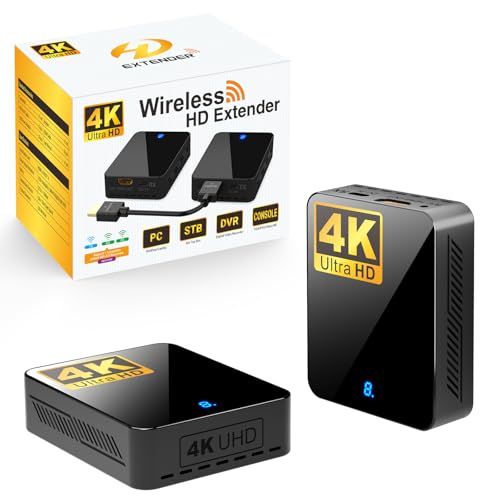
The LuckDog wireless HDMI system streams 4K 30Hz video and audio from HDMI-enabled devices to TVs, projectors, or monitors without cables. With a notable 400 feet (120 meters) range and multiple receivers, it supports flexible room or outdoor arrangements. The system includes advanced cooling features to prevent overheating during extended use. For setups where dragging cables is impractical, this option provides a clean, wireless approach to HDMI display on a TV or monitor, though the reliance on wireless bandwidth means careful placement and potential interference considerations.
Buying Guide
- HDMI vs. USB outputs: If you plan to display on a TV or monitor, ensure the device provides a stable HDMI output. Some cameras also offer USB for recording or secondary displays, which can be useful for teaching or streaming setups.
- Resolution and frame rate: For TV displays, 4K at 30fps delivers sharp imagery, while 1080p at 60fps can feel smoother for fast action. Consider the needs of your application (live events, streaming, or teaching).
- Lens and zoom: A fixed wide-angle lens is simple and broad, but varifocal 2.8–12mm or telephoto 5–50mm options give you flexible framing from near to far in a single setup. Check for optical vs. digital zoom quality.
- Compatibility and mounting: Look for CS-mount or compatible mounts if you need to adapt to specific rigs or tripods. Confirm whether the device supports simultaneous HDMI/USB to simplify multi-output workflows.
- Latency and compression: Low-latency feeds are essential for real-time displays. Devices that use efficient codecs (H.264, MJPEG, or H.265 when available) reduce bandwidth and storage requirements.
- Security and compliance: In public or institutional spaces, NDAA-compliant devices provide procurement clarity around security standards and compliance.
- Wireless options: Wireless HDMI solutions can reduce clutter but may introduce interference or latency. For fixed setups, wired HDMI is typically more reliable.
- Power and integration: Some cameras use USB-C power or external adapters. Ensure your power setup aligns with the intended installation (conference rooms, classrooms, or home theaters).