For laptop users involved in meetings, streaming, or content creation, a reliable webcam is essential. This guide highlights five top 1080p webcams that pair well with most laptops, delivering sharp video, clear audio, and practical features like privacy shutters and adjustable fields of view. Each model is chosen for compatibility with Windows, macOS, and popular conferencing apps, helping you present your best self on every call or broadcast.
| Product | Brand | Key Benefit | Resolution |
|---|---|---|---|
| Logitech C920x HD Pro | Logitech | Trusted 1080p video with dual mics | 1080p/30fps |
| Logitech Brio 101 | Logitech | RightLight auto brightness | 1080p |
| NexiGo N60 | NexiGo | Adjustable FOV and software control | 1080p |
| HP 320 FHD | HP | Wide angle with privacy cover | 1080p |
| XPCAM Full HD 1080P | XPCAM | HDR and pro streaming features | 1080p |
Below are concise, model-by-model looks at five webcams that balance performance, ease of use, and broad laptop compatibility. Each entry links to the official Amazon listing for quick access.
Logitech C920x HD Pro Webcam For Laptops

The Logitech C920x HD Pro Webcam is a staple for laptop video calls and streaming. It delivers Full HD 1080p resolution at 30 frames per second, providing crisp, natural-looking video that remains reliable across typical indoor lighting. The webcam includes a built-in microphone with stereo audio capture, which helps ensure voices come through clearly on calls. Autofocus and auto-light adjustment help maintain sharpness and visibility whether you’re facing bright windows or dim corners. Compatibility spans Windows and macOS, with easy plug-and-play setup for popular apps like Zoom and Teams.
In practice, the C920x excels in straightforward usability and dependable performance. Its dual mics capture more accurate sound than many built-in laptop mics, reducing the need for an external audio solution in many scenarios. While it doesn’t offer ultra-wide fields of view or rare-advanced controls, its reliability and broad software support make it a strong default choice for most laptop users seeking dependable 1080p video. For organizations and individuals prioritizing consistency over premium features, the C920x remains a solid mainstay.
Logitech Brio 101 Full HD Webcam

The Logitech Brio 101 Full HD Webcam is designed to optimize lighting and color for a broad range of environments. Its RightLight auto-brightness system adjusts exposure to deliver clear images even when lighting is less than ideal, helping you maintain a professional appearance during video calls and streams. The 1080p image quality remains crisp at standard desktop distances, making it a strong option for laptop users who want reliable, all-around performance with minimal manual tweaks. The built-in microphone is suitable for most conferencing needs, though more demanding audio tasks may benefit from external mics.
Imaging performance is complemented by practical software integration, allowing easy calibration and distribution of video across common platforms. The Brio 101 emphasizes user-friendly operation and consistent results, which is valuable for professionals who need dependable video without fiddling with settings. For those who regularly encounter mixed lighting—office lighting, natural light, or dim home setups—the Brio 101 provides a balanced, straightforward solution that remains comfortable to use over long sessions.
NexiGo N60 1080P Webcam

The NexiGo N60 1080P Webcam focuses on balance between image quality and practical features. It records at up to 1920 x 1080 with 30fps, delivering smooth, detailed video suitable for video conferences and streaming. The adjustable Field of View (FOV) helps you tailor the scene to your workspace, which is especially useful for narrow desks or group calls. A built-in noise-cancelling microphone reduces ambient sounds, ensuring your voice stays intelligible in typical home or office environments. It’s a plug-and-play solution that works well with Zoom, Teams, and other common apps.
Software control allows you to tweak exposure and color settings beyond automatic adjustments, giving a degree of customization without complexity. The N60 also emphasizes stability and compatibility, making it a solid choice for laptop users who want a versatile webcam that adapts to different room setups. While not featuring pro-grade sensors, its combination of 1080p clarity, adjustable FOV, and straightforward use makes it appealing for everyday business and casual broadcasting alike.
HP 320 FHD Webcam

The HP 320 FHD Webcam is designed for easy setup and broad compatibility with contemporary video platforms. It offers Full HD 1080p resolution with a wide 66-degree field of view, which helps keep you in frame during calls and presentations. A privacy cover adds a physical barrier when the camera is not in use, helping protect your privacy. The clip design and tripod compatibility simplify mounting on laptops or external displays. This model prioritizes straightforward performance and reliability, making it a sensible pick for teams that require reliable conferencing gear that works with Zoom, Teams, and other popular apps.
In everyday use, the HP 320 FHD emphasizes practical value. The combination of a clear 1080p image, natural color reproduction, and a generous FOV makes it suitable for desk setups ranging from compact laptops to larger monitors. While it may not push the boundaries of ultra-wide shots or advanced processing, its simplicity, durability, and plug-and-play nature appeal to users who want a dependable webcam that “just works” with minimal fuss.
XPCAM Full HD 1080P Webcam
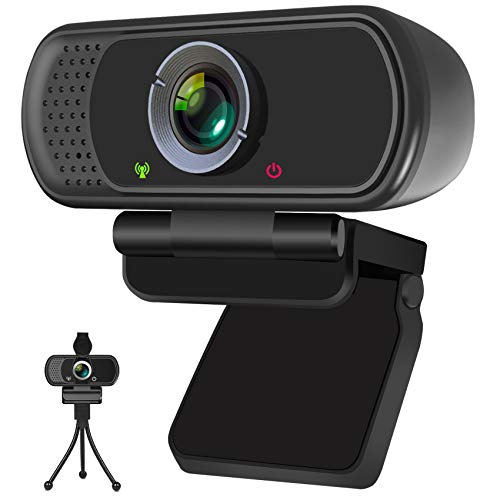
The XPCAM Full HD 1080P Webcam targets prosumer streaming and professional video calls. It delivers Full HD 1080p with a 16:9 widescreen aspect and HDR technology, helping to restore color accuracy in variable lighting. The camera incorporates auto-adjustment for brightness and color, providing usable images across dim or bright environments. A privacy shutter and a universal clip add practical security and flexible mounting for laptops, desktops, and other surfaces. H.264 video compression helps maintain smooth streaming on a wide range of software platforms.
XPCAM emphasizes a strong feature set for more immersive video experiences. Users who need a reliable, smoother picture with better color in different lighting will appreciate the HDR processing and wide-angle coverage. The built-in microphone supports everyday conferencing, while the privacy shutter offers a quick, tangible privacy option when not broadcasting. For creators or professionals seeking a capable 1080p webcam with streaming-friendly features, XPCAM presents a compelling balance of image quality and usability.
Buying Guide
- Resolution and frame rate: Most 1080p webcams operate at 1080p/30fps, which is sufficient for clear video and smooth motion in video calls. Some models may offer enhanced low-light performance or software upscaling, but few provide noticeable gains in regular daylight use without higher-end hardware.
- Low-light performance: Look forRightLight, HDR, or automatic light correction if you often record in dim environments. These features improve visibility and reduce graininess in shadowed areas.
- Audio quality: Built-in microphones vary in clarity and noise rejection. If you frequently record voice, consider models with stereo mics or the option to pair an external microphone for professional quality.
- Field of view: Wider FOVs (around 90–110 degrees) capture more of the scene, which can be helpful for group calls or demonstrations. Narrow FOVs focus more on your face and reduce background distractions.
- Privacy features: A physical privacy shutter adds a simple, reliable privacy option when the camera is not in use, which is increasingly important for security-conscious users.
- Software and compatibility: Ensure the webcam supports your operating system and preferred apps (Zoom, Teams, Skype, etc.). Some models offer software controls for exposure, brightness, and color balance, which can be useful in mixed lighting.
- Mounting options: Clip mounts and tripod threads enhance placement flexibility. Check if the webcam can attach to monitors, laptops, or tripods for the best angle.
- Price-to-feature balance: For everyday use, reliability and ease of setup often trump specialty features. If you need advanced controls or ultra-wide angles, look at models offering software customization or higher-end sensors.