Best Film-to-Digital Conversion Kits for Preserving Old Reels and Negatives
Answering the need to preserve memories on aging film, these film-to-digital conversion kits help you digitize 8mm, Super 8, 35mm slides, and negatives with minimal fuss. They’re best for hobbyists: home archivists who want a simple, standalone solution, and photographers who prefer quick, on-device digitizing without a computer. The top picks below cover built-in screens, batch-scan ability, and adapter-based solutions for multiple formats. A quick summary: the Kodak REELS stands out for its large onboard display and frame-by-frame workflow; the Eyesen unit excels with a compact screen and no computer required; DigitPro’s 22MP-capable 5” LCD view is ideal for daily previews; JJC ES-2 and Upgraded JJC adapters suit users who want macro-lens versatility and camera compatibility. The following table highlights key fit for each product.
| Product | Best For | ||
|---|---|---|---|
| KODAK REELS 8mm & Super 8 Digitizer | All-in-one with large onboard screen | 8mm, Super 8, 3–9 inch reels | Yes, 5″ LCD |
| 8mm & Super 8 Film to Digital Converter ( Eyesen ) | Compact, standalone digitizing | 8mm, Super 8 reels | Yes, 2.4″ LCD |
| DigitPro Film And Slide Scanner | Photo negatives and slides to 22MP | 35mm, 126, 110, slides, Super 8 | Yes, 5″ LCD |
| JJC ES-2 Film Digitizing Adapter Set | Macro-lens digitizing with multiple brands | 35mm negatives, slides | Yes, requires camera/macro lens |
| Upgraded 35mm Film Digitizing Adapter (JJC) | Versatile, adjustable rail for precise capture | 35mm and 120 film | Yes, works with your camera |
KODAK REELS 8mm & Super 8 Digitizer

The KODAK REELS Digitizer is a self-contained film-to-digital conversion system designed for 3″, 5″, 7″, 8″, and 9″ reels. It uses an 8.08-megapixel sensor for frame-by-frame digitizing to 1080p MP4 files. The 5″ onboard LCD provides live preview and editing options, with oversized, easy-to-use buttons for frame alignment, exposure, and color adjustments. It’s best for buyers who want a standalone, screen-forward experience without a computer. A potential limitation is the absence of built-in audio in the resulting files, so expect silent video. This unit suits hobbyists who want simple operation and large viewing area on playbacks. Includes micro USB for transferring scans to a TV or computer, though a computer isn’t required for scanning.
Best for: Do-it-yourself archivists who prefer an all-in-one machine with a large display for quick, on-device viewing.
Caution: SD card storage is external; plan for reliable cards sized appropriately for long reels.
8mm & Super 8 Film To Digital Converter (Eyesen)

The Eyesen unit digitizes 8mm and Super 8 reels up to 9″ with a built-in 2.4″ display. It operates without a computer, saving scans directly to a 32GB SD card included with the kit. The device is fully automated, offering a straightforward “one-button” workflow. It’s best for users who want an ultra-simple, on-device conversion with an immediate LCD preview. A potential limitation is the smaller screen, which may require more frequent checks during scanning.
Best for: Small-space setups and first-time film-to-digital users who want a compact, stand-alone solution.
DigitPro Film And Slide Scanner

DigitPro’s model handles film, negatives, and slides with a 5″ LCD that supports real-time preview and playback. It digitizes 35mm, 126, 110 formats, as well as 50mm slides, directly to built-in memory or to an external SD card (up to 64GB). It’s best for families with mixed media collections who want an all-in-one scanner and preview monitor. One caveat is that the device relies on its internal software for color and exposure adjustments, which might be less flexible than PC-based workflows.
Best for: Families digitizing mixed-format media (negatives, slides, and film) with quick, on-device review.
JJC Film Digitizing Adapter Kit (ES-2 Replacements)

The JJC ES-2 kit is designed to replace Nikon ES-2 and to work with Canon, Nikon, and Sony macro lenses via five adapter rings. It digitizes 35mm negatives and slides by re-photographing through your camera. The kit includes a bright LED light and a practical mounting approach. Best for: photographers who want precise framing with their own macro lens setup and have compatible camera bodies. Limitation: this approach requires a compatible camera and macro lens setup to work optimally.
Upgraded 35mm Film Digitizing Adapter (JJC)
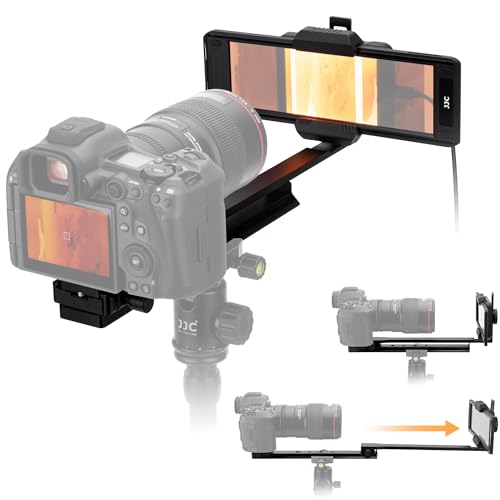
This upgraded rail-based adapter is designed for 35mm and 120 film. It features an adjustable slider rail with a long reach to fit larger frames, a robust aluminum construction, and 11-level backlit brightness for consistent results. It’s best for users who already own a compatible camera body and want precise alignment with scalable distance control. A potential limitation is that setup requires a compatible camera and macro lens; not a standalone scanner.
Buying Guide: Film-To-Digital Conversion Essentials
Key questions to evaluate before buying: Do you want a standalone scanner with an onboard screen, or a kit that uses your camera for digitizing? How many formats do you need to convert (8mm, Super 8, 35mm negatives, slides, 120/other formats)? What memory capacity and file type are required for your archive? The following considerations help compare common setups:
- Standalone vs. camera-based: Standalone devices (like Kodak REELS, Eyesen, and DigitPro) simplify operation and provide live previews, whereas camera-based adapters (JJC ES-2, Upgraded JJC) demand a compatible camera but offer high customizability and potential for higher-resolution captures with your own lens.
- Display and workflow: A large onboard LCD (5″ or bigger) makes frame-by-frame checks easier and reduces post-processing. Smaller screens require connecting to a TV or computer for full review.
- Format compatibility: Make sure the device supports your reels. Some units handle 8mm and Super 8; others also cover 35mm slides, 126/110 negatives, and 120 film. If your archive includes varied formats, a versatile model may save time.
- Storage and export: Check whether the device saves directly to SD cards or requires a computer. For long projects, larger SD cards and reliable file management are essential.
- Ease of use vs. control: One-button scanning is ideal for quick archiving; more advanced units offer color and exposure controls but may require more setup time.
Frequently Asked Questions
- What is the easiest way to digitize old film reels?
Choose a standalone digitizer with a built-in screen for immediate previews and straightforward operation, such as the Kodak REELS or Eyesen units. - Do I need a computer to digitize 8mm film?
Not necessarily. Some models store files directly to SD cards and don’t require a computer during scanning. - Can these kits handle 35mm slides and negatives?
Yes, several options (DigitPro, JJC ES-2, and Upgraded JJC) support 35mm negatives and slides, either directly or with adapters. - Which kit is best for mixed media collections?
DigitPro stands out for handling film, negatives, and slides with a built-in LCD for real-time previews. - Are adapter-based kits suitable for all cameras?
Adapter kits like the JJC ES-2 and Upgraded JJC require compatible macro lenses and cameras, so verify lens compatibility before purchase. - Will the digitized files have sound?
Most film-to-digital conversions generate silent video; you may need to add sound in post-processing if desired.