Best Facial Recognition Security Cameras for Smart Home Security
Answering the top buyer question: which facial recognition security cameras deliver reliable AI alerts, clear video, and practical local storage options? This guide highlights five strong choices for American homes. The best picks appeal to different needs: indoor monitoring with offline AI detection, 4K outdoor surveillance, and kit configurations that simplify setup. Each option notes who it’s best for, plus practical cautions to consider before buying. A quick summary table follows to compare core features at a glance.
| Product | Best For | Key Benefit | Notes |
|---|---|---|---|
| CINMOORE 5G Indoor Security Camera | Families and pet households | Local face storage, free AI detections | AI detection free; cloud storage optional |
| Tapo 4K Indoor Pan/Tilt (C260) | Wide-area indoor monitoring | 360° coverage with 18× digital zoom | Local storage option, no mandatory cloud |
| eufy Security SoloCam E42 | Outdoor or entryway security | 4K clarity, motion tracking, solar option | Facial recognition with local storage |
| eufy Security eufyCam C35 Kit | Low-effort, multi-camera setups | Magnetic mounting, color night vision | HomeBase Mini AI features; compatibility note |
| myQ Secure View 3-in-1 | Integrated door security | Face Access, 2K HDR doorbell camera | Built-in camera with smart lock features |
CINMOORE 5G Indoor Security Camera

The CINMOORE 5G Indoor Camera emphasizes local AI detection with facial recognition stored on-device. It claims to recognize family faces, strangers, pets, and even baby cries or alarms, with encryption and no cloud uploads by default. Real 3K UHD video supports clear viewing, and its dual-band WiFi aims to reduce dropouts. Best for households that want private AI data processing and easy baby or pet monitoring. A noted limitation is that cloud storage requires a paid plan if you want ongoing cloud access.
- Best for: families who prioritize local face storage and private AI alerts.
- Why selected: Free AI detection online of recognized faces; 3K resolution for crisp details.
- Caution: Cloud storage is not free—plans apply if you need remote access or backups.
Tapo 4K Indoor Pan/Tilt Camera (C260)

The Tapo C260 delivers 4K ultra-high-definition clarity with 360° horizontal and 116° vertical views and up to 18× zoom. It supports facial recognition and is designed for broad area coverage, making it easier to identify people or objects as they move through space. This camera is well-suited for users who want sharp detail across a larger indoor area without needing a subscription. Limitations include dependent performance on network stability for high-res streaming.
- Best for: rooms requiring wide, detailed coverage with minimal subscription needs.
- Why selected: 4K clarity, full-area coverage, and high zoom capability.
- Caution: High-res streams demand robust network bandwidth.
eufy Security SoloCam E42

The SoloCam E42 offers true 4K outdoor video with AI motion tracking and a strobe light, plus pan and tilt for broader coverage. It emphasizes local processing and storage, aiming to minimize false alarms and provide clear evidence in day and night conditions thanks to color night vision. Best for users who want outdoor-quality footage with autonomous AI tracking and no monthly cloud fees. A potential limitation is that some advanced AI features may require updating the app to a specific version for full compatibility.
- Best for: outdoor or entryway monitoring with independent AI processing.
- Why selected: 4K video, smart tracking, and color night vision without reliance on cloud.
- Caution: Ensure app version compatibility for optimal AI features.
eufy Security eufyCam C35 Kit
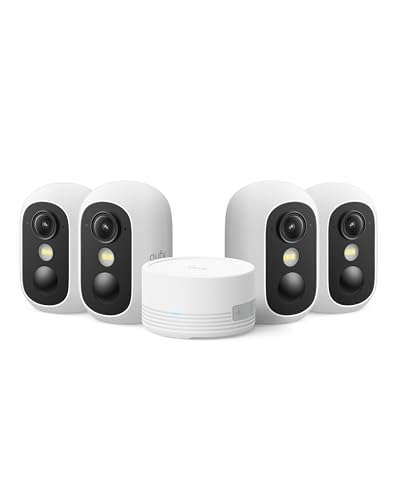
The C35 kit emphasizes ease of installation with magnetic mounting, high-quality color night vision, and a smart home-ready architecture. Built-in AI features include facial recognition and cross-camera tracking when paired with the HomeBase Mini, enabling more cohesive security across multiple cameras. This kit is best for homeowners who want a quick-start, wire-free setup with scalable AI features. Note: It may require HomeBase Mini compatibility to access full facial recognition capabilities across cameras.
- Best for: quick-install, multi-camera setups with AI features.
- Why selected: Magnetic mounting and cohesive AI with HomeBase Mini.
- Caution: Some AI features require compatible HomeBase Mini.
myQ Secure View 3-in-1 Smart Lock With Doorbell

The myQ Secure View combines a smart deadbolt, a video doorbell, and a 2K HDR camera in one device. It supports facial recognition for hands-free entry, along with standard two-way audio and color night vision. Best for front-door security where you want convenient access control and visitor visibility in one device. A limitation is that the facial recognition is tied to the door entry workflow, so privacy considerations and local storage handling should be reviewed before installation.
- Best for: integrated access control with video doorbell features.
- Why selected: 3-in-1 design with face-based entry and 2K HDR video.
- Caution: Face access is tied to door operations; plan for privacy settings.
Buying Guide
What should you consider when choosing a facial recognition security camera system?
- Local vs. cloud AI processing: Local AI keeps facial data on-device, reducing privacy risks but may limit cross-device analysis. Cloud AI enables easier updates and remote access but may incur fees.
- Video resolution and field of view: Higher resolution captures more detail but requires more bandwidth and storage. A wider field of view reduces blind spots but may require more processing power.
- Storage options: Local SD or network storage can save money. Consider bank-grade encryption and whether cloud storage is optional or required for access from outside your home.
- Integration with other devices: Check compatibility with existing smart home hubs (HomeBase Mini, etc.) and whether facial recognition works across multiple cameras.
- Ease of installation: Magnetic mounting, wireless power, and quick-start apps help, especially for multi-camera setups.
- Security and privacy: Review how faces are stored, how data is encrypted, and what controls you have over data sharing and retention.
FAQ
- Do these cameras store facial data locally or in the cloud?
Most options offer both; some provide free local AI detections with optional cloud storage for backups or remote access.
- Can facial recognition reduce false alarms?
Yes, by distinguishing familiar people from strangers, but accuracy depends on lighting, angle, and software updates.
- Is 4K video necessary for facial recognition?
Higher resolution helps with recognition in detail but requires more bandwidth and storage.
- Will these cameras work with existing home networks?
Most use Wi‑Fi or dual-band networks; verify you have a stable 2.4/5 GHz network for best results.
- What about privacy when multiple cameras are used?
Use local storage where possible, enable strict access controls, and review data retention policies for each device.
- Do these devices require ongoing subscription fees?
Some vendors offer free AI detections with optional paid cloud storage; others may include or require cloud plans for features.