Best Digital Photo Album Tablet for Sharing Memories
Searching for a digital photo album tablet that makes sharing memories effortless? This guide highlights five popular frames that balance large viewing areas, easy setup, and private sharing. Best for: travelers who want a wall-friendly display, seniors who value simple controls, and families who share photos across devices. The table below compares key specs to help you decide at a glance.
| Product | Screen Size | Storage | Key Benefit | Best For |
|---|---|---|---|---|
| Pastigio 15.6″ Frame | 15.6″ | 32GB + microSD | HD IPS touch; Instant Frameo sharing | Families wanting large, hands-on viewing |
| Anna Bella 10.1″ | 10.1″ | 32GB | IPS display; Cloud sharing through AiMOR | Grandparents and everyday gifting |
| Skylight 10″ | 10″ | — | Plug-and-play email-based sharing | Non-tech users seeking simple setup |
| YunQiDeer 10.1″ | 10.1″ | 32GB | Frameo with 15s video limit; auto-rotate | Multi-member family sharing |
| WONNIE 15.6″ | 15.6″ | 64GB | Large storage; SD/USB support | Photo-heavy collections and backups |
All five selections are Wi‑Fi connected frames designed to share photos and short videos privately with loved ones. Each option supports a mix of local storage and cloud-like sharing, with varying display sizes to fit desks, shelves, or wall mounts. Read on to see how each model aligns with different user needs and living spaces.
Pastigio 15.6 Inch Frameo Digital Photo Frame

The Pastigio digital picture frame uses Frameo for instant photo sharing over Wi‑Fi. It includes 32GB of built‑in storage and supports expansion with microSD up to 32GB, enabling you to store thousands of photos and videos. The 15.6-inch HD IPS touchscreen provides vivid colors and easy navigation. Best for households that want a vivid, large display and a tactile interface for quick browsing. A potential limitation is the reliance on the Frameo ecosystem for sharing, which may feel restrictive for users accustomed to other apps. This frame suits gifting for parents, couples, and friends who value a heartfelt, wall‑ or tabletop‑ready memory gallery.
Anna Bella Digital Picture Frame 10.1 Inch
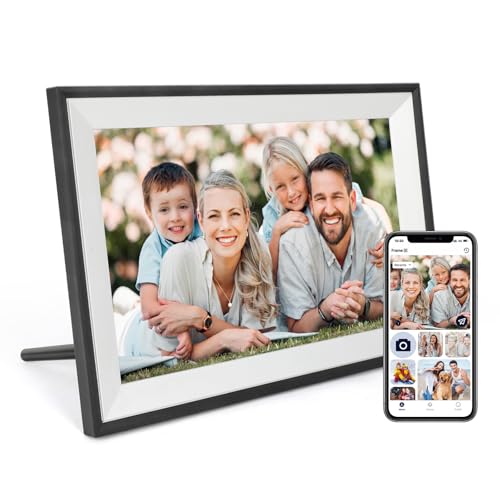
The Anna Bella frame emphasizes image quality and easy remote sharing via the AiMOR app on Android and iOS. A 1280×800 IPS panel delivers clear visuals from wide viewing angles, and the device includes a light sensor to adjust brightness automatically. This model is best for families who want a thoughtful gift that can be preloaded with photos and shared by multiple relatives. A caveat is the app-based sharing requirement, which depends on the user’s device compatibility and app updates.
Skylight Frame – 10 Inch Digital Photo Frame

Skylight offers a straightforward setup with email-based sharing and a Full HD display, making it ideal for users who want a no-fuss experience. The frame is marketed as a bridge for multiple generations, letting non-tech-savvy relatives receive photo updates without complex apps. The main limitation is that sharing relies on the Skylight email workflow, which may require ongoing email management by the sender. This frame is a practical gift for grandparents who appreciate regular updates and a simple interface.
Frameo WiFi Digital Picture Frame 10.1 Inch

The YunQiDeer model uses Frameo for private sharing and offers a 32GB internal memory with the option for microSD expansion. Its 1280×800 IPS touchscreen and auto-rotate support make it flexible for portrait or landscape layouts. It’s best for families who want fast, private photo sharing from multiple people, but note the 15-second video limit. Ideal for memory-rich households that regularly send short clips to a single frame.
WONNIE 64GB 15.6″ Digital Picture Frame

The WONNIE frame emphasizes large internal memory (64GB) and broad compatibility with SD and USB drives, making it well suited for photo‑heavy collections and easy backups. Its 15.6-inch IPS display provides clear, vibrant images, and its support for SD/USB inputs helps in offline sharing. Best for users who want a robust, storage-forward solution. A caution: larger memory devices may require formatting considerations or compatibility checks with the frame’s file handling.
Buying Guide
What size is best for your space?
Choose 10–11 inches for desks or countertops and 15.6 inches for living rooms or hallways. Larger displays are visually striking but require more wall or shelf space.
How should you share photos?
Consider whether you prefer app-based sharing (Frameo or AiMOR), email-based sharing (Skylight), or local transfers via SD/USB. App-based methods work across multiple devices, while local storage supports offline viewing and backups.
Storage and expandability matters?
32GB is common and often expandable with microSD cards. If you anticipate storing thousands of photos or long videos, a model with 64GB or SD/USB support provides better growth headroom.
Which features improve daily use?
Auto-rotate helps with mixed portrait and landscape photos. A touch screen simplifies navigation for older users. A built-in light sensor adjusts brightness for room conditions.
Privacy and sharing scope?
Assess whether you need private sharing with trusted contacts only (Frameo, AiMOR) or broader access via email invitations (Skylight). Some frames enable guests to contribute without revealing sensitive login details.
Best-practice checklist
- Confirm Wi‑Fi compatibility and 2.4 GHz networks when required.
- Check whether the frame supports your preferred photo formats (JPG/JPEG/BMP/PNG) and video formats (MP4).
- Decide on a ground place: tabletop display or wall mountable.
- Evaluate whether you want preloading options (gift-ready frames) or ongoing guest contributions.
Frequently asked questions
- What is Frameo compatible with?
Frameo is a mobile app used to send photos and short videos to compatible frames over Wi‑Fi. It’s designed for private sharing among family and friends.
- Can I use these frames without Wi‑Fi?
Many frames support offline transfers via SD/USB, but sharing typically requires Wi‑Fi or direct app connections.
- Do all frames support wall mounting?
Most do, but check the product details to confirm wall-mount compatibility and included mounting hardware.
- Which frame is best for grandparents?
Skylight and Anna Bella emphasize simple setup and easy gifting, which are often valued by grandparents.
- Is 32GB storage enough for a long-time family album?
32GB stores thousands of photos; frames with 64GB or SD/USB expansion offer more capacity for larger collections.