Transferring photos and videos from your digital camera to your iPhone has never been easier with the right camera to iPhone adapter. These adapters support various memory cards, including SD and MicroSD, and some even include USB ports for additional devices. Below is a summary table of the top adapters designed for quick, plug-and-play connections compatible with multiple iPhone and iPad models.
| Adapter | Type | Compatibility | Key Features |
|---|---|---|---|
| SZHAIYIJIN SD Card Reader | Lightning, USB Female | iPhone, iPad | Dual card slots (SD/TF), no app needed, USB OTG support |
| Apple MFi Certified Lightning to SD Card Reader | Lightning | iPhone, iPad | Supports up to 256GB, compatible with iOS 9.2+, plug and play |
| Pukiou USB C to USB Camera Adapter | USB-C, Dual Card Slots & USB Port | iPhone 15/16, Android, MacBook | High-speed USB 2.0, multi-device compatibility, plug and play |
| DCNETWORK Dual Connector SD Card Reader | Lightning & USB-C | iPhone, iPad, Mac, Android | Plug and play, supports multiple OS, dual interface |
| Denlane SD Card Reader Dual Interface | Lightning & USB-C | Apple devices, USB-C laptops, Android devices | MFi certified, 5-in-1 adapter, plug and play, two-way transfer |
SZHAIYIJIN SD Card Reader for iPhone

The SZHAIYIJIN SD Card Reader is a versatile photography accessory designed for Canon, Nikon, SLR, and other digital cameras. It features dual card slots supporting both SD and TF cards, making it convenient for various memory card types. This adapter requires no additional app; simply insert your card and connect to your iPhone or iPad, wait five seconds, then import your photos and videos via the Photos app.
This adapter also includes a female USB interface doubling as an OTG camera adapter, supporting multiple devices like USB flash drives, card readers, USB headphones, and MIDI keyboards with current limits under 500 mA. However, it does not support printers or hard disk drives.
Apple MFi Certified Lightning to SD Card Camera Reader
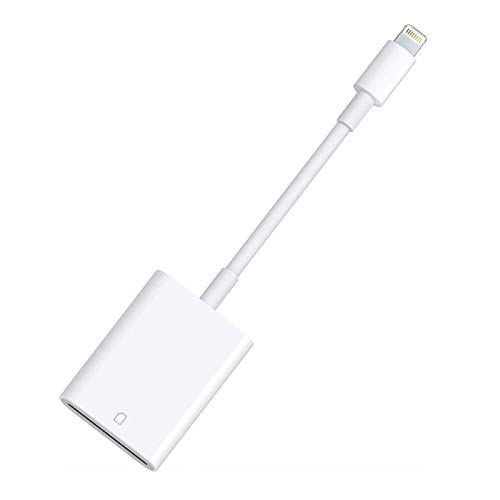
This Apple MFi Certified Lightning to SD Card Camera Reader offers compatibility with SD cards up to 256GB and supports all iPhone and iPad models with iOS 9.2 or later. It is optimized for high compatibility with photo formats like JPEG and RAW, along with video formats such as H.264 and MPEG-4. Users with iOS 13 or later benefit from the ability to transfer documents like Excel, Word, and PDF files too.
With a transmission speed ranging from 14MB/s to 16MB/s, it quickly transfers images and videos directly from your camera’s SD card, streamlining your workflow.
Pukiou USB C to USB Camera Adapter

The Pukiou USB C to USB Camera Adapter is a 3-in-1 memory card adapter designed for the latest devices such as iPhone 15 and 16 series, Samsung Galaxy S25 Ultra, and various USB Type-C devices. It features dual card slots for SD and TF cards and a USB port, supporting peripherals like cameras, flash drives, keyboards, and mice.
Its USB 2.0 high-speed transmission can reach speeds up to 60MB/s for rapid file transfers. This plug-and-play adapter requires no additional applications and is ideal for users needing compatibility across a broad device range, including Android smartphones and MacBooks.
DCNETWORK Dual Connector SD Card Reader

The DCNETWORK SD Card Reader provides a dual connector design featuring both Lightning and USB-C interfaces. It supports SD and MicroSD (TF) cards and is compatible with a wide range of devices, including iPhones (from iPhone 5 up to iPhone 16 series), iPads, Macs, and several Android and Windows systems.
This plug-and-play device requires no drivers or additional software and supports high-speed transfers for photos and videos. Its multi-OS compatibility makes it a solid choice for users with diverse device ecosystems seeking flexibility and efficiency in data transfer.
Denlane Dual Interface SD Card Reader

The Denlane SD Card Reader features dual connectors (USB-C and Lightning) and supports SD, TF, and SIM cards. It is Apple MFi certified and compatible with a wide variety of devices, including iPhone 5 through 16 series, iPads, MacBooks, and multiple Android phones and USB-C laptops. Note that both interfaces cannot be used simultaneously.
This 5-in-1 adapter is designed with photographers in mind, supporting two-way, stable transfer of photos, videos, music, and files. It operates without needing apps, drivers, or extra power, allowing instant import and sharing of high-quality images from digital, trail, or hunting cameras.
Buying Guide for Digital Camera to iPhone Adapters
When selecting the best digital camera to iPhone adapter, consider the following key points:
- Compatibility: Ensure the adapter supports your iPhone model and iOS version. Many adapters are compatible with iPhone 8 and later, but confirming support for the latest models is essential.
- Connector Type: Choose between adapters with Lightning connectors (for older and current iPhones) or USB-C connectors (for the newest iPhone 15/16 series and iPads). Some adapters offer dual connectors for added versatility.
- Memory Card Support: Look for adapters that support your camera’s memory cards, typically SD, SDHC, SDXC, and microSD cards. Dual slot adapters offer greater flexibility.
- Transfer Speed: Higher data transfer speeds (measured in MB/s) reduce wait times when importing large photo and video files.
- Plug and Play: Adapters that require no drivers or apps provide the most straightforward experience, allowing immediate import through the native Photos app.
- Additional Ports: Some adapters include USB ports for connecting external devices or flash drives, which can enhance functionality.
- MFi Certification: Apple’s MFi certification ensures the adapter meets Apple’s standards, improving reliability and compatibility.
- Device Ecosystem: Consider if you need an adapter compatible with multiple devices beyond iPhones, such as iPads, Macs, or Android phones.
Evaluating these factors will help you choose an adapter that fits your workflow, device requirements, and photography needs effectively.