Best Device to Convert Slides to Digital: Top Pickers for Easy, On‑the‑Go Archiving
Answering your search for a reliable slide-to-digital converter, these devices transform old slides and negatives into usable digital files quickly and without a PC. The best options suit different needs: quick one‑button scanning, built‑in displays for preview and editing, and portability for on‑the‑road archiving. This guide highlights five solid choices for hobbyists, families, and small collections, with clear reasons to choose each one and practical cautions where relevant.
| Product | Best For | Why It Stands Out |
|---|---|---|
| KODAK Slide N SCAN | Home enthusiasts with 5” LCD viewing | Built‑in screen, quick‑load trays, wide film compatibility |
| DigitPro 35mm Film & Slide Scanner | Standalone scanning, no computer required | 2.4” LCD, TV‑out sharing, fast feeder |
| DigitPro 35mm Negatives & Slides (2026) | Versatile archive across formats | 5” LCD, SD card support, one‑touch scanning |
| DigitConvert Mobile Film Scanner | On‑the‑go digitizing with smartphone | Portable, battery powered, free app |
| TCNEWCL 35mm Negative Slide Scanner | Compact, foldable option for travel | Foldable design, LED backlight, smartphone compatibility |
KODAK Slide N SCAN Film & Slide Scanner

Best for: households with a mix of 35mm slides and multiple film formats who want an all‑in‑one solution. This scanner provides a built‑in 5” LCD for immediate preview and editing, plus a quick‑load tray for faster batch scans. It supports 135, 126, and 110 film formats and saves directly to an SD card. The large display helps verify results without a computer, and the included slide adapters simplify setup. A potential limitation is SD card dependency if the user needs large archival storage beyond card size.
DigitPro 35mm Film & Slide Scanner

Best for: users who want a standalone device without connecting to a computer. Its 2.4” LCD allows quick previews, and the TV‑out sharing feature enables viewing on a larger screen. The fast feeder supports larger batches, making it suitable for archiving sizable collections. Limitation: smaller built‑in screen may require occasional external viewing for precise color checking.
DigitPro 35mm Negatives & Slides (2026)

Best for: archival projects requiring a wide format support with a built‑in memory and SD card expansion. The 5” LCD provides immediate feedback, and the device supports 35mm negatives, 50mm slides, and related formats. It emphasizes simple one‑touch scanning and built‑in software for color and date adjustments. Caution: external memory may be needed for very large libraries beyond internal storage.
DigitConvert Mobile Film Scanner

Best for: travelers and casual users who want to digitize slides or negatives with a smartphone. This compact, battery‑powered scanner folds for easy carrying and relies on a free app for quick conversion. It’s ideal for creating digital copies on the go and sharing instantly. Limitation: image quality is tied to the phone’s camera and app capabilities, so it may not satisfy high‑resolution archiving needs.
TCNEWCL 35mm Negative Slide Scanner

Best for: a compact travel companion that folds away when not in use. The foldable design minimizes footprint, and LED backlighting helps with visibility. It is best for simple 35mm slides and negatives, and it accommodates smartphone usage. Caution: image quality depends on the phone’s camera, and the device’s portable design may trade off some scanning speed and control compared with larger, dedicated scanners.
Mobile Film Scanner 35mm Slides & Negatives (DigitConvert)

Best for: users who want to scan 35mm slides or negatives directly to a phone with editing and sharing in mind. The device emphasizes ease of use, with scanning via a dedicated app and a straightforward workflow. Limitation: long‑term archival projects might require larger storage or higher resolution than some mobile setups provide.
DIGITNOW! 135 Film Negative Scanner

Best for: users archiving 35mm negatives and slides with adjustable rapid feeder and SD card storage. It supports stand‑alone 1800DPI high‑resolution scanning and can transfer to a computer. Good for those who want higher scanning resolution and simple file management. Caution: some setups may require basic cable connections to external displays or devices for viewing on larger screens.
DGODRT Mobile Film Scanner for 35mm
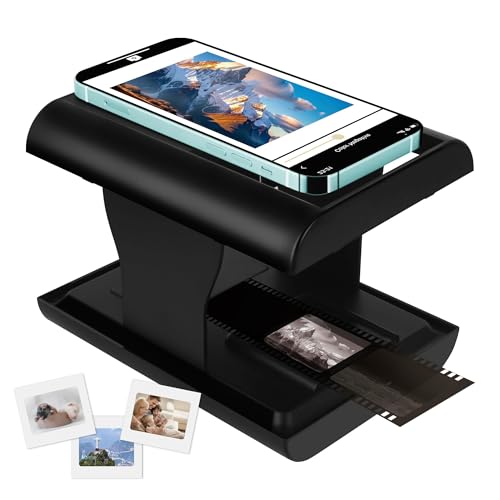
Best for: those needing a smartphone‑centric workflow with wide compatibility across 35mm colors and slides. The included LED backlight and app pairing facilitate easy scanning and sharing. Limitation: image quality depends on the phone and app capabilities, so it may not meet high‑end archival standards for very large collections.
Buying Guide: Key Considerations For Choosing A Slide-To-Digital Device
- Display and review: Do you prefer a built‑in LCD for immediate cropping and color checks, or is a phone screen sufficient when using a smartphone app?
- Format support: Are you digitizing 35mm only, or do you also need to cover 126, 110, or 50mm slides? Consider devices with broad format compatibility.
- Storage options: Look for SD card support or built‑in memory if you want stand‑alone operation. External storage can matter for large libraries.
- Connectivity: Do you want TV‑out or HDMI sharing for easy viewing on a larger screen, or is direct editing on the device enough?
- Portability: If you travel or scan in multiple locations, a foldable or battery‑powered model may be advantageous.
- Ease of use: One‑touch scanning and straightforward software can save time, especially for beginners.
- Image quality vs. convenience: Higher DPI and larger sensors yield crisper scans but often require more space or power.
Frequently Asked Questions
- What is the best device for scanning mixed film formats?
– A scanner with broad format support (35mm, 126, 110) and a large display is often best for mixed archives. - Do these devices require a computer?
– Some models are standalone with built‑in memory or SD card support, while others pair with a smartphone or TV for viewing. - Is a higher resolution always better for slides?
– Higher DPI can improve detail, but the final quality also depends on the film’s original condition and your viewing method. - Can I archive directly to cloud storage?
– Most devices save to SD cards or internal memory; you can transfer to cloud storage later using a computer or smartphone. - Are foldable scanners worth it for travel?
– Foldable designs save space and are convenient for on‑the‑go digitizing, though may limit scanning speed and robustness. - Which device suits beginners best?
– Models with one‑touch scanning and built‑in viewing are typically easiest for first‑time users.