Best Slides to Digital: Top 5 35mm Slide Scanners for Archiving Memories
Answering your search for converting 35mm slides to digital, this guide highlights five reliable options. Each model is suited to different needs—great for hobbyists, small memory-archiving projects, or casual family use. The products below offer built‑in displays, varying resolutions, and easy loading to help you preserve old photos without a computer. Use this comparison to choose the best fit for your slide collection and workflow.
| Product | Brand | Best For | Why It Stands Out |
|---|---|---|---|
| KODAK Slide N SCAN Film & Slide Scanner | KODAK | All-around memory archiving | 5” LCD, supports multiple film formats, direct SD card saving, quick feeding |
| 35mm Film & Slide Scanner with 2.4″ LCD | DigitPro | Compact, PC-free scanning | Standalone operation, TV-out sharing, fast slide feeder |
| Film and Slide Scanner – 22MP | DigitPro | High-detail digital copies | 5” LCD, SD/128MB memory, one‑touch scanning |
| DIGITNOW! 135 Film Negative Scanner | DIGITNOW | Budget-friendly, easy setup | Rapid slide feeder, standalone, up to 1800DPI |
| Mobile Film Scanner for 35mm Slides | DGODRT | On‑the‑go digitizing | Phone app integration, portable and simple |
Buyer tips: when selecting, consider display size, supported formats, one-touch scanning, and whether you want direct SD card saving or full PC workflow. The table above highlights core strengths and intended users to help you pick quickly.
KODAK Slide N SCAN Film & Slide Scanner

The Kodak model offers broad film compatibility (135, 110, 126) and a 5” LCD for preview and editing. It saves directly to an SD card (not included) and includes a 50mm slide holder with adapters. Best for: families preserving mixed-format slides and negatives with simple operation. Caution: SD card not included, so you’ll need to supply one to save files.
35mm Film & Slide Scanner with 2.4″ LCD Screen

DigitPro’s compact scanner is self-contained, requiring no computer. It supports 135 negatives, slides, and B&W modes for archiving. Best for: users who want a PC-free workflow and easy, quick previews via the 2.4” display. Caution: TV-out feature is available, but performance may vary with older TV models.
Film and Slide Scanner – 22MP Digital Conversion

DigitPro’s all‑in‑one scanner digitizes 35mm, 126, and 110 formats, with a built‑in 5” LCD for instant review. It can save to the built-in memory or SD card (up to 64GB, not included). Best for: archivists needing higher resolution and straightforward one‑touch scanning. Caution: external storage is optional; plan storage in advance.
DIGITNOW! 135 Film Negative Scanner

DIGITNOW offers an affordable option with a rapid slide feeder and standalone operation. It can save to SD card up to 32GB (not included) or a computer, with 1800DPI output. Best for: budget-conscious users digitizing larger collections. Caution: higher DPI settings may require longer scan times.
Mobile Film Scanner for 35mm Slides
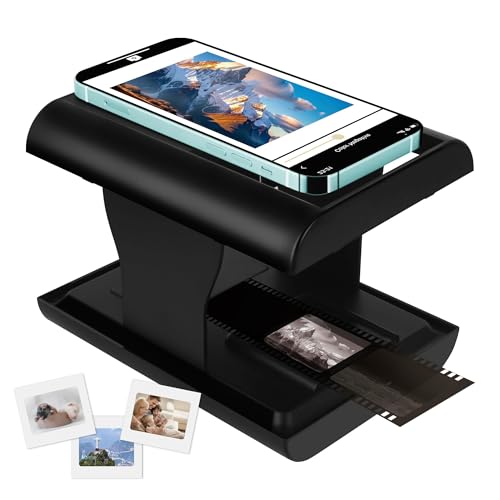
DGODRT’s mobile scanner leverages a smartphone app to capture slides and negatives. It’s ideal for on‑the‑go digitizing and sharing, with battery-powered operation. Best for: travelers or casual users who want quick, shareable results. Caution: app reliance may affect consistency across devices and lighting conditions.
JJC Film Digitizer Kit
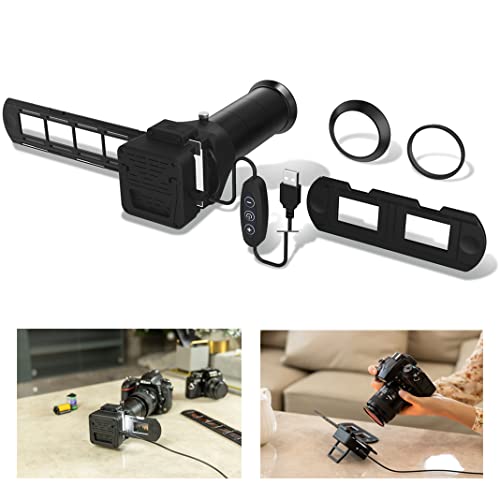
The JJC kit uses macro lenses to re-photograph 35mm negatives and slides with multiple lens adapters. It fits select Canon, Nikon, and Sony macro lenses and includes a bright 6500K LED backlight. Best for: photographers who want to digitize with existing camera gear and achieve high control over focus and lighting. Caution: requires compatible macro lenses and careful setup.
BEONEGLOBAL ClearScan MINI

ClearScan MINI delivers up to 16MP scans with an LCD display and simple controls. It saves directly to an SD card up to 32GB and emphasizes ergonomic design for easy use. Best for: casual users wanting straightforward, consistent results in a compact form. Caution: 16MP may be lower than some high‑end scanners for very large prints.
Buying Guide: How to Choose the Right 35mm Slide Scanner
What format do you need to digitize? If you only have 35mm slides, select a model that excels at 35mm and offers strong handling for reels, negatives, and frames. Do you want PC‑free operation? Consider scanners with built‑in memory and LCD previews. How much storage is needed? Look for SD card support and memory options. Are high details important? Prioritize higher megapixel counts and lossless saving modes where available. Do you value portability? Mobile scanners or compact standalone units suit travel or casual use. Is future-proofing important? Choose models with USB/HDMI or TV-out to expand viewing options and transfer methods.
Frequently Asked Questions
- What is the typical resolution of these scanners? Typical outputs range from 2MP to 22MP, with higher-end models offering more detail for archival purposes.
- Can I scan multiple slides at once? Some models feature rapid feeders for continuous loading; check the product specifics for batch capabilities.
- Which formats are supported? Most support 35mm, 126, and 110 film, plus various slide sizes; verify compatibility before purchase.
- Will scans preserve color accuracy? Look for scanners with good dynamic range and color controls on the LCD or in built-in software.
- Are these suitable for old Kodachrome or Ektachrome slides? Many scanners handle color slides, but some older transparency types may require higher-end or specialized gear.