Best Continuity Camera Mounts for External Monitors and Desktops
Whether you’re upgrading video calls, streaming, or content creation, continuity camera mounts help you turn your iPhone into a high-quality webcam for desktop setups. This guide highlights five reliable options, explaining who each is best for, their key strengths, and a practical caveat. Perfect for designers, remote workers, educators, and creators seeking steadier, hands-free camera angles with MagSafe compatibility.
Summary of chosen products
| Product | Best For | Notes |
|---|---|---|
| Stouchi Continuity Camera Mount for Desktop Monitor | Mac desktops and iMac users seeking MagSafe-friendly mounting | Light aluminum, easy angle adjustments |
| Itramax Continuity Camera Mount for iMac/Desktop Monitor (First) | Sturdy stand with rear camera setup | MagSafe compatible, robust build |
| Itramax Continuity Camera Mount for iMac/Desktop Monitor (Second) | 360° rotation, flexible angles | Includes 1/4″ tripod compatibility |
| FANAUE Continuity Camera Mount | MagSafe compatibility and versatile desktop use | Magnetic ring for secure hold |
| OMOTON VC07 Continuity Camera Mount | MagSafe-friendly with dual-axis adjustment | 180° rotation, 360° base |
Stouchi Continuity Camera Mount for Desktop Monitor

The Stouchi mount uses a lightweight aluminum alloy to support iMacs and many external displays. It is designed for Macs running Ventura and supports MagSafe-enabled iPhones. Best for iMac users who want a secure, magnetic attachment and easy angle adjustments from vertical to about 30 degrees downward. A potential limitation is removing phone cases other than MagSafe-compatible ones before mounting.
Itramax Continuity Camera Mount for iMac & Desktop Monitor

This model emphasizes turning your phone into a high-quality webcam for professional calls and streams. It is built from durable aluminum with soft silicone pads and is ideal for monitor setups rather than ultra-thin laptops. Notable is its rear-camera support orientation, which can yield crisper video. Best for desktop setups where stability and screen protection matter; choose this if you prioritize a solid, non-slip mount. A limitation: heavier phones on very thin laptops may affect balance if you rely on a single monitor support.
Itramax Continuity Camera Mount for iMac & Desktop Monitor (360°)

This upgraded model adds a full 360° swivel head, letting you adjust angles without tilting your monitor. It uses MagSafe magnets for secure attachment and offers a foldable aluminum design with a 1/4″ threaded hole for tripod mounting. Best for users who need rapid orientation changes and external mounting flexibility. Caution: heavier phones may require a stable external monitor or tripod for balance.
FANAUE Continuity Camera Mount for Desktop Monitor

FANAUE’s mount emphasizes a magnetic attachment for MagSafe-enabled iPhones. It functions as a desktop monitor mount and includes a 1/4″-20 screw to double as a tripod adapter. Best for MagSafe users seeking a strong magnetic hold and a simple, stable webcam setup. The limitation is the need for a MagSafe-compatible iPhone for optimal performance.
OMOTON VC07 Continuity Camera Mount
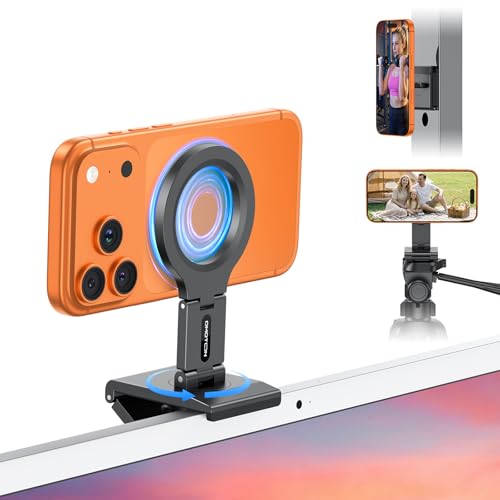
OMOTON’s VC07 offers 4K-ready potential for image calls and a dual-axis adjustment along with a 180° rotation and a 360° rotating base. It supports MagSafe iPhones and is designed for use with monitors, TVs, and other surfaces. Best for users who want flexible angle control and magnetic attachment. Limitation: some setups may require extra space to achieve the full rotation range without obstructing the display.
Buying Guide: Key Purchase Considerations
- Compatibility: Confirm your iPhone model and Mac/PC setup (iMac, Mac mini, desktop monitors) with the monitor’s size and stand strength. Look for MagSafe compatibility if you plan to rely on magnetic attachment.
- Mounting Surface: Decide between top-of-monitor mounts, desktop stands, or wall/tripod-ready designs. Some mounts include a 1/4″-20 screw for tripod attachments for added stability.
- Adjustability: Consider rotation (360°), tilt (30° downward), and overall range of motion. A model with a rotatable base helps you quickly adapt to different video angles.
- Phone Case Considerations: If the mount requires removing cases, verify whetherMagSafe-compatible cases are supported and whether you’re willing to remove non-MagSafe cases for camera use.
- Build Quality: Aluminum alloys and silicone pads reduce scuffs and protect screens. Look for soft padding on contact surfaces to avoid scratches on displays.
- Portability vs. Stability: Foldable, travel-ready designs are convenient, but ensure the mount remains stable with your phone weight and monitor size.
- Setup and Use: Some models emphasize rear-camera use or a brighter field of view. Choose a mount whose intended use aligns with your typical video calls or streaming workflows.
FAQ
- What is a continuity camera mount? It is a stand or magnetic attachment that secures an iPhone to a monitor or desktop setup to act as a webcam using Continuity Camera features.
- Do these mounts require special software? Most rely on built-in iPhone features like Continuity Camera and do not require extra software beyond macOS or iOS updates.
- Can I use any iPhone with these mounts? Most mounts support MagSafe-enabled iPhone models; check the product features for compatibility with iPhone 12 through iPhone 17 series and beyond.
- Are these mounts suitable for laptops? Some mounts are designed for larger desktops and monitors; for thinner laptops, balance and stability may vary, so an external monitor is often preferred.
- Is rotation important for video calls? A wider rotation range (360°) allows you to switch between landscape and portrait framing easily, which is useful for streaming and conferencing.
- Do these mounts affect screen protection? Look for mounts with soft silicone padding and non-scratching contact surfaces to protect displays during adjustments.