Best Color Photo and Label Printers for Stickers, Photos, and Labels
Answering your search for a color photo and label printer, these options cover compact photo printing, on‑the‑go label making, and all‑in‑one sticker creation. Best for students, crafters, and small offices who want quick, vibrant outputs without complicated setup. The top picks below emphasize color richness, ease of use, and flexibility for creating photos, labels, and stickers. A quick buyer table follows to compare core specs at a glance.
| Product | Type | Best For | Key Benefit |
|---|---|---|---|
| Liene PixCut S1 | All‑in‑One Sticker Printer | Craft lovers, DIY projects | Print and cut in one step with AI auto-cut |
| Nelko PP01 | 2×3″ Portable Photo Printer | On‑the‑go prints | Sticky‑back prints, ultra‑portable |
| HP Sprocket Panorama | Mini Label & Photo Printer | Casual photo booths, labels | Zink technology, no ink cartridges |
| Liene PixCut S1 Inspire Kit | All‑in‑One Color Sticker Printer | Bulk crafting, large paper supply | Includes 180 sheets of paper for ongoing projects |
| KODAK Dock Plus | 4×6 Dye‑Sub Printer | Home photo prints | Docking and easy smartphone printing |
Note: Each product offers color photo printing with various label or sticker capabilities. Review the sections below to identify which model aligns best with your intended use, whether leisure crafting, school projects, or simple home photo labeling.
Liene PixCut S1 Color Sticker Printer & Cutter

The Liene PixCut S1 combines high‑resolution photo printing with precise die cutting in a single device. Best for crafters who want to edit, print, and cut directly from a smartphone via Bluetooth. The AI image extraction recognizes subjects and guides the cutting edge for clean edges. Prints use thermal dye‑sublimation at 300 dpi with a broad color range for vibrant photos, stickers, and labels.
- Best for: DIY sticker makers, small craft projects, and quick label creation.
- Why selected: All‑in‑one device reduces setup and speeds up workflows compared to separate printer and cutter systems.
- Caution: AI edge cutting may require precise subject isolation; backgrounds or complex edges can challenge automatic extraction.
In practice, this model is ideal for sticker lovers who want professional edges without extra equipment. The included app enables on‑device editing and print‑and‑cut sequences, making it a strong choice for classroom or home craft use.
Nelko PP01 Mini Color Photo Printer

The Nelko PP01 offers a compact, portable option for 2×3″ sticky‑back photos. It prints in full color with up to 603 dpi quality on water‑ and tear‑resistant sticky paper. Lightweight at about 0.6 pounds, it is well suited for field trips, school projects, and quick photo keepsakes. Bluetooth pairing with iOS and Android enables straightforward app‑driven printing.
- Best for: Quick, on‑the‑go photo prints with adhesive backing.
- Why selected: Portable size combined with good print resolution and sticky‑back media extends use beyond standard photos.
- Caution: Inkjet technology may require careful handling of the provided paper to avoid jamming or misfeeds.
Choose this if portability and adhesive photos are your priority, especially for scrapbooks or labeling personal items with photos on the go.
HP Sprocket Panorama Instant Color Printer

The HP Sprocket Panorama supports 2″ wide sticky‑back prints, suitable for photos, labels, and small crafts. It uses Zink technology to produce vibrant, glossy prints without ink cartridges, easing maintenance. The companion app enables creative templates, filters, and simple project sharing. This model is best for casual use and quick photo projects at home or events.
- Best for: Fun, lightweight photo booths, simple label projects, and casual printing.
- Why selected: Inkless printing reduces ongoing costs and mess while delivering durable glossy finishes.
- Caution: Print size is fixed to 2″ strips; larger photos or labels require alternative devices.
Choose this if you want a budget‑friendly, easy‑to‑use option for quick prints and printable stickers in a social or party setting.
Liene PixCut S1 Inspire Kit
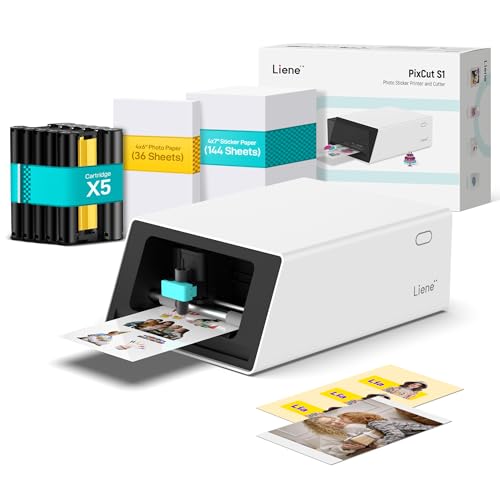
The Inspire Kit expands the S1 platform with 36 photo papers and 144 sticker papers, letting creators print longer sessions without reloading. It retains AI image extraction, and the 300 dpi dye‑sublimation prints preserve color depth for professional‑looking edges on stickers and labels. Suitable for serious hobbyists and classrooms that require a steady supply of print media.
- Best for: Enthusiasts who want a ready‑to‑craft bundle with ample paper supply.
- Why selected: The larger paper bundle supports extended sessions and diverse sticker projects without interruption.
- Caution: The kit lengthens setup time slightly due to more media handling; ensure you’re near a power source for longer sessions.
Opt for this if you plan batch sticker production or frequent photo labeling, and you want an all‑in‑one device with ample media stock included.
Liene M100 4×6 Inch Photo Printer

The Liene M100 is a dedicated 4×6 photo printer designed for smartphones and PCs with Wi‑Fi printing. It ships with a substantial media package, including multiple sheets and cartridges, and emphasizes durable dye‑sublimation finishes for long‑lasting, water‑ and fade‑resistant photos. It is well suited for family photo prints, scrapbooks, and portable photo booths in homes and classrooms.
- Best for: Families and students needing large, colorful photo prints from mobile devices.
- Why selected: Strong emphasis on durable, high‑quality 4×6 outputs with convenient wireless printing.
- Caution: Primarily a photo printer; it does not target label or sticker customization as its primary function.
Choose this if your focus is high‑quality photo prints at 4×6 size with reliable wireless printing and a broad media pack.
KODAK Dock Plus 4×6 Photo Printer

The KODAK Dock Plus provides a docking station experience for easy 4×6 prints. It uses Dye Sublimation 4PASS technology to deliver color‑rich photos with a protective lamination layer. The simple setup and wireless printing from compatible smartphones make it suitable for home use and casual photo labeling tasks. It’s best for straightforward, ready‑to‑print photos without extra steps.
- Best for: Quick, reliable 4×6 photo prints from mobile devices.
- Why selected: Built‑in dock and 4PASS dye sublimation deliver durable, glossy photos with minimal fuss.
- Caution: Focused on photo printing; not optimized for large label or sticker production beyond photos.
Pick this if you want a simple, dedicated photo printing dock that’s easy to use and produces durable prints for albums or frames.
Buying Guide: Key Considerations
What to look for when choosing a color photo and label printer:
- Print type and media: Dye sublimation yields durable, vibrant photos; Zink or inkjet options suit different budgets and use cases. Consider whether you need sticky‑back media for labels or standard photo paper.
- Portability: If you’ll print on the go, prioritize compact, lightweight models with wireless app control and long battery life where applicable.
- All‑in‑one vs dedicated: All‑in‑one sticker printers save space and streamline workflows. Dedicated photo printers can offer larger formats and potentially higher print fidelity.
- Paper supply and bundles: Look for kits or bundles if you anticipate ongoing projects. A larger media bundle avoids frequent reordering.
- Software and AI features: AI edge detection or automatic subject extraction can simplify sticker creation but may require steady app support and clean input images.
- Ease of use: App reliability, straightforward pairing, and intuitive editing templates reduce time to final output for hobbyists and educators alike.
FAQ
- Which printer is best for sticker making? The Liene PixCut S1 and Liene PixCut S1 Inspire Kit are designed for print‑and‑cut sticker workflows, with AI cutting and high color fidelity.
- Do these printers require ink? Some use dye sublimation; others rely on cartridge or media embedded color systems like Zink. Check the media compatibility for each model.
- Is portable printing reliable for photos? Portable options like Nelko PP01 and HP Sprocket Panorama provide convenient on‑the‑go prints, though print size and media types differ.
- Can I print 4×6 photos at home easily? Yes, with models like KODAK Dock Plus or Liene M100, which emphasize simple setup and durable 4×6 outputs.
- Are all‑in‑one sticker printers worth it? For creators who frequently print and cut, an all‑in‑one unit saves space and time by combining steps in one device.
- What should I consider about paper bundles? A kit with ample sheets reduces interruptions during long projects, especially for sticker design and batch photo labeling.