Best Cheap Webcams With Microphones for Clear Video Calls
If you’re shopping for an affordable webcam with a built‑in microphone, you want reliable HD video, clear audio, and easy setup. This guide highlights five budget-friendly options that fit common use cases like remote work, online classes, streaming, and casual video chats. Each pick is chosen for strong core features, plug‑and‑play simplicity, and value. The buyer profiles below help you decide who benefits most from each model. A quick comparison table follows to summarize key specs.
| Product | Best For | Key Feature | Limitations |
|---|---|---|---|
| NIVEOLI Webcam 1080P | Frequent video calls, backlit rooms | HDR, privacy shutter | USB 2.0 only |
| XOCLON HD 1080p | Remote workers, students | Auto light correction, easy plug‑and‑play | Built‑in mic; may pick up background noise |
| Vuexar Pro Series | Professional meetings, streaming | Dual mics, wide angle | pricier than single‑mic models |
| NexiGo N60 | Zoom/Teams users, classrooms | Software control, wide compatibility | Some users report limited OS updates |
| Diccik 1080P | Creators, online teaching | F2.2 low‑light, IMX132 sensor | May require lighting for best results |
NIVEOLI Webcam 1080P With Microphone

Best for video calls in variable lighting and small home offices. The NIVEOLI model delivers 1080p HD video at 30fps with HDR that helps front‑facing subjects stay visible in backlit scenes. The built‑in dual noise‑canceling microphones reduce background chatter, making it a solid pick for online meetings, streaming, and casual gaming.
Why chosen This webcam combines clear video, a privacy shutter, and USB 2.0 plug‑and‑play setup, offering straightforward use for non‑tech users and busy professionals alike.
Limitations It relies on USB 2.0 bandwidth; higher frame rates or extended USB 3.0 features aren’t advertised. If you have many USB devices, bandwidth can compete for resources.
XOCLON HD 1080p Webcam With Microphone

Best for remote workers and students who want a simple, reliable plug‑and‑play setup. It auto‑adjusts exposure and white balance to keep you looking natural in various lighting conditions, and requires no driver installation.
Why chosen Its wide compatibility and built‑in microphone make it a strong all‑in‑one option for daily calls and online classes.
Limitations The microphone is serviceable, but some environments may benefit from a dedicated headset for noisy rooms.
Vuexar Full HD 1080P Webcam With Microphone
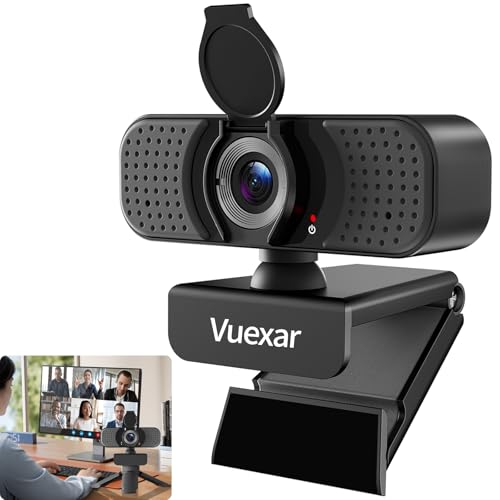
Best for web conferences and streaming where clearer audio from two microphones helps minimize background noise. The wide‑angle lens expands your field of view for group calls without sacrificing video quality.
Why chosen The dual mics and 1080p accuracy provide a balanced package for meetings and light production work.
Limitations As a step up in features, it may be pricier than single‑microphone options and its weight may affect portability.
NexiGo N60 1080P Webcam With Microphone

Best for users who need software control and broad compatibility across devices. It delivers 1080p video at 30fps with a built‑in microphone suitable for Zoom, Skype, and Teams.
Why chosen Plug‑and‑play ease with broad OS support makes it a reliable mainstream choice for home offices and classrooms.
Limitations Some users may prefer a higher frame rate for fast‑motion activities like gaming.
Diccik 1080P Webcam With Microphone

Best for creators and online teachers who need strong low‑light performance and color accuracy. The IMX132 sensor and large aperture help reduce grain in dim environments.
Why chosen The optical improvements support professional presence in streaming and calls without requiring extra lighting gear.
Limitations The sensor size and imaging benefits are best realized with decent ambient light; very dark rooms may still need lighting.
Buying Guide: Key Purchase Considerations
- Video quality: Look for at least 1080p resolution and 30fps for smooth, clear imaging.
- Audio quality: Dual microphones and noise reduction help keep your voice clear in bustling environments.
- Lighting: Cameras with automatic light correction or HDR perform better in mixed lighting; consider a simple lamp if needed.
- Privacy and security: A physical privacy shutter protects against inadvertent camera exposure.
- Compatibility and setup: USB plug‑and‑play with broad OS support reduces driver issues and setup time.
- Field of view: A wider angle helps with group calls, but can distort if set too wide for a single subject.
- Size and portability: Clip or stand design matters for laptop use, desktops, or travel.
- Use case alignment: Remote work, classes, streaming, or casual calls each benefit from different mic and sensor strengths.
Frequently Asked Questions
- Q: Do I need an external microphone if I buy a webcam with a built‑in mic? A: It depends on your environment. Built‑in mics are convenient, but a dedicated mic can improve voice quality in noisy spaces.
- Q: Is 1080p enough for professional video calls? A: Yes, 1080p at 30fps provides clear, readable video for most meetings and streams.
- Q: Will these webcams work with Mac and Windows? A: Most listed models are plug‑and‑play across major OSes, but check compatibility notes for each product.
- Q: What is the benefit of privacy shutter cameras? A: Privacy shutters allow you to physically block the lens when not in use, enhancing security.
- Q: Can I use these webcams for streaming on platforms like Twitch? A: Some models are well‑suited for streaming, especially those with good low‑light performance and dual mics.
- Q: Do these webcams require drivers? A: Most are USB plug‑and‑play and do not need extra drivers for common operating systems.