Best Cell Phone Remote Camera Shutter Solutions for Clear Selfies and Photos
The best answer to “cell phone remote camera” is to choose a compact Bluetooth shutter remote that fits your device, shooting style, and distance needs. This guide highlights top picks ideal for selfies, travel photos, TikTok clips, and hands-free group shots. Each option fits different budgets and usage scenarios, from micro-sized keychain remotes to feature-rich models with zoom and front/rear camera switching.
Buyer types at a glance:
– The Everyday Selfie Taker: compact remotes that fit on a keychain for quick access.
– The Content Creator: remotes with zoom, front/rear camera switching, and video control.
– The Distance Photographer: longer-range Bluetooth remotes for tripod or distant shots.
– The Multi-Person Photographer: models with reliable cross-device pairing and long battery life.
| Product | Best For | Key Feature |
|---|---|---|
| Xenvo Shutterbug | Content creators wanting reliability and broad compatibility | Instant auto-connect, long battery life, wide compatibility |
| CamKix Camera Shutter Remote | Users who want simple, reliable hands-free shooting | Lightweight, quick pairing, up to 30 ft/10 m |
| 2 Pack Wireless Camera Remote Control (Skoutag) | Travelers needing multiple remotes or group shots | 30 ft/10 m range, Instagram/Snapchat compatible |
| AOQIYUE / EszkozTA Wireless Remote (3 Pack) | Family and friends sharing remotes | 50 ft/15 m range, compact with wrist strap |
| Zttopo Wireless Camera Remote | Keychain-friendly option for on-the-go users | Up to 30 ft/10 m, two-button shutter and video capture |
Xenvo Shutterbug — Versatile Bluetooth Camera Shutter
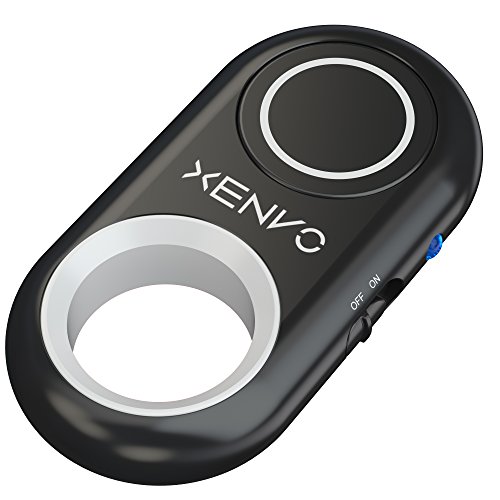
Best for: Content creators who want a reliable, quick-pair shutter with broad compatibility across iPhone, iPad, Android, and tablets. The Xenvo Shutterbug emphasizes crisp photos and seamless video capture with a single button press.
- Pairing and compatibility: Auto-connects to most devices; no app required.
- Functionality: Triggers photos and starts/stops video; simple OFF/ON switch.
- Durability: Small and portable, designed for easy clipping or pocket carry.
Limitation: Not compatible with Windows phones; consider this if you use non-mainstream devices.
CamKix Camera Shutter Remote — Simple and Reliable
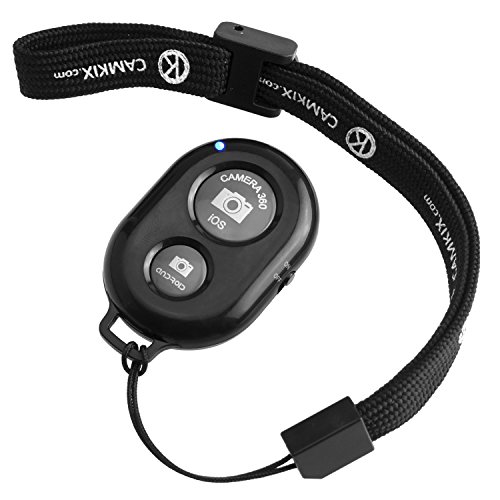
Best for: Anyone who wants an easy-to-carry remote with dependable Bluetooth pairing and broad compatibility for social sharing on apps like Snapchat and Instagram.
- Portable design: Lightweight, pocket-friendly, with a wrist strap option for quick access.
- Pairing: Smooth pairing with certified Bluetooth technology; reliable up to 30 ft (10 m).
- Use case: Ideal for selfies, group shots, and smooth video capture.
Limitation: Some users may need to re-pair after device reboots; once paired, re-connects quickly.
EszkozTA AOQIYUE Wireless Remote — Multi-Pack Convenience

Best for: Families or groups needing multiple remotes for shared adventures or group photos, with extended range for comfortable shooting from a distance.
- Range: Up to 50 feet (15 meters) for flexible shooting from afar.
- Contents: Includes wrist strap and compact design suitable for pockets or bags.
- Use with: Compatible for quick selfies, videos, and basic camera control on iPhone/Android.
Limitation: As a multi-pack, individual remotes may vary slightly in battery life; plan for regular swaps if used heavily.
Skoutag 2 Pack Wireless Remote — Simple, Everyday Use

Best for: Travelers who want an extra remote for a group shot or two separate devices without complicating setup.
- Range and compatibility: Up to 30 ft (10 m); working with popular social apps like Instagram and Snapchat.
- Portability: Lightweight and easy to carry; two-pack provides flexibility for different devices or routes.
- Use case: Great for quick selfies and casual videos on the go.
Zttopo Wireless Camera Remote — Pocket-Sized Remote

Best for: Buyers seeking a compact, keychain-friendly remote for easy access to shutter control on the go.
- Range: Operational up to 30 feet (10 meters) from your device.
- Design: Small and lightweight; includes wrist strap for quick handling.
- Suitability: Simple shutter and video capture; suitable for casual photography and social sharing.
Limitation: Basic features may not satisfy advanced creators looking for zoom or front/rear camera switching.
Buying Guide
What should you consider when choosing a cell phone remote camera?
- Range: Choose a remote with a range that fits how you shoot. If you sit near a tripod, a shorter range is fine; for distant selfies or group photos, look for 30–50 ft (10–15 m).
- Compatibility: Ensure compatibility with your device family (iPhone, Android, iPad, tablets). Some remotes require no apps; others work across multiple platforms with minimal setup.
- Power and battery life: Most remotes use coin-cell batteries (CR2032 or similar). Consider models advertised for longer life or those with replaceable batteries.
- Size and portability: If you travel often or carry a small bag, a compact, keychain-friendly remote is ideal. Wrist straps improve accessibility during shoots.
- Additional features: Zoom control, front/rear camera switching, and video start/stop can be decisive for content creators. If you only need to capture basic photos, a simple shutter button may suffice.
- App dependency: Some remotes work without apps, while others require app-based control for advanced features. Decide whether you need app-free operation or app-driven versatility.
- Durability and build: Look for a lightweight design with secure button action and a sturdy clip or strap for on-the-go use.
How to use a cell phone remote camera effectively?
- Pairing: Turn on Bluetooth, enable the remote, and follow the on-screen prompts if pairing is required by your device.
- Positioning: Use a tripod or stable surface to avoid blur. Ensure lighting is even and faces the camera for the best results.
- Shutter timing: For group shots, count your breath and align timing with your camera’s focus to reduce motion blur.
- Distance: Hold the remote steadily away from the phone to avoid hand shake. A longer range allows more flexibility for creative angles.
- Maintenance: Replace batteries as needed and store remotes in a protective case to avoid battery leaks or damage.
FAQ
- Do these remotes require an app to work? Some do not require apps, while others use companion apps for advanced features. Check the product description for app dependency.
- Can I use a cell phone remote with any smartphone? Most remotes support iPhone and Android devices. Verify compatibility and range in the product details.
- Is longer range always better? Not necessarily. A longer range helps in larger settings or group shots, but a compact range is sufficient for everyday selfies and close-up shots.
- Will a remote work with tablets? Many remotes advertise compatibility with smartphones and tablets; confirm device compatibility before purchase.
- What’s the difference between 2-pack and 3-pack remotes? Multi-pack offerings provide multiple remotes for shared devices or groups; check if any pack includes extra features or only extra quantity.
- Are there safety considerations with battery types? Most remotes use CR2032 or similar coin cells; replace them according to manufacturer guidelines and dispose of batteries properly.