For photographers and videographers, fast and reliable memory card readers streamline workflows from field shoots to studio edits. This guide highlights five top card readers that work across devices and operating systems, ensuring you can transfer RAW files, 4K video, and large photo batches quickly and safely. Below you’ll find quick product highlights, along with a buying guide to help you choose the right interface, speed, and compatibility for your camera gear.
| Product | Type | Interfaces | Cards Supported |
|---|---|---|---|
| SmartQ C368 USB 3.0 Card Reader | 4-in-1 | USB 3.0 | SD, microSD, MS, CF |
| BENFEI 4in1 USB-C/USB 3.0 Card Reader | 4-in-1 | USB-C/USB 3.0 | SD, microSD, MS, CF |
| SZHAIYIJIN Memory Card Reader for iPhone | Lightning/USB OTG | Lightning to USB | SD, microSD |
| Anker 2-in-1 USB-C Card Reader | Dual-slot | USB-C | SD, microSD |
| xdgeLoad USB-C SD Card Reader | 2-in-1 | USB-C | SD, microSD |
All five options balance portability with performance, offering plug-and-play use, wide compatibility, and solid transfer speeds. The list below explores each model in detail to help you decide which fits your camera setup best.
SmartQ C368 USB 3.0 Card Reader

The SmartQ C368 is a four-in-one card reader that supports Micro SD, SD, MS, and CF cards. It reads data independently and is designed for plug-and-play use, making it a strong choice for travelers and field shooters. Its USB 3.0 interface promises high speeds, up to USB 3.0 performance, which translates to efficient transfers for large media files. The device is built for compatibility across Windows, macOS, and Linux, without the need for extra drivers.
Key advantages include broad card compatibility in a compact form, straightforward operation, and a robust plug-and-play experience. For photographers frequently swapping cards from DSLRs or older cameras, this reader offers a dependable, no-fuss workflow.
Considerations: While USB 3.0 supports fast transfers, real-world speeds depend on the card type and the host USB port. Mac and PC users will benefit from the broad OS compatibility, but ensure your workflow includes at least USB 3.0 ports to maximize performance.
BENFEI 4in1 USB-C/USB 3.0 Card Reader

The BENFEI 4in1 reader combines USB-C and USB 3.0 interfaces in a single adapter, supporting SD, microSD, MS, and CF cards. Its 4-in-1 design enables simultaneous or sequential data transfer across multiple card formats, which is helpful when working with different camera setups. The reader supports read/write speeds up to 104 MB/s when connected via USB-C or USB 3.0, with broad compatibility across modern laptops and smartphones that support USB-C and USB 3.0 ports.
Strengths include a versatile two-connector design, capable of connecting to USB-C or USB-A hosts, and strong activity in UHS-I mode for quick previews and transfers. This makes it a practical choice for editors who juggle several media types on location and in the studio.
Limitations: The ultimate speed depends on the card and host interface. If your workflow involves older USB 2.0 ports, speeds will drop accordingly. Ensure your gear supports USB-C or USB 3.0 to unlock full potential.
SZHAIYIJIN SD Card Reader for iPhone

This reader targets photographers who share workflow between iPhone devices and cameras. It supports SD and microSD cards, with a Lightning-to-USB interface designed for direct iPhone connectivity. The plug-and-play design means no app installation is required, and it enables quick import of photos and videos to iPhone or iPad for editing or sharing. It’s positioned as a practical accessory for photographers who often move between field shooting and mobile editing on iOS devices.
Pros include easy iPhone compatibility and a straightforward import process. A potential limitation is the lack of broader USB-C or multi-platform support, which may not suit users who rely on desktops, Android devices, or non-iOS ecosystems.
SUNTRSI SD Card Reader for iPhone and iPad

The SUNTRSI reader focuses on iPhone and iPad users, offering dual-card support and a USB connection that facilitates high-speed data transmission. The claimed 20–30 MB/s transfer range supports practical on-device transfers for quick backups and sharing from cameras and drones. It emphasizes a plug-and-play approach without requiring extra software, which aligns with mobile-centric workflows where quick access to media is essential.
Strengths include simplicity and speed suitable for casual to semi-professional trips. However, users requiring full desktop integration or Windows/macOS-wide compatibility may want a more universal device with broader OS support.
Anker SD Card Reader, 2-in-1 USB-C
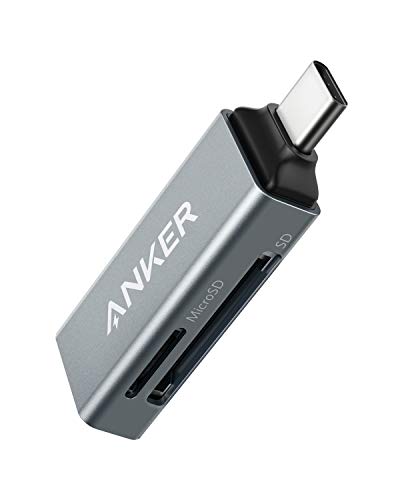
The Anker reader offers a compact, dual-slot design that supports SD and microSD, with a USB-C interface designed for modern devices like MacBook models and USB-C phones. It emphasizes portability and universal compatibility, making it a strong option for photographers who frequently travel with a laptop and want to minimize gear while maintaining reliable transfers.
Its small form factor is ideal for crowded bags or tight camera cases. The device’s two slots enable convenient file organization and quick transfer between multiple cards. For users with a mix of SD and microSD cards, this reader provides a straightforward solution that works across many USB-C hosts.
xdgeLoad USB-C SD Card Reader

The xdgeLoad SD Card Reader features a 2-in-1 USB-C design with dual card slots supporting SD and microSD, along with a bi-directional transfer mode for quick uploading and saving of data to various devices. Its single USB-C port is designed to avoid blocking other ports on a computer, which is beneficial for workspace setups with multiple peripherals. The device is described as durable for travel and outdoor use, with a focus on stable data transfer through a robust internal chip.
Strengths include bidirectional transfers and a user-friendly USB-C design. This reader is well-suited to photographers who need fast on-the-go transfers to mobile devices or laptops with USB-C, particularly when space and port availability are considerations.
Buying Guide: Key Purchase Considerations
Choosing the right card reader depends on your camera setup, workflow, and preferred devices. Consider these factors when evaluating options:
- Card types and slots: If you shoot with DSLRs or mirrorless cameras using CF or MS cards, prioritize readers offering CF and MS slots in addition to SD and microSD. For most modern cameras, SD and microSD support is essential.
- Interface and speed: USB-C and USB 3.0 support provide the fastest transfers. The actual speed depends on the card, host port version, and card reader’s internal controller.
- Device compatibility: Ensure compatibility with your computer OS (Windows, macOS, Linux) and mobile devices if you plan to transfer to phones or tablets.
- Portability vs. durability: Field use benefits from compact, lightweight readers; rugged housings suit outdoor shoots. Consider whether you need water resistance or shock protection for travel.
- Plug-and-play vs. driver requirements: Most readers are plug-and-play, but some may require drivers on certain systems. If you regularly work offline or on legacy hardware, verify driver availability.
- One-to-many vs. one-to-one: If you routinely transfer from multiple cards, a reader that supports simultaneous reads can save time but may be bulkier or more expensive.
- Phone and tablet compatibility: For on-device editing, consider readers with Lightning or USB-C compatibility for iPhone/iPad or Android devices, respectively.
Performance expectations should align with card type (SD, microSD, CF, MS) and the host device. When choosing, balance the number of supported card formats with the portability you require. For professionals who frequently switch between cameras, a 4-in-1 or 2-in-1 reader with USB-C or USB-A compatibility provides the greatest versatility across systems.