Best Cameras With HDMI Output for Direct TV or Monitor Viewing
Direct HDMI output cameras are ideal for anyone who wants instant, lag-free live viewing on a TV, monitor, or capture device. This guide highlights five models that clearly list HDMI or HDMI-compatible output, helping you pick the right option for monitoring, streaming, or live display. The best choices cover a range of needs—from simple direct-view HD setups to high-resolution multi-lensor camcorders for professional use. The table below compares key details to help buyers choose quickly.
| Product | Best For | ||
|---|---|---|---|
| LINOVISION HD1080P HDMI Security Camera | Direct TV/HD monitor display | HDMI or VGA output | HD1080p, 2.8mm lens, HDTVI loopout for DVR use |
| ZIMOCE 4K 60FPS Camcorder | High-detail video on HDMI displays | HDMI output up to 4K60 | Dual lens options, 21X zoom, 120°/60° FOV |
| MOKOSE HDMI Camera (C-Mount) | Professional HDMI video feeds | HDMI output up to 4K/30 | 2.8-12mm varifocal lens, manual controls |
| IFWATER 1080P HDMI Camera | Live streaming and dual display | HDMI output (1080P); USB-C for PC | 2.8-12mm zoom, simultaneous HDMI/USB |
| SDTNOVA HDMI USB3.0 Dual Output Camera | Professional multi-output setups | HDMI and USB 3.0 outputs | 1080P60, 2.8-12mm lens, CS mount |
LINOVISION HD1080P HDMI Security Camera

Best for: Users seeking a plug-and-play HD display directly on a television or monitor without extra encoders or DVRs. This camera offers HDMI or VGA output to deliver immediate HD video on compatible displays. The 2.8mm fixed lens provides a wide field of view, making it useful for small rooms or entryways. It also supports an HDTVI loopout to enable continuous DVR recording if you already own a recording system. A potential limitation is that it relies on a fixed focal length, which may reduce flexibility in high-traffic spaces.
ZIMOCE 4K 60FPS Video Camera Camcorder

Best for: Creators needing ultra-high-definition 4K footage with smooth motion, and flexible zoom options. This model features dual lenses (wide 120° and narrow 60°) for varied shooting scenarios, plus 4K at 60FPS and 48MP stills. It is well-suited for vlogging, fast-action scenes, and events. A caveat is that the camcorder’s complexity may require more setup time and practice to optimize both lenses and manual controls for optimal HDMI output quality.
MOKOSE 12MP HDMI Camera (C-Mount)
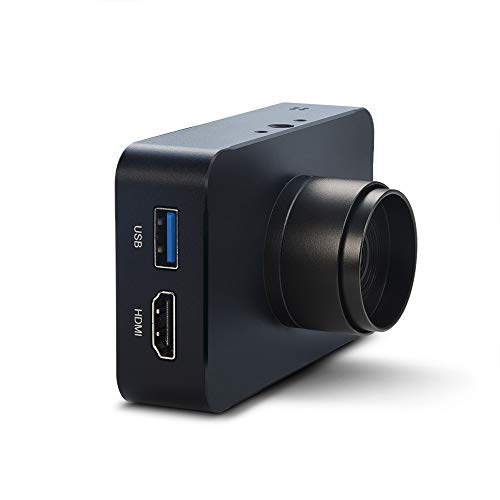
Best for: Professionals needing reliable HDMI output with high-resolution imagery for surveillance or broadcasting. The camera uses a 12MP CMOS sensor and supports 2160P/30fps or 1080P outputs, with a 2.8-12mm manual varifocal lens for precise framing. It is suitable for controlled environments like studios or labs. Limitations include the need for manual focus adjustments and potential compatibility checks with your recording setup.
IFWATER 1080P HDMI Camera

Best for: Streamers and presenters who need simultaneous HDMI and USB-C outputs for live displays and computer feeds. The 2.8-12mm zoom enables flexible framing, and the camera supports up to 3840×2160 MJPEG/H.264 formats for efficient streaming. A note: USB output may differ in resolution from HDMI, so plan display setups accordingly.
SVPRO 4K Streaming Webcam

Best for: Professional-grade streaming and monitoring with dual HDMI and USB outputs. It offers 4K at 30fps and a 5-50mm zoom lens with CS mount, making it versatile for long-distance capture or close-up shots on a monitor or projector. A limitation is the need to manage lens settings (manual zoom and focus) to maintain sharp HDMI output during dynamic scenes.
SDTNOVA HDMI USB3.0 Dual Output Camera

Best for: Studios or classrooms that require simultaneous HDMI and USB outputs with reliable 1080P60 video. The camera uses a 2.8-12mm varifocal lens and a high-quality IMX307 sensor for clear footage. It supports YUY2 and various compression formats for flexible workflows. A caution: ensure your USB connection supports the required bandwidth to avoid latency in live feeds.
Buying Guide
What should you consider when choosing an HDMI-output camera?
- Output resolution and frame rate: Match to your display or recording setup—4K requires compatible monitors and cabling.
- Lens type and zoom range: Varifocal or fixed lenses affect framing flexibility in different spaces.
- Sensor and image quality: Higher MP and modern sensors improve detail, especially in low light.
- Output compatibility: Confirm HDMI version, USB-C, and any DVR or capture device requirements.
- Mounting and form factor: Consider fixed installations vs. portable camcorders for on-the-go use.
FAQ
- Can all HDMI cameras output to HDMI without a capture card? Yes, many listed models provide direct HDMI output to TVs or monitors.
- What is C-mount, and who is it for? C-mount lenses are common on professional cameras for modular framing and telephoto reach; suitable for studios or labs.
- Do these cameras support live streaming? Several models offer USB or HDMI streaming capabilities, sometimes with additional software requirements.
- Is 4K output necessary for monitoring on a TV? Not always; for most homes, 1080p is sufficient, but 4K helps in professional monitors and large displays.
- What does “varifocal” mean? It means the lens can adjust focal length within a range to zoom in or out without moving the camera.
- Are HDMI loopouts useful? They allow direct DVR or monitor connections without extra encoding steps, improving workflow efficiency.