Best Cameras for Seniors: Clear Visuals, Easy Controls, and Reliable Monitoring
Finding the right camera setup for seniors means prioritizing simplicity, reliable connections, clear video, and helpful alerts. The following selections focus on home safety, caregiving support, and user-friendly operation. Each option blends straightforward setup with features like two-way talk, night vision, and motion or person detection to help families stay connected and reassured. This guide highlights five top picks and what makes them suitable for seniors and their caregivers.
| Product | Brand | Key Benefit |
|---|---|---|
| Blurams 5G Cameras for Home Security, 2K PTZ | blurams | 360° coverage and AI detections for hands-free monitoring |
| CallToU Elderly Monitor with Camera | CallToU | No Wi-Fi, secure 2.4 GHz FHSS for private monitoring |
| Smart Caregiver Video Monitor for Elderly | Smart Caregiver Corporation | Wireless, battery-powered, infrared night vision |
| KEENLUK Home Security Camera with Screen | KEENLUK | 4.3″ screen with two-way video calls for easier communication |
| GALAYOU Indoor Security Camera 2K | GALAYOU | 360° coverage with alerting and two-way audio |
All five options prioritize accessible interfaces, clear video, and reliable connectivity. Depending on whether you need a camera tailored for independent living, constant caregiver oversight, or a simple in-home monitor, one of these picks can fit into a senior-friendly setup.
Blurams 2K Indoor Camera With 360° Coverage

The Blurams 2K indoor camera is designed for whole-room visibility, making it suitable for bedrooms, living rooms, and pet areas. Its 360° pan-and-tilt capability helps minimize blind spots, so caregivers can quickly verify a senior’s activity from a smartphone. Integrated AI detects humans, motion, and sound without requiring a subscription, simplifying ongoing monitoring. The camera supports hands-free control through popular assistants like Alexa and Google Assistant, allowing easy voice commands for screen-free operation. Night vision adds clarity in low light, while two-way talk enables reassuring conversations without changing rooms.
Key considerations for seniors and caregivers:
– Pros: Full-room coverage reduces the need to move units; AI detection minimizes false alerts; voice control supports hands-free use.
– Cons: Requires stable Wi-Fi for cloud or local access and may need setup assistance for first-time users.
CallToU Elderly Monitor With Camera
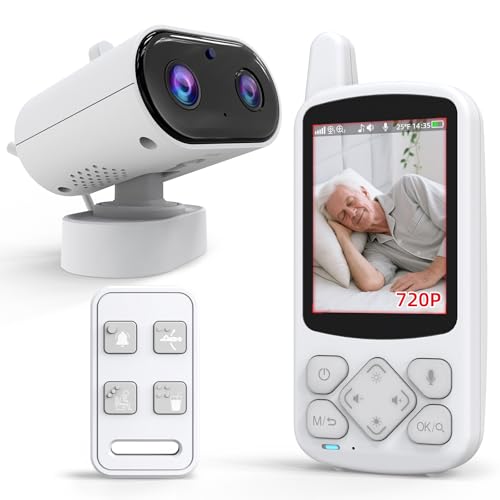
CallToU emphasizes privacy and simplicity with a no-Wi‑Fi design. Operating on a secure 2.4 GHz FHSS signal, this monitor offers real-time camera and two-way audio without internet exposure, which some families value for security and reliability. An emergency SOS button adds a straightforward physical aid, while daily prompts (like reminders to drink water or move) can support routine health checks without constant caregiver intervention. The device is designed for easy operation, making it a practical option for seniors who prefer a limited, predictable tech experience.
Key considerations for seniors and caregivers:
– Pros: Private, non-internet monitoring; clear night vision; quick SOS access.
– Cons: No remote app over the internet, so caregivers may rely on local access only; fewer modern smart features than Wi-Fi-enabled cameras.
Smart Caregiver Video Monitor With Infrared Night Vision

This portable caregiver monitor is built for mobility and independence. It features a rechargeable design with infrared night vision, making it suitable for checking in during evening hours. The compact 2.8-inch screen is easy to view from a standing or seated position, and the system is designed for secure, non-Wi‑Fi operation, helping avoid potential network hassles. The combination of a compact monitor and a camera creates a practical, on-the-go solution for caregivers who need to move around while keeping an eye on an older adult.
Key considerations for seniors and caregivers:
– Pros: Battery-powered for portability; straightforward interface; privacy-friendly design.
– Cons: Smaller screen means details may be harder to spot for some users; coverage is limited to the one camera connected to the monitor.
KEENLUK Home Security Camera With 1080P Screen
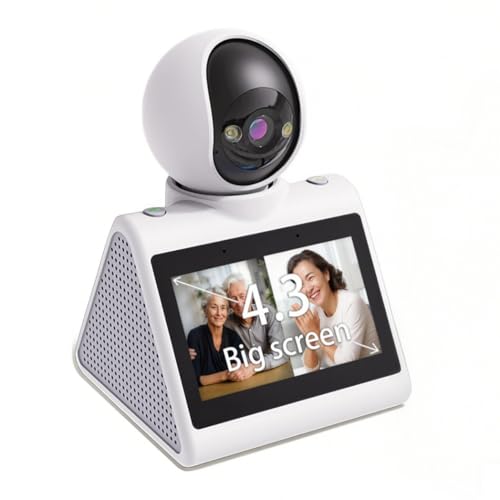
KEENLUK’s solution combines a home security camera with a dedicated 4.3-inch display for direct, nearby viewing. Two-way video calls on a larger built-in screen can simplify communication for seniors who may find smartphones challenging. The device advertises simple operation with a one-button call feature, making it accessible for relatives who are not tech-savvy. Local storage supports SD cards for quick, private recordings, and the device is designed to maintain a reliable home presence for day-to-day monitoring with an easy, button-driven workflow.
Key considerations for seniors and caregivers:
– Pros: Large display for easier viewing; simple call button for quick communication; direct device-to-device interaction.
– Cons: Requires stable 2.4 GHz Wi-Fi for full feature use; SD storage is optional but may require setup.
GALAYOU 2K Indoor Security Camera
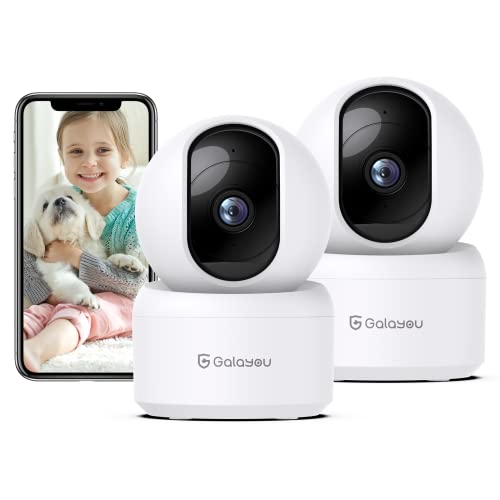
The GALAYOU 2K indoor camera delivers sharp 2K streaming with full 360° coverage. It leverages 2.4 GHz WiFi and 5 GHz is not supported, offering a straightforward setup for many households. Intelligent motion sensors and a siren help deter intruders, and the camera saves 10-second video clips automatically when movement is detected. Night vision with four infrared LEDs ensures visibility in low light, while two-way audio supports simple, direct communication with family members at any distance. This option fits a senior living environment where caregivers want continuous visibility with clear alerts.
Key considerations for seniors and caregivers:
– Pros: Broad coverage; quick motion-based recording; clear night vision.
– Cons: Lacks 5 GHz support; motorized PTZ performance depends on app responsiveness and network stability.
Buying Guide: Key Purchase Considerations For Cameras For Seniors
Choosing the right camera setup for an aging loved one involves balancing ease of use, privacy, and dependable alerts. Consider the following factors:
-
<liConnectivity and ease of use
- Video quality and night vision
- Two-way audio and alert types
- Privacy and data security
- Ease of setup and day-to-day use
- Power source and placement
- Caregiver workflow
Decide between Wi-Fi-based cameras with cloud access or offline models that operate without internet. Some families prefer no-wifi options for privacy and reliability, while others value remote access for real-time monitoring from anywhere.
Higher resolution (2K or 4K) provides clearer detail when viewing a senior, but bandwidth needs and storage considerations matter. Color night vision can help with distinguishing features in low light.
Two-way talk helps caregivers communicate quickly. Some cameras offer AI-based alerts (person, motion, sound) to reduce false alarms, while others provide sirens or visual alerts to deter intruders.
Consider models that offer local recording options, encrypted connections, and straightforward privacy controls. No-Wi‑Fi devices prioritize privacy but may limit remote monitoring capabilities.
Look for devices with large displays, simple remotes, or single-button features. For seniors, a straightforward interface reduces learning time and frustration.
Rechargeable versus plugged-in units affect portability and maintenance. Consider placement that minimizes the need to interact with the device often, while still ensuring coverage and accessibility.
Determine if the system integrates with other caregiving tools you may use, including notifications to smartphones or tablets, or if it stands alone as a dedicated monitor.
In selecting a camera for seniors, weigh the balance between supervision needs, ease of use, and privacy. The five options highlighted here provide a range of approaches—from self-contained, non-internet monitors to connected, feature-rich devices—so families can tailor a setup that aligns with daily routines and comfort levels.