Best Indoor Cameras for Home Use: Smart Security for Your Space
Looking for the best indoor cameras to monitor your home, baby, pets, or office? This guide showcases five strong options and explains who they’re best for, plus practical buying tips. Each pick integrates motion alerts, two‑way talk, night vision, and easy storage. Ideal buyers include new parents, busy professionals, pet owners, and small households seeking reliable 24/7 indoor monitoring.
Summary of chosen products:
| Product | Best For | Storage | Notes |
|---|---|---|---|
| TP-Link Tapo C100 | Entry-level baby/pet monitoring | SD Card or Cloud | Compact, simple setup |
| Tapo C101 | Wired or flexible home use | SD Card or Cloud | Improved night vision vs. C100 |
| OZHGQ 2K Indoor Camera (2K 2-Pack) | Multi-room monitoring | SD Card or Cloud | Higher resolution 2K, dual-band |
| Tapo C211 2K Pan/Tilt (2-Pack) | Widest view, smart home setups | Local or Cloud | Pan/tilt with higher res |
| LaView 4‑Pack 1080P | Multi-room family monitoring | SD Card + App access | Multiple feeds, robust app |
TP-Link Tapo C100 Indoor Security Camera

Best for: new parents or pet owners looking for an easy, entry-level monitor without monthly fees for basic baby or pet viewing. The C100 supports motion detection with instant push alerts, plus 2‑way audio and a built-in siren for quick alerts. It works over 2.4GHz Wi‑Fi and supports local storage via SD card or optional cloud storage through TP-Link’s ecosystem. Night vision reaches up to 30 feet, enabling reliable viewing in darker rooms.
Key reasons to choose this model: It offers straightforward setup, essential motion alerts, and clear two‑way communication. The built‑in siren can deter unwanted activity, making it a simple, effective indoor camera for smaller spaces or budgets. A potential limitation is the reliance on Wi‑Fi stability and the need to purchase cloud storage separately if you want cloud‑based history beyond local storage.
Best for: buyers who want an affordable, no-fuss indoor camera with reliable basic features and straightforward app control. Not ideal for those needing high‑resolution 4K or extensive multi‑camera systems without additional gear.
Tapo 1080P Indoor Wired Security Camera (C101)

Best for: households that want a wired option with local or optional cloud storage, plus reliable 1080p video and strong night vision. The C101 includes motion detection, 2‑way audio with a built‑in siren, and night vision up to 30 feet. It’s suitable for baby rooms or living spaces where stable connectivity is essential, and where you don’t mind running power to the camera.
Key reasons to choose this model: Improved night vision and a wired connection can reduce Wi‑Fi interference in busy homes. It lets you decide between local SD storage and cloud options, offering flexibility as your storage needs grow. A potential limitation: wired setup may require routing cables to the camera location, which could affect placement in some rooms.
Best for: buyers who want a reliable, privacy‑focused wired option with flexible storage and clear night vision, suitable for nurseries or high‑traffic areas where consistent performance matters.
OZHGQ 2K Indoor Security Camera (2K 2-Pack)
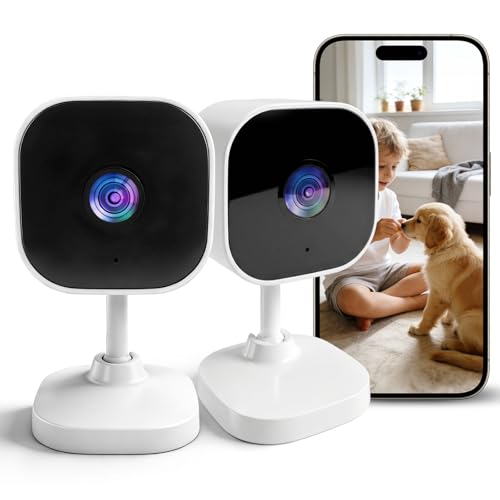
Best for: larger homes or multi‑room setups where higher resolution helps identify faces and details. The 2K resolution improves clarity over standard 1080p, and dual‑band WiFi (2.4G and 5G) reduces buffering in busy networks. It supports local microSD storage and optional cloud storage, making it flexible for growing security needs.
Key reasons to choose this model: The 2K resolution can help with clearer footage during daytime and better identification at night when combined with good lighting. The dual‑band connectivity helps maintain smooth streams in bigger houses. A potential limitation: like many security cameras, performance depends on network bandwidth; expect better results on a stable 5G/2.4G setup.
Best for: buyers wanting sharper video and a scalable multi‑camera setup, especially in larger homes or rooms with more activity where crisp detail matters for evidence or monitoring.
Tapo 2K Indoor Pan/Tilt Camera (C211, 2-Pack)

Best for: spaces needing wide coverage and flexible viewing angles. The C211 offers 2K resolution with pan/tilt control, allowing you to monitor large rooms or hallways from a single vantage point. It supports local storage up to a microSD card and optional cloud storage, making it adaptable for growing security needs.
Key reasons to choose this model: The pan/tilt function expands coverage without adding more cameras, which is helpful for living rooms, nurseries, or kitchens. A potential limitation: motorized movement can wear over time, and the setup relies on stable Wi‑Fi for smooth streaming.
LaView Security Cameras 4‑Pack (1080P)

Best for: households that want multi‑room coverage with a single app. The LaView four‑camera set provides 1080p video, motion detection, and two‑way audio, plus remote access via the LaView app. It supports up to nine simultaneous live feeds, which is helpful for monitoring multiple rooms.
Key reasons to choose this model: The multi‑camera option reduces the need to mix brands for each room, enabling centralized monitoring. It’s a solid, budget‑friendly choice for family homes or small offices. A potential limitation: 1080p video, while sufficient, doesn’t offer the higher detail of 2K/4K options, and compatibility with some 5GHz networks isn’t supported.
Buying Guide
What should you consider first?
- Resolution: Higher resolution (2K) provides clearer detail but demands more bandwidth and storage.
- Wired vs. wireless: Wired cameras can offer steadier performance; wireless cameras are easier to install but depend on Wi‑Fi quality.
- Storage: Local microSD storage is simple and private; cloud storage offers longer history and remote access but may incur ongoing costs.
- Pan/tilt: Pan/tilt adds coverage in a single unit, reducing the number of cameras needed in large rooms.
- Two‑way audio and sirens: Useful for real-time communication and deterring intruders or alarming household members.
Which features matter for you?
- Baby monitoring: Look for reliable motion alerts, quiet audio, and clear night vision. A non-subscription model may be attractive for budget-conscious buyers.
- Pet monitoring: Opt for cameras with good motion tracking and a strong night vision range to observe pets in dim lighting.
- Home security: Consider higher resolution and robust storage options, plus remote access and alert specificity (e.g., person vs. general motion).
Placement and network tips
- Place cameras at entrances, living rooms, nurseries, and hallways for comprehensive coverage.
- Ensure stable Wi‑Fi or use wired connections where possible to avoid buffering.
- Test motion zones to minimize false alerts from pets or small motion.
FAQ
- What is the main difference between local and cloud storage?
Local storage uses a microSD card inside the camera; cloud storage stores footage on remote servers. Local storage keeps footage on‑site, while cloud storage enables access from anywhere and longer history, usually with a subscription.
- Is 2K resolution worth it for indoor cameras?
Yes for clarity and detail, especially in larger spaces or when identifying faces. It requires more bandwidth and storage than 1080p.
- Do I need a smart home hub?
Most modern indoor cameras work directly with Wi‑Fi and vendor apps. A hub may be useful if you want to centralize control with other devices, but it is not always necessary.
- What lighting is best for night vision cameras?
Infrared night vision works in low light; color night vision models provide better detail in low to moderate light. Adequate ambient light improves image quality for all cameras.
- Can I use these cameras for baby monitoring without subscribing?
Some models offer non‑subscription storage via SD cards. Others provide limited features without a subscription; cloud storage is optional on many of these options.
- How many cameras should I start with?
For a small home, 2–4 cameras across key rooms is common. If you need room‑to‑room monitoring, a multi‑camera kit like a four‑pack can simplify setup.