Best Cameras for Computer Monitors: Upgrade Your Video Calls
For productive home offices and hybrid work, built-in or add-on cameras on computer monitors can streamline video meetings and streaming. This guide highlights five top options that pair well with modern displays, emphasizing clarity, reliability, and ease of use. Each pick integrates with typical PC setups and supports common conferencing platforms.
| Product | Brand | Type | Key Benefit |
|---|---|---|---|
| Philips 34E1C5600HE | Philips Computer Monitors | Monitor with Built-in Webcam | Ultra-wide display plus integrated camera and mic |
| Logitech Brio 101 | Logitech | USB Webcam | High quality 1080p with advanced features |
| ASUS BE24EQK | ASUS | Monitor with Built-in Webcam | Business-ready conferencing with mic array |
| ASUS BE279QFK | ASUS | Monitor with Built-in Webcam | Full HD with integrated webcam and speakers |
| MSI PRO MP272PMG | msi | Monitor with Built-in Webcam | 120Hz, built-in webcam and eye-care features |
Philips 34E1C5600HE 34″ UltraWide Monitor With Built‑in Webcam

The Philips 34E1C5600HE combines a 34″ UltraWide QHD (3440 x 1440) panel with a built-in Windows Hello webcam and noise-canceling microphone. The 1500R curved VA screen enhances immersion and may help reduce eye strain during long sessions. Ultra Wide Color technology expands color accuracy, supporting sRGB around 123%, and NTSC coverage near 99%, delivering vibrant, true-to-life visuals for video calls and multitasking.
This monitor is optimized for productivity with a USB-C docking option, stereo speakers, and a 100 Hz refresh rate. It suits remote teams, digital whiteboarding, and multi-app workflows where a single screen setup keeps meetings smooth while streaming or presenting content.
Logitech Brio 101 Full HD 1080p Webcam

The Logitech Brio 101 provides reliable 1080p video with built-in microphone capabilities and compatibility with popular platforms like Zoom and Teams. Enhanced auto-light balance helps deliver clearer appearance in varying lighting, while the compact design makes it easy to place on a monitor’s edge or a desk setup without clutter.
Useful for meetings, conference calls, and live streaming, Brio 101 emphasizes practical performance and straightforward setup. The camera’s smart exposure and shadow-reducing features help ensure you appear clearly during video calls, even in mixed lighting environments.
ASUS BE24EQK 23.8” Business Monitor With Built‑in Webcam

This 24-inch business monitor integrates a full 1080p webcam with a microphone array and stereo speakers for unified videoconferencing. The frameless IPS panel supports wide viewing angles, which is beneficial for group calls or sharing screens with participants off to the sides. The 16:9 aspect ratio and solid brightness levels provide clear visibility across different lighting scenarios.
Ideal for telecommuting, online learning, and collaborative work, it combines easy setup with dependable conferencing features, making it a practical choice for office desks and home offices where space is at a premium.
ASUS BE279QFK 27” Full HD IPS With Built-in Webcam

The ASUS BE279QFK brings a 27-inch Full HD (1920×1080) IPS panel with a frameless design and an integrated webcam, mic array, and built-in speakers. It’s designed for video conferencing and online learning, offering a wide viewing angle and accurate color reproduction (sRGB coverage). A 100 Hz refresh rate provides smooth motion for video calls and on-screen collaboration.
With height-adjustable features and ergonomic design options, this monitor supports extended work sessions and comfortable positioning for long calls, screen sharing, or learning activities in a home or small office setting.
MSI PRO MP272PMG 27” IPS Monitor With Built‑in Webcam
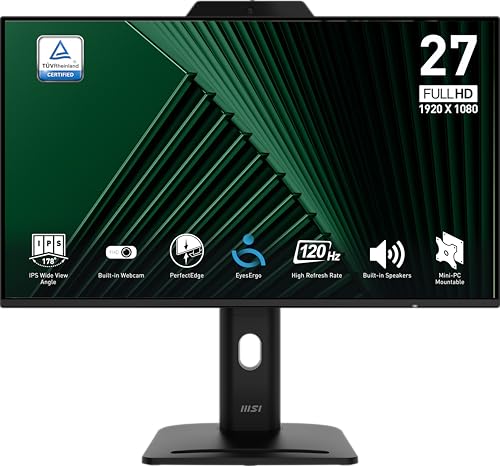
The MSI PRO MP272PMG is a 27-inch IPS display with Full HD resolution, a 120 Hz refresh rate, and a built-in webcam with a digital microphone. This combination supports smoother video during calls and quick response times for collaboration software. The panel includes TÜV-certified eye comfort features, anti-flicker technology, and ergonomic tilt/height adjustments for comfortable long sessions.
Designed for business and education environments, the MSI MP272PMG prioritizes consistent color, reduced eye strain, and easy integration with conferencing tools, making it a strong all-in-one option for desk setups that require dependable video capture on a monitor-based system.
Buying Guide: Key Considerations For Cameras On Computer Monitors
- Resolution and framing: Higher resolutions (1080p or better) deliver clearer video, while larger screens benefit from cameras with wide fields of view to capture participants in meetings.
- Built-in vs. external: Monitors with integrated webcams are convenient but may lack upgrade flexibility. External USB webcams offer higher quality and easier replacements without changing the monitor.
- Microphone quality: An effective microphone reduces the need for a separate audio device. Look for digital mics with noise suppression and echo cancellation for clearer calls.
- Privacy and security: Cameras with physical shutters or switches help protect privacy when not in use. Software controls can also mute and disable video streams.
- Lighting and auto-adjustment: Cameras with automatic light correction perform better in mixed lighting. Consider lighting conditions in your workspace when choosing a model.
- Compatibility: Ensure the camera works smoothly with your preferred conferencing platforms (Zoom, Teams, Meet) and with your operating system.
- Ergonomics and placement: Monitor-integrated cameras save desk space but may require optimal height/angle adjustments. External webcams offer flexible placement for the best framing.
- Refresh rate and motion handling: For dynamic video calls or streaming, higher refresh rates (60–120 Hz) provide smoother video and reduces motion artifacts.
- Privacy, durability, and warranty: Look for anti-scratch housings, reliable mounts, and a solid warranty to protect your investment in a busy workflow.