Best Camera to iPad Connector for Seamless Photo Transfer
For photographers and enthusiasts who rely on iPads for viewing, editing, and sharing RAW or high-resolution images, a reliable camera-to-iPad connector is essential. The following selected adapters support SD/SDXC/ Micro SD memories and offer plug-and-play simplicity, often with dual USB-C and Lightning inputs. The options below are tailored for quick transfers from trail cameras, DSLRs, and other digital memory cards directly to iPad or iPhone, helping you review shots faster and share moments instantly.
| Product | Brand | Connector Type | Key Benefit |
|---|---|---|---|
| Luonanava SD Card Reader | Luonanava | USB-C & Lightning Dual | Plug-and-play, two-way transfers |
| Microwoo Lightning to USB Camera Adapter | Microwoo | Lightning | Charge while transferring, wide OTG support |
| AkHolz SD Card Reader | AkHolz | Lightning & USB-C dual | Five-in-one with USB-A port, no app required |
| Cirafon Lightning to USB Camera Adapter | Cirafon | Lightning | Two-way data transfer, USB expansion |
| Wahbite Lightning to USB Camera Adapter | Wahbite | Lightning | USB 3.0 compatibility, fast transfer |
Luonanava SD Card Reader Review

Luonanava offers a dual-connector reader that supports USB-C and Lightning, designed for iPhone, iPad, and other USB-C devices. It is compatible with SD and Micro SD cards and requires no app, network, or extra power. The device is described as Plug and Play, enabling quick transfer of photos, videos, and other files from a camera memory card to an iPhone or iPad. It is particularly suitable for photography creators who need fast access to memory cards from trail or digital cameras and want two-way transfers between devices and memory cards.
Microwoo Lightning Adapter With Charge
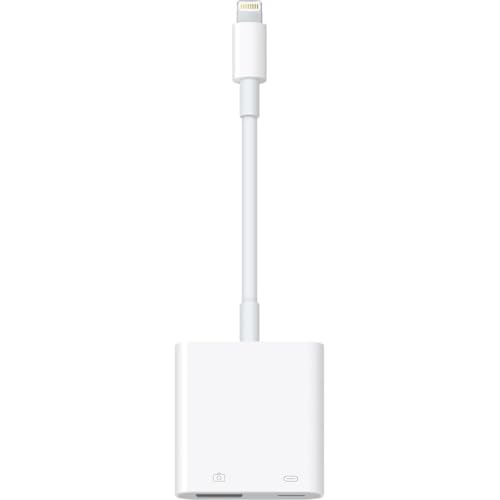
Microwoo presents an Apple MFi certified Lightning to USB Camera Adapter with a charging port. It supports USB 3.0 and USB OTG for iPhone and iPad, enabling direct data transfer from cameras or USB drives. The accessory is positioned as a versatile tool for copying photos and videos quickly, while also allowing charging during use. It can connect to a variety of USB devices beyond cameras, including keyboards, mice, and MIDI equipment, providing broader workflow flexibility for mobile professionals.
Untvie Lightning To USB Camera Adapter

Untvie’s Lightning to USB Camera Adapter emphasizes MFi certification and a plug-and-play experience. It supports two-way data transfer for iOS devices and works with a broad range of iPhone and iPad models. The device is designed to enable simultaneous charging and data access, which is useful for busy shoots or lengthy editing sessions on the go. It also claims compatibility with JPEG/RAW photo formats and SD/HD video files, expanding its utility beyond simple photo transfer.
Cirafon Apple MFi USB Camera Adapter

Cirafon’s MFi-certified Lightning to USB Camera Adapter focuses on easy sharing without apps. It supports two-way data transfer and is compatible with a wide range of iPhone and iPad models running iOS 9.2 and later. The adapter also enables connection to USB drives, keyboards, and MIDI devices, broadening its role beyond simple photo import. While it does not support hard disks, it remains a convenient option for quick photo and data transfers and peripheral connectivity.
Wahbite USB Camera Adapter With Charging
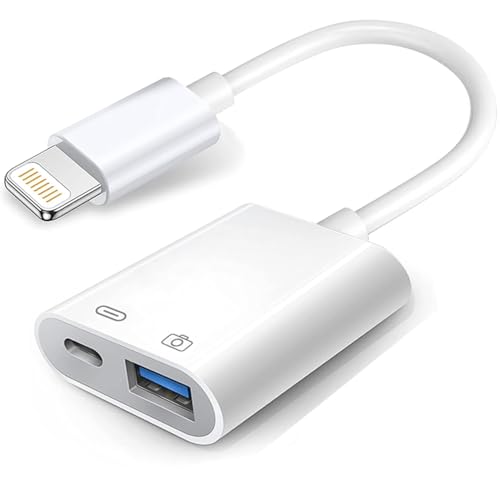
Wahbite’s upgrade emphasizes charging while transferring data, supporting USB 3.0 with speeds up to 5Gbps. It offers a plug-and-play experience with broad iOS device compatibility. The adapter is designed to work with iPhone 13/12/11 series and iPad models running recent iOS versions, providing a fast and convenient way to move photos, videos, and other media from cameras or USB devices to an iPhone or iPad, and it supports a range of USB peripherals for expanded usability.
Buying Guide
When choosing a camera-to-iPad connector, consider the following factors:
- Compatibility: Check Apple MFi certification and supported iPhone/iPad models to ensure seamless operation without alerts.
- Connector options: Dual USB-C and Lightning is ideal for mixed-device environments; ensure the port configuration matches your devices.
- Transfer speed: USB 3.0 support yields faster transfers than USB 2.0, which matters for large RAW files or 4K video.
- Power delivery: A charging port is valuable to prevent battery drain during active transfers or editing sessions.
- Storage formats: Verify support for SD, Micro SD, and USB drives, and note any format limitations (e.g., XD-MS cards).
- App dependency: Most options advertise no app requirements, but always confirm compatibility with iOS Photos or Files for import/export workflows.
- Durability and build: Look for reinforced connectors and robust cables if you travel or shoot outdoors.
- Two-way transfer capability: Some adapters read from memory cards to iOS devices and also copy files back to memory cards.
- Multi-device workflow: If you need to connect keyboards, mice, or MIDI devices, ensure the adapter supports USB-A female or OTG usage.
Comparative considerations
For users prioritizing ultra-fast data transfer, prioritize USB 3.0 supports and high-quality connectors. If charging while transferring is important, choose adapters with an integrated charging port. For photographers who frequently switch between USB-C and Lightning devices, a dual-connector design reduces the need for multiple adapters. Finally, ensure the product has reliable customer support and clear compatibility notes to avoid compatibility issues with newer iOS releases.