Best Cameras That Print Pictures Directly From Your Phone
Instant photo printers and cameras that print pictures from your smartphone combine convenience and creativity, allowing you to capture memories and print them on the spot. Below is a summary table showcasing the top devices that let you print photos instantly from your phone, emphasizing key features such as printing technology, portability, and additional functions like video and customization options.
| Product | Brand | Printing Tech | Photo Size | Special Features |
|---|---|---|---|---|
| Canon Ivy 2 Mini Photo Printer | Canon | ZINK (Zero Ink) | Credit card size | Sticky-back photos, customizable via app |
| HP Sprocket Studio Plus 4×6″ Wireless Printer | HP | Dye Sublimation | 4×6 inches | Waterproof photos, app editing tools |
| Lifeprint 2×3 Instant Printer for iPhone | Lifeprint | ZINK-based, Bluetooth | 2×3 inches | Print photos & videos, augmented reality prints |
| Mini Printer Sticker Thermal Printer | cabaro | Thermal sticker paper | Custom sized labels | Inkless, portable, label maker |
| HiMont Kids Instant Print Camera | HiMont | Thermal printing | Varies with paper rolls | HD video, photo effects, kids-friendly |
Canon Ivy 2 Mini Photo Printer – No Ink Needed

The Canon Ivy 2 Mini Photo Printer offers the convenience of direct smartphone printing using ZINK (Zero Ink) technology, eliminating the need for ink cartridges. This device prints vibrant, colorful photos embedded with dye-based crystals in the paper itself.
Its standout feature is the peel-and-stick backing, allowing you to place photos anywhere. Photos can be customized through the Canon Mini Print App, supporting both iOS and Android devices for seamless connectivity. Ideal for scrapbooking, journaling, or sharing instant memories with friends.
HP Sprocket Studio Plus 4×6″ Wireless Instant Photo Printer

The HP Sprocket Studio Plus prints premium 4×6-inch photos using dye sublimation technology, known for producing smudge-proof, tear-resistant, and waterproof prints. It connects wirelessly to iOS and Android devices, enabling instant printing on high-quality paper.
With an intuitive editing app, users can add stickers, frames, filters, and other creative touches before printing. The printer is designed for efficiency, delivering dry-to-the-touch photos instantly — a perfect choice for vibrant photo keepsakes that last.
Lifeprint 2×3 Instant Printer for iPhone – Prints Photos & Videos
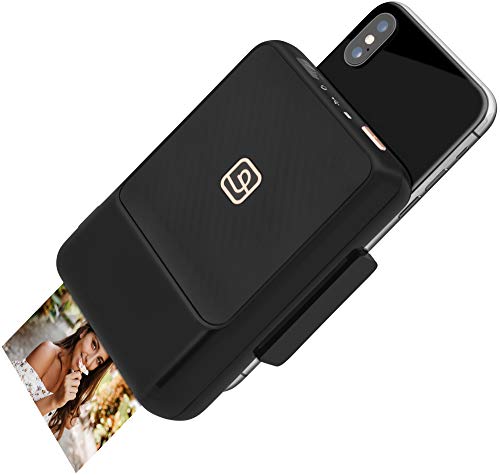
The Lifeprint 2×3 Instant Printer transforms your iPhone into an instant-print camera. Using Bluetooth, it prints 2×3 inch photos quickly and easily, even compatible with slim phone cases. A unique feature is the ability to embed videos inside printed photos via the Lifeprint app, which come to life through augmented reality scanning.
This printer ensures higher-quality prints while offering a fun, interactive experience beyond standard photo printing, perfect for tech-savvy users who enjoy mixing digital media and physical prints.
Mini Printer Sticker Thermal Printer with 3 Rolls Paper

The cabaro Mini Sticker Thermal Printer is an inkless, Bluetooth-enabled portable printer that uses thermal sticker paper. It appeals to users who want to print photos, memos, labels, or study notes on the go, making it ideal for journaling and DIY crafts.
It comes with 3 rolls of thermal sticker paper that you can cut into any shape or size, offering versatile customization without the expense of ink. Compatible with both Android and iOS devices, its compact size is perfect for mobile printing anytime.
HiMont Kids Instant Print Camera – Fun for Children

The HiMont Kids Instant Print Camera is specially designed for children, combining HD photography and 1080P video capture with instant thermal printing — no ink needed. It offers two printing modes (dot matrix and grayscale) and features cartoon effects to stimulate kids’ creativity.
Kids get three rolls of print paper and color pens to decorate their printed photos, encouraging artistic expression. The camera’s user-friendly interface and fun functions like games and music make it an all-in-one entertainment device suitable for ages 3 to 14.
Buying Guide for Cameras That Print Pictures from Your Phone
When choosing a camera or printer that prints pictures directly from your phone, consider the following key factors to ensure it meets your needs:
Printing Technology
- ZINK (Zero Ink): Uses embedded dye crystals in paper for no-ink printing. Produces vibrant color photos, usually small credit-card size, ideal for portability.
- Dye Sublimation: Offers higher quality, durable 4×6-inch prints that resist fading, smudging, and water damage, suitable for photo enthusiasts.
- Thermal Printing: Inkless with a focus on monochrome or limited color prints. Great for stickers, labels, and kids’ cameras but less vibrant.
Photo Size and Print Quality
- Consider whether you want small wallet-size photos or larger prints like 4×6 inches for framing or albums.
- Higher resolution and premium printing methods produce sharper and longer-lasting images.
- Durability matters if photos will be handled frequently or stuck onto surfaces.
Device Compatibility and Connectivity
- Check compatibility with your smartphone’s operating system (iOS, Android).
- Wireless options like Bluetooth and Wi-Fi provide easy, cable-free printing.
- Some devices support printing through dedicated mobile apps offering editing tools and customization.
Additional Features and Use Cases
- Customization: Editing apps that add filters, stickers, and frames enhance creative control before printing.
- Video Printing: Some printers embed videos in photos using augmented reality, offering an interactive experience.
- Kids-Friendly: Cameras designed for children often include safe printing technologies, games, and artistic tools for engagement.
- Portability: Compact, lightweight designs suit travel and on-the-go photo printing.
Cost and Consumables
- Inkless technologies reduce ongoing costs but check paper prices and availability.
- Some printers require specialized paper or cartridges, which can affect long-term expense.
- Thermal printers offer low maintenance but may only print black and white or limited colors.
Assess your primary use—whether casual party prints, scrapbooking, kids entertainment, or high-quality photo albums—to pick a device that perfectly matches your photography printing needs.