Best Cameras for Teaching Online: Clear, Reliable Document Cameras and Webcams
Find the right camera for online teaching with options that balance image clarity, ease of use, and portability. This guide highlights five dependable choices for educators and remote instructors, from compact USB document cameras to high-resolution 4K models. Each pick is explained by who it’s best for and why it stands out, with practical cautions to help you decide quickly.
| Product | Best For | Key Advantage |
|---|---|---|
| IPEVO V4K | Live demos, dim lighting | Ultra high definition 8MP with fast focus |
| OKIOCAM T-4K | Large-page materials | 8MP sensor with compact, portable design |
| DEPSTECH DW49 | Webinars and online teaching | 4K/8MP with autofocus and dual mics |
| INSWAN INS-1 | Desk setups and close-up works | 8MP Sony sensor, LED, macro capability |
| Gawervan | Flexible demonstrations | 3-in-1 webcam/visualiser with auto focus |
IPEVO V4K Ultra High-Definition Document Camera

The IPEVO V4K is designed for live demos and distance learning with an 8-megapixel sensor that captures up to 3264 x 2448 pixels. It streams at up to 30 fps in full HD and up to 15 fps at the highest resolution, balancing detail with smooth motion. A Sony CMOS image sensor helps reduce noise and improve color reproduction in dim rooms, and fast focusing minimizes interruptions during material changes. This makes it a strong choice for teachers who frequently switch between worksheets, models, and handwritten notes.
Best for: instructors who need high-detail captures and reliable performance in variable lighting. The V4K is well suited for math, science demonstrations, and art projects where close-up clarity matters. Caution: higher resolution modes can demand more bandwidth and processing, so consider your computer and connection strength if you plan to run at full 3264 x 2448.
OKIOCAM T-4K 8MP USB Document Camera
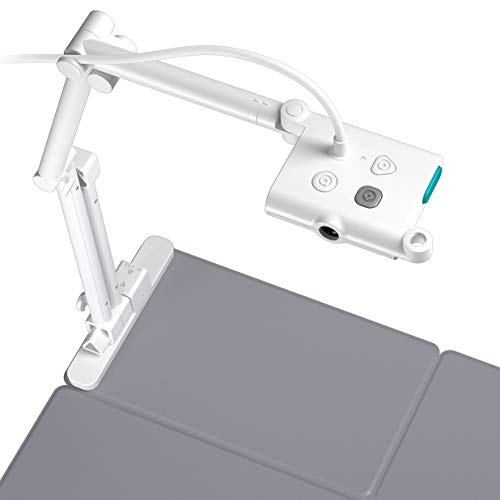
The OKIOCAM T-4K doc camera captures at 8MP with a compact, portable footprint and a focus on ledger-size work while maintaining an 13.86″ x 18.11″ max view. It emphasizes low-profile portability with a detachable lens and four-button controls to adjust focus, exposure, zoom, and image flip. Best for teachers who need to present large documents or maps without oversized gear. Limitation: while it supports high detail, users should expect a straightforward setup rather than advanced event streaming features.
Best for: educators who frequently present large sheets, maps, or artworks and want a highly portable device. Choose this if you value a compact footprint and simple, reliable operation. Avoid this if you need built-in advanced streaming features or heavier multi-angle configurations.
DEPSTECH 4K Webcam DW49

The DEPSTECH DW49 brings 4K streaming with an 8MP sensor and Sony optics for crisp, detailed video. Autofocus helps maintain sharpness during dynamic teaching activities, while dual built-in microphones provide clearer room audio. It’s designed for professional online teaching, webinars, and video calls where consistent image quality is essential. Caution: autofocus may briefly hunt in extremely uneven lighting; a stable light source helps mitigate this effect.
Best for: online classes and webinars where high resolution and reliable auto-adjustment are priorities. Choose this if you want strong overall image fidelity and better audio pickup from a single device. Avoid this if you require macro close-ups or specialized lighting control with manual focus.
INSWAN INS-1 Classic USB Document Camera

The INSWAN INS-1 combines 8MP resolution with Sony-level imaging and a built-in LED for dim environments. It includes a microphone and a macro capability that can capture objects as close as 3.9 inches, making it suitable for close-up demonstrations in science labs or art projects. The multi-joint, space-saving design helps keep a desk tidy without compromising viewing size. Caution: setup may require balancing to maintain stability when using the macro mode.
Best for: teachers who need close-up detail and reliable video in desk setups or smaller classrooms. Choose this if you regularly display fine text, micrographs, or small artifacts. Avoid this if you require large-scale whole-page capture in a single frame unless you pair it with other display tools.
Gawervan USB Document Camera for Teachers

The Gawervan document camera is a versatile 3-in-1 device that functions as a webcam, visualizer, and document camera. Its 360-degree adjustable lens supports 1080P live demos, worksheets, and 3D objects in interactive sessions. Its foldable USB design makes it travel-friendly for teachers who conduct remote teaching or live demos from different locations. Caution: while flexible, it may require occasional recalibration to maintain focus during long sessions.
Best for: educators who value multi-angle demonstrations and travel-friendly setups. Choose this if you need a flexible visualizer that switches easily between documents and live camera views. Avoid this if you require the highest resolution or the strongest macro capabilities in a single setup.
Buying Guide: How to Choose a Camera for Online Teaching
What resolution do you need?
For clear text and detailed diagrams, 1080p is often sufficient, while 4K or 8MP models provide extra detail for close-ups and large documents. Consider your typical teaching materials and whether you frequently share fine print, maps, or art.
Is autofocus important?
Autofocus helps when you switch between objects quickly, but it can hunt in very dim lighting. If your teaching space lacks steady lighting, look for cameras with good low-light performance and manual focus as a backup option.
What about audio?
Many document cameras include built-in mics; however, for noisy rooms or large classes, an external microphone may improve clarity. Dual mics on some models can help reduce background noise during online sessions.
Portability and setup
Educators teaching from multiple locations benefit from foldable designs and compact form factors. USB cameras with plug-and-play setup reduce IT friction and speed up classroom deployments.
Flexibility for different materials
If you present large sheets, maps, or ledger-size documents, prioritize models with wide capture areas or tall document framing. For small artifacts and close-up science demonstrations, choose cameras with macro capability and stable stands.
Durability and ease of use
Budget-friendly options often trade some convenience for features. Look for multi-joint designs, stable bases, and intuitive controls that minimize on-video time spent adjusting equipment during class.
Maintenance and compatibility
Confirm compatibility with your operating system (Windows, macOS, ChromeOS) and ensure drivers or software updates are straightforward. USB-C compatibility can simplify integrations with newer laptops.
Summary of key considerations
- Resolution vs. bandwidth: Higher resolution needs more bandwidth and processing power.
- Lighting: A good sensor helps in dim rooms; consider adding a reliable light source.
- Flexibility: Multi-angle or foldable cameras save space and adapt to different teaching styles.
- Audio: Decide if built-in mics are enough or if you need external audio support.
- Portability: For traveling teachers, compact designs reduce setup time.
FAQ
- What camera is best for online math demonstrations? Best pick may be a high-resolution document camera with stable autofocus and macro capability for close-up equations and diagrams.
- Can I use a regular webcam for teaching demos? Yes, but document cameras often provide better macro focus, larger capture areas, and easier object framing for classroom materials.
- Do I need a microphone on the camera? Some models include built-in mics, which is convenient, but external mics can improve voice clarity in larger rooms.
- Is 4K overkill for online teaching? It depends on your materials. For text-heavy lessons and fine print, 4K can be beneficial, but ensure your computer, lighting, and internet support it.
- How important is portability? If you teach in multiple rooms or locations, a portable camera reduces setup time and keeps your classroom routine consistent.
- Should I choose autofocus or manual focus? Autofocus is convenient for dynamic demos, but manual focus prevents unexpected shifts when lighting changes or objects move slowly.