Best Camera for Skype on TV and Desktop: Clear, Easy Video Calls
When choosing a camera to use with Skype on a TV or large display, focus on resolution, field of view, audio quality, and compatibility. The right option suits a specific setup: a compact TV-friendly camera for smart TV use, a versatile webcam for laptops and desktops, or an all-in-one conference system for meetings. The top picks below cover 4K to 1080p options, with features tailored to home offices, living rooms, and conference spaces. The buyer’s guide highlights what matters most for different needs and environments.
Summary table of selected products:
| Product | Best For | Key Benefit |
|---|---|---|
| AOC 4K Webcam | Streaming, conferencing on PC | 4K clarity with plug-and-play setup |
| LINOVISION HD1080P | TV or HDMI monitor display | Direct HDMI/VGA output |
| RayBit 4K Conference System | Small to medium meeting rooms | AI framing and speaker tracking |
| UGREEN 2K Webcam | Everyday calls on PC | 2K clarity with dual mics |
| Samsung Slim Fit Camera | TV-mounted, living room use | Magnetic attachment, slim design |
AOC 4K Webcam With Privacy Cover And 90° View

The AOC 4K Webcam delivers ultra-high-definition video for professional-looking calls on Skype, Zoom, or Teams. Best for users who want sharp detail and a wide but controlled field of view. It’s ideal for home offices or streaming setups where you sit close to the screen.
- 4K Ultra HD video for crisp, lifelike detail
- Wide 90° field of view with full 360° rotation
- Plug-and-play USB connection; no driver setup required
Best for: professionals who need sharp image quality and flexible mounting. Better for: desktop setups with monitor mounting. Avoid if: you require ultra-wide angles beyond 90° for large rooms.
LINOVISION HD1080P HDMI TV Display Camera

This camera connects directly to a TV or HDMI monitor, offering immediate display of HD video without encoding or a DVR. It’s a practical choice for using a camera as a TV webcam or for simple remote viewing on a larger screen.
- HDMI or VGA output for direct TV/monitor display
- Full HD 1080p video; 2.8mm fixed lens with wide angle
- HDTVI loop-out for continuous DVR recording
Best for: users who want a straightforward TV-connected viewing experience. Better for: rooms where you want the camera to serve as a display source. Choose this if: you need direct TV output without a computer middleman.
RayBit 4K Conference System With AI Framing

The RayBit solution combines 4K webcam, speakers, microphone, and remote into a single room-friendly unit. It features AI auto framing and speaking-tracking to keep conference participants centered and speaking subjects in view.
- All-in-one 4K camera with built-in audio
- AI auto framing to keep participants centered
- Auto speaking following for presenter tracking
Best for: small to medium conference spaces or home offices needing a compact, integrated setup. Better for: lengthy meetings where framing and speaker tracking reduce manual adjustments. Caution: AI features depend on compatible conferencing software.
UGREEN 2K Webcam With Dual Microphones
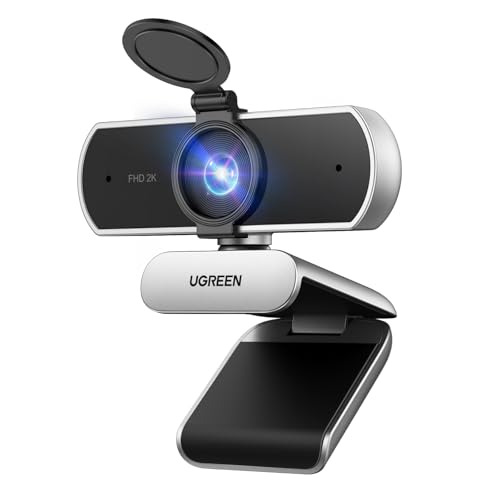
The UGREEN webcam raises the standard for everyday online calls with 2K resolution and dual microphones. It provides automatic light adjustment and a wide 95° field of view, making it solid for desk setups, video calls, and streaming.
- 2K 30FPS with 4 MP sensor for clear visuals
- Dual microphones reduce background noise
- Auto-adjusting light and 95° FOV
Best for: users seeking a reliable daily webcam with clear audio. Better for: calls from cluttered spaces where extra light and wider framing help. Limitation: 2K resolution may be less future-proof than 4K in some scenarios.
Samsung Slim Fit Camera For TV

The Samsung Slim Fit Camera is designed to mount close to your TV, delivering 1080p video with a slim, unobtrusive profile. Its magnetic attachment helps keep the camera tucked neatly near the screen for TV-first setups.
- Full HD 1080p video at 30 fps
- Slim design with magnetic mounting
- Designed to integrate with TV viewing spaces
Best for: living room or entertainment setups where the camera should sit near the TV without obstructing the view. Better for: casual calls and light video chats. Caution: magnetic mounting requires compatible TV edge placement to maximize stability.
Buying Guide
What resolution do you need?
4K cameras offer the sharpest image, helpful for professional-looking calls and streaming. 1080p is typically sufficient for most video chats and is compatible with older systems. Consider your display capability and bandwidth when choosing.
Which field of view fits your space?
A wider field of view captures more people and background but may distort faces at the edges. Narrower FOVs keep focus on the speaker but require precise positioning. For living rooms or conference spaces, a wider angle helps with group calls.
Are built-in microphones enough?
Many webcams include dual or single mics. For noisy environments, look for noise suppression. In shared spaces, an external mic or integrated speakers in a system may improve clarity across participants.
Do you need direct TV or monitor output?
Some models offer HDMI or VGA outputs to display video directly on a TV or monitor, which is ideal for screen-based conference setups. Others are computer-centric with USB plug-and-play.
What mounting options matter?
Mounting style affects stability and placement. Monitor mounts, tripods, or wall/TV mounting provide versatility. Slim designs work well near TVs, while versatile stands suit desks or hybrid spaces.
Software compatibility and ease of use
Plug-and-play devices that support major platforms (Skype, Zoom, Teams) reduce setup friction. Consider whether you need AI framing, focus tracking, or other advanced features that align with your workflow.
Durability and privacy
Privacy covers or physical shutters enhance security when cameras aren’t in use. Build quality and ease of cleaning are practical for long-term use, especially in shared spaces or living rooms.
FAQ
- Is a 4K webcam worth it for Skype on a TV? Yes, if you want exceptional detail on large displays and you have sufficient bandwidth. For casual calls, 1080p often suffices.
- Can I use a TV camera with a computer? Many cameras support USB plug-and-play on PCs for video calls and streaming. HDMI-only models may require a display-side connection rather than a computer input.
- Do I need a separate microphone? If you need clear audio in busy rooms or large groups, a dedicated microphone or all-in-one system with speakers can improve sound pickup and reduce feedback.
- What’s the advantage of AI framing and speaking tracking? These features help keep participants centered and the active speaker in view, reducing manual camera adjustments during meetings.
- Which mounting option should I choose? For TV setups, magnetic or slim camera designs work best. For desktops, a tripod or monitor-mounted camera offers flexibility with placement.
- Are these cameras compatible with Skype? All listed models are designed to work with major platforms, including Skype, Zoom, and Teams, via standard USB or HDMI connections.