Best Cameras for Online Classes: Clear Visuals for Remote Teaching
Ready to upgrade your online classes with reliable, high-quality video? This guide highlights five standout cameras ideal for remote teaching, live demos, and virtual classrooms. Each option is chosen for ease of use, solid image quality, and effective demonstrations. Best for teachers, tutors, and students seeking reliable visuals for virtual sessions.
| Product | Best For | Why It Stands Out |
|---|---|---|
| AlKOR USB Document Camera | Educators & remote presenters | Manual focus, flexible angles, portable design |
| EMEET C950 1080P Webcam | Online classes & meetings | Privacy cover, good low-light correction, fixed 70° view |
| Xweiryn Webcam | Students & teachers on a budget | 1080p, plug-and-play, broad OS support |
| Gawervan Document Camera | Live demos & class sharing | 3-in-1 webcam/visualizer, portable |
| EMEET C950 4K Webcam | High-detail demonstrations | 4K option, PDAF autofocus, built-in mic |
AlKOR USB Document Camera For Teaching

Product: AlKOR USB Document Camera for Teaching & Distance Learning
Brand: AIKOR
Key features: 2MP 3-in-1 USB webcam, document camera, and visualizer; rotating lens for live demonstrations; flexible hose design; 360-degree adjustable camera; 1080P full HD; manual focus; up to 30 FPS; portable and lightweight at about 1.1 pounds.
Best for: Educators and professionals who need to show text, worksheets, or small objects with stable focus and adjustable angles during live demos. The manual focus helps avoid auto-focus drift in dim rooms and preserves true color for teaching materials.
Limitations: Manual focus requires some adjustment if lighting changes quickly; no built-in privacy cover is mentioned, so consider placement and lighting to maintain privacy.
EMEET C950 1080P USB Webcam

Product: EMEET C950 1080P Webcam with Microphone & Privacy Cover
Brand: EMEET
Key features: 1080P at 30 FPS; privacy cover; 2MP sensor; low-light correction; 70° view; software (EMEETLINK) for settings; plug-and-play USB; stable fixed focus.
Best for: Online classes and meetings where privacy and a balanced field of view are important. The privacy cover adds a simple security feature, and the software allows fine-tuning.
Limitations: Fixed focus means you rely on lighting and distance for optimal sharpness; avoid backlighting for best results.
Xweiryn Webcam For PC

Product: Xweiryn Webcam For PC
Brand: Xweiryn
Key features: 1080P HD video; USB plug-and-play; compatible with Mac/Windows; widely compatible with major platforms; up to 30 FPS; good for live streaming and online classes.
Best for: Budget-conscious students or teachers needing reliable 1080P video with minimal setup for daily online sessions.
Limitations: Fixed focus geographic range may require camera to be closer to the subject for sharp text; consider a well-lit desk setup.
Gawervan Document Camera For Teachers

Product: Gawervan Document Camera for Teachers and Classroom
Brand: Gawervan
Key features: 3-in-1 tool (document camera, webcam, visualizer); 360° lens rotation; 1080P at 30fps; portable foldable hose; built-in mic; Mac OS/Windows/Chromebook compatible.
Best for: Teachers needing dynamic demonstrations and resource sharing in remote or hybrid classrooms. Rotation helps capture different angles of worksheets or experiments.
Limitations: 3-in-1 versatility sometimes means slightly longer setup to switch modes; ensure your software supports the visualizer mode for best results.
EMEET C950 4K Webcam
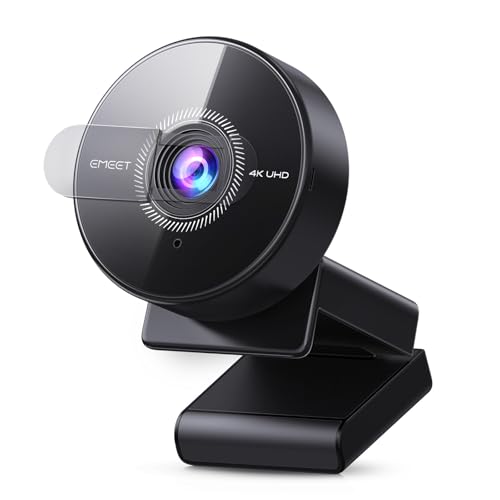
Product: EMEET C950 4K Webcam
Brand: EMEET
Key features: 4K UHD up to 30FPS; PDAF autofocus; built-in omnidirectional mic; 70° field of view; privacy cover; USB 2.0 plug & play; firmware upgrades via EMEETLINK.
Best for: High-detail demonstrations and teaching where crisp visuals matter, such as science labs or art tutorials. The PDAF autofocus helps maintain sharp focus on moving subjects.
Limitations: 4K functionality depends on software support and lighting; not all platforms render 4K at the same effective frame rate.
Buying Guide: How To Choose The Right Camera For Online Classes
- What will you teach? If you demo small objects or worksheets, a document camera like those from AlKOR or Gawervan offers direct capture of materials.
- Do you need flexibility or simplicity? Document cameras excel for demonstrations; standard webcams are easier for general meetings.
- How important is privacy? Cameras with physical privacy covers reduce risk of accidental filming; consider models from EMEET with built-in privacy features.
- What about lighting? Many cameras perform best in well-lit environments. Look for models with auto light correction or low-light adjustment.
- What is your platform compatibility? Ensure the camera supports your operating system (Mac, Windows, Chromebook) and primary software (Zoom, Teams, Meet).
- Do you need high detail or flexibility? For intricate demonstrations, a 4K webcam offers the sharpest visuals; for everyday classes, 1080P is usually sufficient.
FAQ
- What is a document camera and when should I use one? A document camera captures physical materials (papers, books, objects) and can project them live to students. Use it for demonstrations, math steps, or science experiments.
- Is 1080P enough for online classes? Yes, 1080P typically provides clear enough detail for most remote lessons, especially when combined with good lighting and a stable connection.
- Do I need a built-in microphone? Many webcams include integrated mics, which is convenient. If audio quality is critical, pair with an external mic in a noisy environment.
- What does a privacy cover do? It blocks the camera lens when not in use, protecting privacy during off-hours or shared spaces.
- What is PDAF autofocus and why is it helpful? Phase Detection Autofocus (PDAF) offers faster, more precise focusing on moving subjects, which is useful for live demonstrations and teaching materials.
- Are 4K cameras necessary for online classes? 4K offers higher detail, but many platforms and setups do not fully utilize 4K. A quality 1080P option is usually sufficient for standard online teaching.