Best Camera for Microscope Eyepiece: Top Picks for Clear, Connected Imaging
Choosing the best camera for a microscope eyepiece combines compatibility, image quality, and ease of use. The following selections focus on universal fit, live view capabilities, and easy connectivity to phones or PCs. Whether you’re doing student projects, scientific hobby work, or professional microscopy, these cameras offer reliable performance and flexible control to capture sharp images and smooth video through your eyepiece. Below are five strong options with different strengths to fit your setup and budget.
| Product | Brand | Key Benefit |
|---|---|---|
| 64GB Digital Eyepiece Telescope Camera | Unalace | 2K video, 16MP photos, WiFi app control |
| FTVOGUE Electronic Eyepiece 2MP | FTVOGUE | Two modes, clear imaging, easy settings |
| AOMEKIE Digital Eyepiece | AOMEKIE | Three adapter rings, 1080P, built-in battery |
| WnewTools 16MP USB C-mount | WnewTools | HDMI output, high resolution live feed |
| AmScope MD300A 3MP USB Eyepiece | AmScope | Comprehensive software for editing and measurement |
Unalace 2K Eyepiece Camera With WiFi

The Unalace camera installs easily on 25–50mm eyepieces, making it compatible with many microscopes and telescopes. A tool-free secure rotation simplifies setup. Built-in WiFi hotspot enables direct smartphone connection for live HD streaming or remote control via a dedicated app, even without internet access. It records 2K video and captures up to 16MP stills, with time-lapse and timed recording options that support hands-free observation for long sessions.
FTVOGUE Electronic Eyepiece 2MP

This electronic eyepiece features a 1/3-inch sensor with progressive scanning for clear imaging in low light. It provides two modes to accommodate manual or automatic white balance and exposure, enhancing color accuracy and exposure control. The stainless steel metal case adds durability, while the 960 TV line interface supports reliable image capture. The device is designed to work with PAL standards, ensuring broad compatibility with many microscopes.
AOMEKIE Digital Eyepiece 1080P
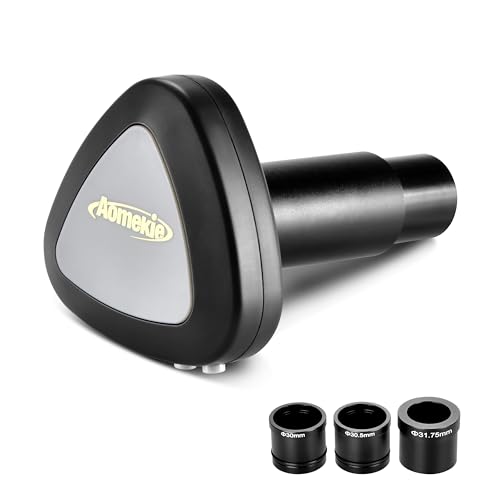
AOMEKIE’s eyepiece offers three adapter rings to fit astronomical telescopes and various microscopes, expanding compatibility. It supports iOS, Android, and PC connections, including WiFi for real-time viewing on mobile devices. A built-in 800 mAh battery provides 60–90 minutes of use after a full charge, making it suitable for on-the-go observations and field work.
WnewTools USB C-mount 16MP Camera

Designed to work in tandem with a microscope, this USB C-mount camera delivers high-resolution live viewing via HDMI output on monitors, projectors, or TVs. It emphasizes high-quality, clear imaging and practical compatibility with standard display devices, enabling easy sharing of observations or classroom demonstrations. The USB-C interface supports modern computers and peripherals for straightforward setup.
AmScope MD300A 3MP USB Eyepiece

AmScope’s MD300A captures still images and live video with a 3MP sensor and USB connectivity. The accompanying Windows software supports editing, stitching, exposure control, and color adjustments, while Linux and Mac software extend compatibility for cross-platform workflows. Advanced features like EDF (-edge, dark-field) and measurement functions aid researchers and educators in documenting observations with precision.
Buying Guide: Key Purchase Considerations
- Compatibility and fit: Check eyepiece diameter (commonly 23–25mm or 25–50mm adapters) and whether the camera includes multiple adapter rings for different microscopes and telescopes.
- Resolution and sensor quality: Higher megapixels and good low-light sensitivity improve image clarity, especially for live viewing under a microscope’s lighting conditions.
- Connectivity: Consider whether you prefer direct smartphone control via WiFi, USB connectivity to a laptop/PC, or HDMI output to a monitor—each supports different workflows.
- Power and portability: Built-in battery options aid field use and portability; otherwise, ensure reliable power via USB or an external power source.
- Software features: Look for stitching, time-lapse, exposure and white balance controls, and calibration tools to enhance image accuracy and analysis.
- Presentation and sharing: HDMI or USB output enables easy sharing in classrooms or labs, while app-based viewing is convenient for quick notes and annotations.
- Durability and build quality: A metal chassis tends to offer better durability in educational or field environments.
- Price-to-performance balance: Decide whether you need basic live viewing or advanced image processing, then compare features that deliver the most value for your use case.
Additional Considerations and Perspectives
For students and educators, a camera with straightforward setup and reliable app support reduces friction in demonstrations. Researchers may prioritize higher resolution, robust stitching, and precise exposure control for quantitative analysis. Hobbyists often benefit from devices with long battery life and simple connectivity to mobile devices for on-site observations. When evaluating options, consider future-proofing through compatibility with common operating systems and the availability of regular software updates.