Best Cameras for Lego Stop Motion: Complete Kits and Timelapse Tools
Explore top camera kits and standalone options designed for LEGO stop motion. This guide compares complete kits with built‑in software, user‑friendly interfaces, and long‑lasting battery life to help you choose the right setup for brickfilm projects, classroom play, or hobbyist animations. Each pick below focuses on reliability, ease of use, and suitability for LEGO brickfilms.
| Product | Brand | Key Benefit |
|---|---|---|
| HUE Animation Studio: Complete Stop Motion Kit (Blue) | HUE | All‑in‑one kit with camera, software, and book |
| Stopmotion Explosion: Complete HD Stop Motion Animation Kit | Stopmotion Explosion | Full HD camera and guided tutorials |
| Zu3D Complete Stop Motion Animation Software Kit | Zu3D | Professional software with included media kit |
| Brinno TLC2020 Time Lapse Camera | Brinno | Long battery life for extended shoots |
| Brinno TLC200 f1.2 Camera | Brinno | Wide aperture for low‑light stop motion |
Below are five carefully selected options that align with LEGO stop motion needs—from classroom‑friendly kits to dependable time‑lapse cameras suitable for longer builds. Each entry includes a brief description and essential features to help you compare quickly.
HUE Animation Studio Blue Stop Motion Kit

The HUE Animation Studio kit provides a complete setup for LEGO brickfilms, combining a HUE HD USB camera with an integrated microphone, user‑friendly stop motion software for Windows and macOS, and a 64‑page full‑color book of animation ideas. A compact mini stage with background, printable activities, and sound effects extend its educational value. It is STEM.org authenticated and widely used in classrooms, homeschooling, and clubs, making it a strong all‑in‑one option for beginners and educators alike.
Stopmotion Explosion Full HD Kit

This complete HD kit bundles a 1920×1080 camera with a guided Stopmotion Explosion book and online tutorials. It’s well suited for LEGO brickfilms and other toys, offering straightforward setup and reliable connectivity to a computer. The kit emphasizes step‑by‑step instruction, helping users learn to animate figures, clay, and accessories. It is a practical choice for families and educators seeking a fully integrated solution with clear learning paths.
Zu3D Complete Stop Motion Software Kit
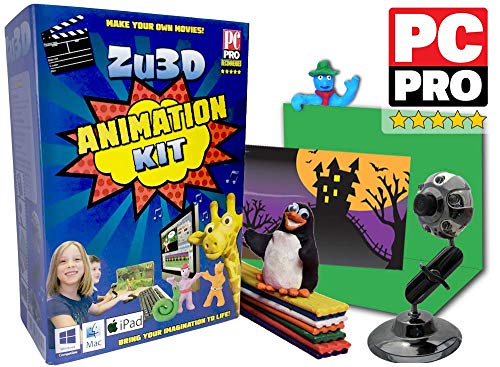
Zu3D offers a comprehensive software kit designed for kids and families, including an animation webcam, green screen, modeling clay, mini‑set, and a detailed handbook. It ships with two software licenses and a library of sounds and effects, supporting creativity across a range of stop motion projects. It is widely used in schools and homes for its intuitive interface and robust feature set that accommodates budding brickfilm creators.
Brinno TLC2020 Time Lapse Camera

The Brinno TLC2020 focuses on long‑term timelapse and stop motion, featuring a 99‑day battery life and 1080p HDR output with a wide 118° field of view. Its battery‑friendly design and simple interval shooting are ideal for extended LEGO build sessions and environmental change projects. It provides reliable endurance for classroom projects and independent creators who need a camera that can run for days between battery changes.
Brinno TLC200 f1.2 Aperture Time Lapse Camera

The TLC200 f1.2 model features a large aperture lens, a 140° field of view, and enhanced low‑light performance—helpful for stop motion scenes with limited indoor lighting. Its wide angle helps capture broader scenes in LEGO builds, while the faster aperture improves image clarity during close‑up actions. This camera is well suited for ambitious brickfilm projects and longer shoots that require reliable, consistent framing.
Buying Guide
Key purchase considerations for LEGO stop motion cameras and kits include:
- All‑in‑one kits vs. separate camera and software: All‑in‑one kits simplify setup and ensure compatibility, while separate components offer upgrade paths as skills grow.
- Software features: Look for timeline editing, onion skinning, frame blending, and audio options. Education kits often bundle guided tutorials and lesson plans.
- Camera capabilities: Resolution (1080p is common and sufficient for LEGO work), frame rate options, and sensor quality affect output quality and ease of use.
- Battery life and power options: For longer builds, long‑lasting batteries or USB powered solutions reduce interruptions.
- Ease of use for beginners vs. advanced control: Beginners benefit from guided instructions, while experienced users may value manual exposure, focus, and interval control.
- Durability and portability: Carry cases and compact stages help with classroom or travel use, while sturdier builds suit heavy use at home or in clubs.
- Educational value and certifications: Kits with teacher recommendations or STEM endorsements may align with school curricula.
- Compatibility and ecosystem: Consider whether the kit supports additional accessories (green screens, backdrops, brick films props) and cross‑platform software.