Best Camera Attachments for Laptop to Improve Video Calls
Answering the need for clearer video chat, streaming, or online teaching, these five camera attachments enhance laptop setup with high-resolution imaging, built‑in mics, privacy features, and easy plug‑and‑play use. Best for remote workers, students, streamers, and presenters who want reliable, risk‑free upgrades. Each pick below highlights who benefits most and why it stands out in real-world use. A quick buyer table follows to help you compare at a glance.
| Product | Brand | Best For | Why It Stands Out |
|---|---|---|---|
| Tewiky Full HD Webcam | Tewiky | Broad compatibility and ease of use | 1080p video, wide angle, privacy cover, detachable tripod, plug‑and‑play |
| NIVEOLI 1080P Webcam | NIVEOLI | Low-light and secure setups | HDR, dual mics, privacy shutter, USB plug‑and‑play |
| Logitech Brio 101 | Logitech | Premium quality for meetings | Full HD 1080p, RightLight, built‑in privacy shutter |
| NexiGo N60 | NexiGo | Versatile USB camera with easy setup | 1080p, wide compatibility, built‑in mic, privacy cover |
| EMEET C960 | EMEET | Balanced value with solid audio | 1080p, dual mics, auto light adjustment, privacy cover |
Tewiky Full HD Webcam With Built‑In Microphone

Tewiky’s 1080p webcam delivers crisp video at 30fps with a wide-angle lens. Best for remote workers who need broad room coverage during calls, or streamers who want more of their background visible. It is plug‑and‑play, with universal USB compatibility and a 5ft cable for immediate use. The built‑in noise‑cancelling microphone helps reduce ambient noise in busy spaces.
Best for: students and professionals who value simple setup and broad field of view. Caution: no specific software features beyond auto light correction; performance relies on adequate ambient lighting.
NIVEOLI 1080P Webcam With Privacy Cover

NIVEOLI emphasizes sharp Full HD video at 1080p with HDR to maintain facial visibility in varying light. It includes dual built‑in microphones to improve voice capture and a privacy shutter for quick lens blocking. No drivers are needed—just plug into USB 2.0.
Best for: meetings in mixed lighting and users who want secure privacy with reliable audio. Caution: some users may prefer manual focus options for specific setups.
Logitech Brio 101 Full HD Webcam

Logitech Brio 101 targets professional meetings and streaming with high‑quality imaging, RightLight auto‑exposure, and a privacy shutter for security. It’s designed to maintain bright, clear visuals in diverse environments, including backlit rooms.
Best for: users who require dependable, high‑quality video and consistent lighting adjustments. Caution: premium features may require compatible software and devices for full effect.
NexiGo N60 1080P Webcam

NexiGo N60 offers full 1080p resolution with a practical field of view and a USB plug‑and‑play design. It is compatible across a broad range of operating systems and devices, making it a versatile option for families or multiple setups. The built‑in microphone supports clear voice capture for calls and conferences.
Best for: mixed‑device households and classrooms needing straightforward setup without extra drivers. Caution: not compatible with certain gaming consoles when used with non‑PC devices.
Gadget Ray Webcam Privacy Cover Slide
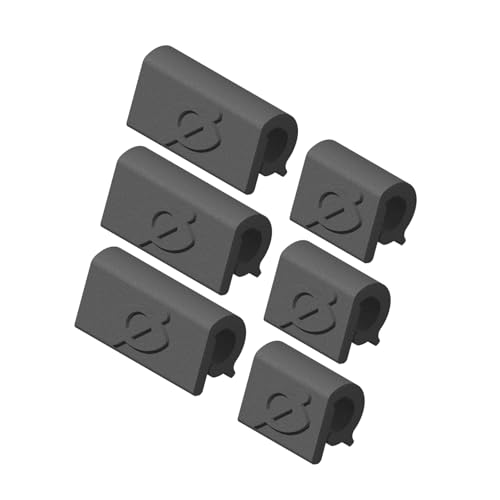
Gadget Ray offers a no‑adhesive privacy cover, designed to slide over your laptop or tablet camera. It comes in two widths per pack and is made in the USA. This is a practical, budget‑friendly way to add privacy to any device without residue or sticky issues.
Best for: budget‑conscious buyers needing a reusable privacy solution. Caution: not a webcam itself; needs to be used with a camera to block lens.
MESMOS 6pk Laptop Camera Covers

MESMOS offers a cute privacy cover set that fits multiple devices, including laptops and tablets. The sliders are thin and slide smoothly, allowing quick privacy control. This option doubles as a thoughtful gift for plant‑lovers or privacy‑minded users.
Best for: users who want lightweight, easily portable privacy covers. Caution: these do not include a built‑in microcontroller or auto‑shutter features; they are manual covers.
Buying Guide: What To Consider When Choosing a Laptop Camera Attachment
- Resolution and frame rate: For video calls, 1080p at 30fps is standard; higher resolutions help for streaming but require more bandwidth.
- Low-light performance: Look for HDR or dynamic exposure features to ensure good skin tones in dim rooms.
- Audio quality: If the camera has a built‑in mic, check for dual mics or noise cancellation for clearer conversations.
- Privacy features: A built‑in physical shutter or slide cover adds security when the camera is not in use.
- Compatibility and setup: USB plug‑and‑play is easiest; confirm OS support (Windows, macOS, Linux) and whether drivers are required.
- Field of view: Wide angles capture more of your environment; consider your desk size and background when choosing.
- Mounting options: A detachable tripod helps flexible positioning; built‑in stands may suit compact setups.
- Budget and value: Compare features like privacy, mic quality, and software extras to determine value per dollar.
Frequently Asked Questions
- Do I need drivers to use these webcams?
- No; most of the listed cameras are USB plug‑and‑play and work without additional drivers on compatible systems.
- Is a privacy cover essential for laptop cameras?
- Privacy covers help block the lens when not in use, reducing the risk of unwanted recording and protecting privacy.
- What’s the difference between a 720p and 1080p webcam?
- 1080p provides sharper video and detail, especially on larger screens or zoom calls; 720p is adequate for basic video chats.
- When should I choose a camera with a built‑in mic?
- A built‑in mic is convenient for single‑device setups or tighter desk spaces; for rich audio, consider an external mic.
- Are privacy slides or physical shutters more secure?
- Physical shutters offer quick, reliable protection when the camera is not in use, and reduce accidental exposure during meetings.