Choosing the right memory card is essential for reliable photography and smooth 4K video. This guide highlights five dependable options for cameras, balancing capacity, speed, and durability. Use the quick-reference table below to compare core specs at a glance.
| Product | Brand | Capacity | Speed Class | Notable Feature |
|---|---|---|---|---|
| SanDisk Extreme Pro 128GB | SanDisk | 128GB | C10 U3 V30 | Up to 200MB/s read; 90MB/s write |
| SanDisk Ultra 128GB | SanDisk | 128GB | C10 U1 | Up to 100MB/s read |
| SanDisk Ultra 256GB | SanDisk | 256GB | C10 U1 | Up to 150MB/s read |
| Gigastone 128GB 4K Pro | Gigastone | 128GB | A1 V30 | 4K UHD compatible |
| Gigastone 256GB 4K Pro | Gigastone | 256GB | A1 V30 | 4K UHD compatible |
Below are five carefully selected memory cards that cover a range of shooting needs—from everyday Full HD to demanding 4K video. Each item links to its full product page for detailed specifications and purchasing options.
SanDisk Extreme Pro 128GB SD Card
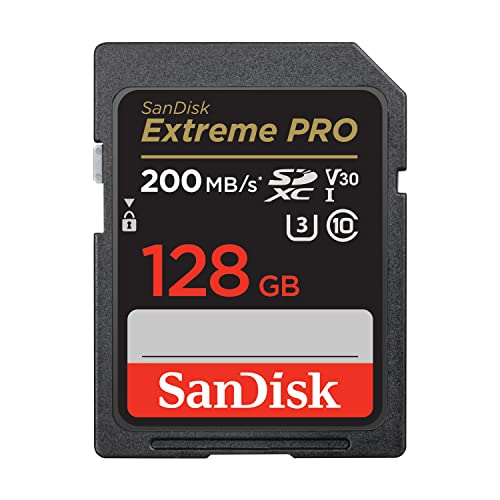
The SanDisk Extreme Pro 128GB SDXC card is designed for professional use with fast offload speeds up to 200MB/s, enabled by SanDisk QuickFlow technology. It carries C10, U3, and V30 ratings, making it suitable for 4K UHD recording and burst shooting. The card claims high sustained performance and is often paired with a reader to maximize throughput for demanding workflows. Real-world speeds depend on the host device and conditions, but this model is consistently recognized for reliability in high-demand scenarios.
Ideal for photographers who require rapid media transfer and robust reliability during long shoots. This card is commonly used in professional DSLRs and mirrorless cameras that support high-speed UHS-I interfaces. It’s particularly advantageous when importing large RAW files or 4K video to minimize downtime between shoots.
SanDisk Ultra 128GB SDXC UHS-I
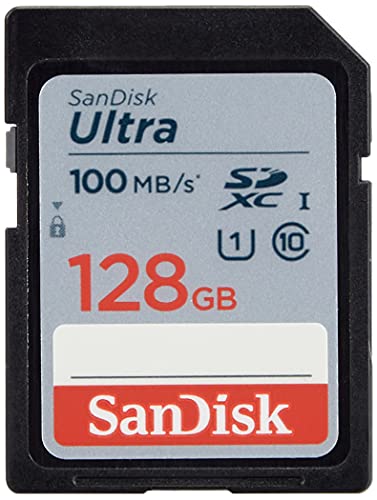
The SanDisk Ultra 128GB SDXC card offers up to 100MB/s read speeds and C10, U1 ratings, making it a strong choice for everyday photography and Full HD video. It’s well-suited for compact to mid-range point-and-shoot cameras and is a popular option for shooters who prioritize value and solid performance. Real-world transfer speeds can vary with device and file attributes, but the card provides dependable capacity and reliable results for standard shooting or travel days.
SanDisk Ultra 256GB SDXC UHS-I

The 256GB Ultra SDXC card from SanDisk delivers quick transfer speeds up to 150MB/s and a high-capacity option for storing large photo libraries and Full HD video. It is designed for everyday use in compact to mid-range cameras, offering substantial storage without frequent card swapping. While speeds exceed older UHS-I benchmarks, actual performance depends on the host device and file management practices. The broad capacity makes it a practical choice for travelers and enthusiasts who shoot in RAW or high-resolution JPEGs daily.
Gigastone 128GB SD Card 4K Pro

The Gigastone 128GB SD Card 4K Pro is positioned for 4K camera users, offering up to 100 MB/s transfer speeds and A1/V30 performance. This card is suitable for serious videographers who need reliable media capture for 4K UHD content and fast media offloads, with compatibility across Canon and other major brands. The 128GB capacity is a practical middle ground for shooters who balance space with weight and cost on location shoots.
Gigastone 256GB SD Card 4K Pro

The 256GB Gigastone 4K Pro SD card provides a higher capacity solution for extended shoots or multi-day projects. It supports 4K UHD video recording and offers up to 100 MB/s transfer speeds with A1 and V30 performance ratings. This is a solid choice for photographers who need substantial on-card storage without sacrificing the dependable performance required for high-resolution video capture.
Buying Guide
Key purchase considerations
- Capacity needs: Choose based on shooting habits. 128GB works well for shorter trips or 4K practice, while 256GB and higher suit extended shoots and RAW workflows.
- Speed class and performance: Look for C10, U3, and V30 ratings for reliable 4K recording. For burst shooting and high-frame-rate capture, higher read/write speeds reduce buffering.
- Read vs write speeds: Read speeds affect file transfers to a computer, while write speeds affect real-time recording. For video, sustained write performance is crucial.
- Device compatibility: Ensure your camera or recorder supports UHS-I or higher and the card’s capacity is compatible with the camera’s firmware.
- Durability and reliability: Some cards advertise rugged features like waterproofing or shock resistance—useful for outdoor shoots.
- Data recovery and warranties: Some brands offer data recovery services or longer warranties, which can be valuable in professional contexts.
Speed and class explained
- C10: Minimum write speed of 10 MB/s; common for many cameras and Full HD recording.
- U1/U3: UHS speed class for video; U3 supports higher bitrates needed for 4K and high-resolution footage.
- V30: Video Speed Class rating indicating sustained write performance suitable for 4K video.
- A1/A2: App performance grades indicating suitability for running apps from the card itself, relevant for some cameras that handle on-card processing or previews.
Capacity vs. cost considerations
- Higher capacity cards reduce the need to swap cards, but come at a higher upfront cost. For travel or documentary work, 256GB or larger can be cost-effective in the long run.
- Always format cards in-camera to optimize performance and ensure the correct file structure for your device.
Practical shooting tips
- Carry multiple cards and back up footage regularly to prevent data loss.
- Label cards with date or project names to keep media organized on-location.
- Avoid chewing through the card’s write speed by recording in high-bitrate modes only when necessary.