Best Camcorders With USB Connection for Easy Recording and Transfer
When shopping for camcorders with USB connection, you want devices that streamline recording, charging, and data transfer. This guide highlights five practical options for different buyers—from vloggers to home archivists—so you can choose with confidence. Below, you’ll find concise product notes, who each camera is best for, and practical trade-offs. A quick summary table is provided to compare key points at a glance.
| Product | Best For | USB Connection Type | Key Benefit |
|---|---|---|---|
| Sanpyl 1080P Video Camera | Beginner vloggers | USB recorder/charging | Rotatable screen and fill light |
| Sony Camcorder miniDV Transfer Kit | Old tapes to digital archiving | USB capture device | Direct tape to computer and DVD transfer |
| Sanpyl 1080P USB Camcorder (Second Model) | Mobile creators | USB recorder/charging | Fill light and 2.4″ screen |
| VIXLW VHS to Digital Converter | Analog-to-digital projects | USB streaming to PC/Mac | RCA/USB conversion |
| ORIVISION Cam Link Capture Card | Live streaming and gaming | USB 2.0, HDMI input | 4K input, real-time preview |
Sanpyl 1080P Video Camera With USB Recording

Best for entry-level vloggers who want a compact camera with built-in lighting, reliable 1080P video, and convenient USB recording. The camera features a 2.4-inch rotatable screen for flexible shot angles, 16X digital zoom, and 16MP stills. A front-fill light helps when lighting is poor, making it suitable for indoor shoots or dim environments. It supports recording while charging, which is useful for longer shoots. External microphone support adds sound quality options for narration or interviews.
- Best for: Vloggers starting their channel who need a simple workflow and a built-in light.
- Why selected: Combines basic recording quality with practical USB recording and charging capabilities, reducing setup hassles.
- Caution: Battery life is not specified; plan for external power if shooting extended sessions.
Sony Camcorder for MiniDV Tape Transfer

Better for archivists and hobbyists who need to digitize old miniDV tapes. This camcorder ecosystem centers on playback and transfer to computer files or DVD via a USB capture pathway, with power supply and AV/S-Video cables included for versatile playback and transfer options. It’s a practical choice for those preserving legacy footage and seeking a straightforward workflow from tape to digital formats.
- Best for: Users with existing miniDV tapes looking to archive content digitally.
- Why selected: Provides direct tape playback and multiple transfer options to computer or DVD without separate capture hardware.
- Caution: Not a modern standalone USB video creator; designed primarily for transfer from tapes.
VIXLW VHS to Digital Converter

This device targets those converting analog video to digital formats using USB. It supports RCA or S-Video inputs and transfers to a PC or Mac at 720P, providing a plug-and-play experience with no power supply required. It’s ideal for family videos, old home movies, or educational recordings stored on physical media that need modern access. It also functions as a simple RCA-to-USB converter for basic digitization projects.
- Best for: Users who want a straightforward way to digitize analog video without complex setup.
- Why selected: Combines analog input options with USB output for quick digitization of older media.
- Caution: Output resolution is limited to 720P, which may not meet higher-definition needs.
ORIVISION Cam Link USB HDMI Capture Card

This USB 2.0 capture card targets content creators who need reliable live streaming or recording from HDMI sources like cameras, DSLRs, or gaming consoles. It supports 1080P capture and real-time preview, with broad compatibility across Windows, macOS, and Android platforms and popular software such as VLC, OBS, and Amcap. It’s a robust choice for hobbyists performing live streams or classroom demonstrations that require immediate feedback and straightforward setup.
- Best for: Streamers and educators who require reliable HDMI-to-USB capture with real-time preview.
- Why selected: Clear compatibility and real-time feedback improve production quality during live sessions.
- Caution: Requires compatible software and relatively low-latency performance; check system requirements for high-demand tasks.
MaxLLTo USB Cable For Sony Handycam
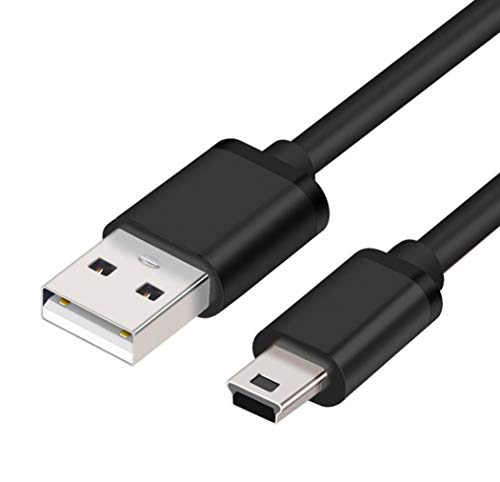
This 6-foot USB data cable targets Sony Handycam models for data syncing and charging during transfers. It’s best for users who need a reliable, longer connection to their computer or power source without frequent cable changes. The product emphasizes USB 2.0 compatibility and versatility for in-device charging while file transfers occur. It’s a straightforward accessory rather than a standalone camera; choose this if you want a longer, dependable cord for studio setups.
- Best for: Hands-on users who regularly transfer footage from Sony Handycam models and prefer a longer cable.
- Why selected: Supports both data transfer and charging, simplifying workflows during shoots.
- Caution: May not be compatible with newer camera models that require USB-C or different data standards.
Buying Guide: Key Considerations For Camcorders With USB
USB connectivity varies across camcorders and capture devices. When choosing, consider how you plan to capture and edit video, whether you need on-device recording while charging, and the types of sources you’ll connect to. The following questions help compare options:
- What is my primary use: casual vlogging, archival digitization, or live streaming?
- What is the expected video resolution and quality I need (720P vs 1080P vs 4K in some cases)?
- Do I need HDMI input or only USB capture to a computer or streaming device?
- Is built-in lighting important for my environment or can I rely on external lighting?
- Do I require continuous power during recording or frequent battery changes?
- What software will I use for editing or streaming (OBS, VLC, Amcap, etc.)?
Comparing Common Scenarios
- For easy upgrades from old tapes: Sony miniDV transfer kit is designed for direct tape-to-digital workflows.
- For compact on-the-go filming with lighting: Sanpyl models provide a rotatable screen and fill light, with USB recording options.
- For live streaming and content creation: ORIVISION Cam Link capture cards offer real-time previews and broad software support.
- For digitizing family memories: VIXLW’s VHS-to-Digital converter simplifies RCA-to-USB digitization without extra power needs.
- For longer reach in studio setups: a longer USB cable like MaxLLTo supports stable connections during shoots.
What Not To Ignore
- Check compatibility: Some devices require specific software or drivers; ensure your editing or streaming setup supports them.
- Assess output options: If you need 1080P or better, verify whether the device or capture card supports it at your desired frame rate.
- Look for power flexibility: If you shoot long sessions, choose options with charging while recording or strong battery life.
FAQ: Quick Answers For Buyers
- Do all these camcorders support USB recording?
Most listed Sanpyl models include USB recording or charging features. Verify the exact model’s specs before purchase.
- Can I digitize old tapes with these devices?
Yes, the Sony miniDV transfer kit and VIXLW converter are designed for converting tapes to digital formats.
- Is HDMI to USB capture needed for streaming?
For high-quality streaming from HDMI devices, a capture card like ORIVISION is recommended to bridge HDMI output to USB input.
- Do I need extra software to use the capture devices?
Some devices work with common software like VLC or OBS, but always check compatibility and driver requirements.
- What is the best option for beginners?
A camera with built-in lighting, a rotatable screen, and USB recording, like the Sanpyl models, tends to be beginner-friendly.
- Are there limitations with analog-to-digital converters?
Analog Digitizers may be limited to certain resolutions (often 720P) depending on the device; confirm output specs if higher quality is needed.