Best AV Out Digital Cable Options for Canon and Camcorders in 2026
Looking for reliable AV out cables to transfer files or connect cameras to TVs and PCs? This guide highlights five suitable USB/AV out cables for Canon Rebel and PowerShot models, plus common camcorders. Each option is evaluated for best use cases, durability, and compatibility to help buyers pick quickly. The top picks range from high-durability USB data cables to simple AV output cords for TV connections. Below you’ll find clear, comparison-friendly guidance and a buying guide to address common questions.
| Product | ||
|---|---|---|
| AGVEE 6.6ft USB Data Cable (Canon Rebel & Vixia) | Photography enthusiasts needing long reach | Durable shell, long lifespan |
| Eanetf 3.5mm to RCA AV Cable | Older camcorders and TVs with RCA inputs | Supports AV output for TV or speakers |
| AILTECK 3.5mm to RCA AV Cable | Simple AV connections for Handycam and TV | Straightforward 3.5mm to RCA compatibility |
| AGVEE 2 Pack 3.3ft AV/Data Cable | Multi-device photographers needing extra cables | Two cables for convenience and backup |
| AGVEE 3.3ft with Magnetic Ring | Minimized interference on Canon interfaces | Magnetic shielding reduces EMI |
AGVEE 6.6ft USB Data Cable for Canon Rebels and Vixia

The AGVEE 6.6ft USB data cable is designed to replace Canon IFC-400PCU and similar models, allowing file transfers from camera to PC or Mac. Best for photographers who need a longer reach during transfers or studio setups. The aluminum alloy shell and nylon braid provide durability for frequent use.
Best for: Canon EOS Rebels and Vixia camcorders that require robust, long-range data transfer cables. Better for users who value a hardened exterior and extended length. Caution: This cable emphasizes data transfer; verify USB compatibility with your specific computer OS and camera model before use.
Eanetf 3.5mm to RCA Camcorder AV Cable

This AV cable provides a straightforward 3.5mm to 3 RCA connection, ideal for camcorders and TVs with RCA inputs. It supports both audio and video signals, making it useful for playback from Sony, Canon, JVC, and similar devices.
Best for: Users with older TVs or projectors that rely on RCA jacks. Choose this if you need a simple, widely compatible AV connection. Limitation: It does not handle USB data transfer or digital connections—use for AV output only.
AILTECK 3.5mm to RCA AV Cable

AILTECK’s AV cable uses RCA connectors to deliver composite video and stereo audio. It’s compatible with camcorders that provide a 3.5mm output and works well with Sony and TCL TVs.
Best for: Quick, no-fuss connections between camcorders and TVs or PA systems. Consideration: It’s a basic AV lead without data transfer capabilities or shielding features beyond standard RCA cables.
AGVEE 2 Pack 3.3ft USB Data/AV Cable
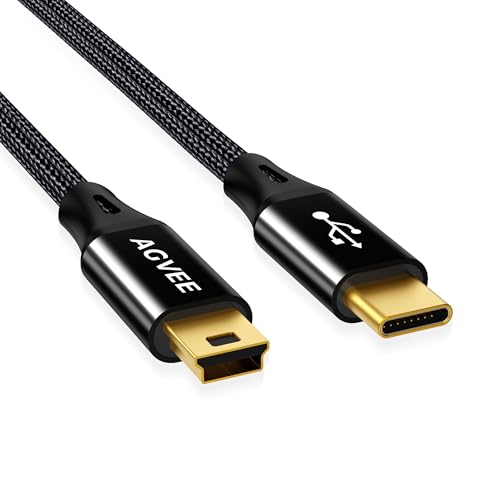
This AGVEE two-pack provides a compact option for Canon SLRs and PowerShot cameras, replacing older IFC-series cables. The dual-pack setup is ideal for backup and multi-camera setups. The aluminum shell and braided exterior emphasize durability for frequent use.
Best for: Photographers who shoot with multiple Canon bodies and need ready backups. Limitation: Smaller length limits reach in some setups; confirm your camera’s data transfer method aligns with USB compatibility.
AGVEE 3.3ft Cable with Magnetic Ring

This AGVEE model adds an anti-interference magnetic ring to reduce EMI during data and AV transmission. It’s described as a strong replacement for Canon IFC-500U and similar cables, including a durable aluminum shell and TPE/nylon braid.
Best for: Users worried about signal interference in busy environments. Choose this if you need more stable data and AV transmission. Caution: EMI claims are design notes; real-world results vary with setup and ambient electronics.
AGVEE 10ft USB Data Cable for Canon Bodies
This long 10-foot cable is designed for extended reach when transferring photos or files from Canon cameras to PC or Mac. It emphasizes a long lifespan, with a durable aluminum shell and premium braiding.
Best for: Studio or field setups where the computer is far from the camera. Limitation: Longer cables can be less manageable in tight spaces; ensure your path to the computer is clear of pinch points.
Buying Guide: Key Considerations for AV Out Cables
What should you check before buying an AV out cable? Start by confirming device compatibility. If you need data transfer, prioritize USB cables with camera and computer support. For playback on TVs or projectors, examine RCA or AV connectors and whether a 3.5mm jack is required. Durability matters for frequent use; look for aluminum shells, braided cables, and proper insulation. Length can affect convenience and signal quality; balance reach with manageability. If EMI is a concern in busy environments, magnetic-ring options may help reduce interference.
Choosing by Use Case
- Photographers needing long reach: Choose AGVEE 10ft USB cable for Canon bodies.
- Camcorders to TVs via RCA: Eanetf or AILTECK options offer straightforward AV output.
- Backups and multi-camera setups: AGVEE 2 Pack 3.3ft cables provide redundancy.
- EMI-sensitive environments: AGVEE cable with magnetic ring can help stabilize signals.
Common Questions
- Do these cables transfer photos or video? Some USB cables handle data transfer; AV cables primarily transport audio/video signals for playback.
- Will these work with all Canon models? Most listed cables aim to replace common Canon IFC-series interfaces and support many Rebels and PowerShot models; verify your exact model.
- Are there shielding features? Magnetic rings and braided exteriors are noted for durability and EMI control in some options.
- Is longer always better? Longer cables offer more reach but may introduce signal degradation in some setups; check device specifications and testing in your environment.
- Can I use RCA cables with modern flat-screen TVs? Yes, many modern TVs support RCA inputs via adapters if necessary.
- Are two-pack cables worth it? If you own multiple cameras or want a spare, a two-pack adds convenience and backup capability.
FAQ
- What is the main use of these AV cables? To transfer data or output AV signals from cameras to PCs or TVs, depending on the model.
- Do these cables require drivers? Typically no additional drivers are required; basic compatibility is handled by devices’ built-in support.
- Are there compatibility notes for macOS or Windows? Ensure your computer recognizes the camera or AV device via the appropriate port (USB or AV inputs).
- What should I do if the signal is unstable? Try a cable with shielding (magnetic ring) and ensure secure connections at both ends; shorter cables can reduce interference.
- Is a warranty offered? Some listings mention a 1-year warranty; check the product page for specific terms.